118
T26 System Manual Part 1: Installation
2.7 Connecting External Devices to the Door Station
A power relay can be connected to the door station via an external power supply (max.
24 V AC/DC) for the purpose of switching dierent types of devices (for example, outside lights,
garage doors, alarm systems, additional doorbells and so on). Connection is established
either via the MOBOTIX IO Module (accessory) or the access module (KeypadRFID/BellRFID).
The T26 camera soware is used to congure the switching of external devices and can be
accessed via a standard web browser such as Internet Explorer. For additional information
on this topic, see the T26 Systemhandbuch Teil 2.
2.7.1 Using the IO Module
Connect the IO Module to the camera module T26-CamCore via MxBus, which connects
it to the network. It has eight physical signal inputs that allow it to distinguish between a
pending full-wave and half-wave if an external AC voltage source has been connected. This
makes it possible to connect two switches to each signal input terminal so that 16 button
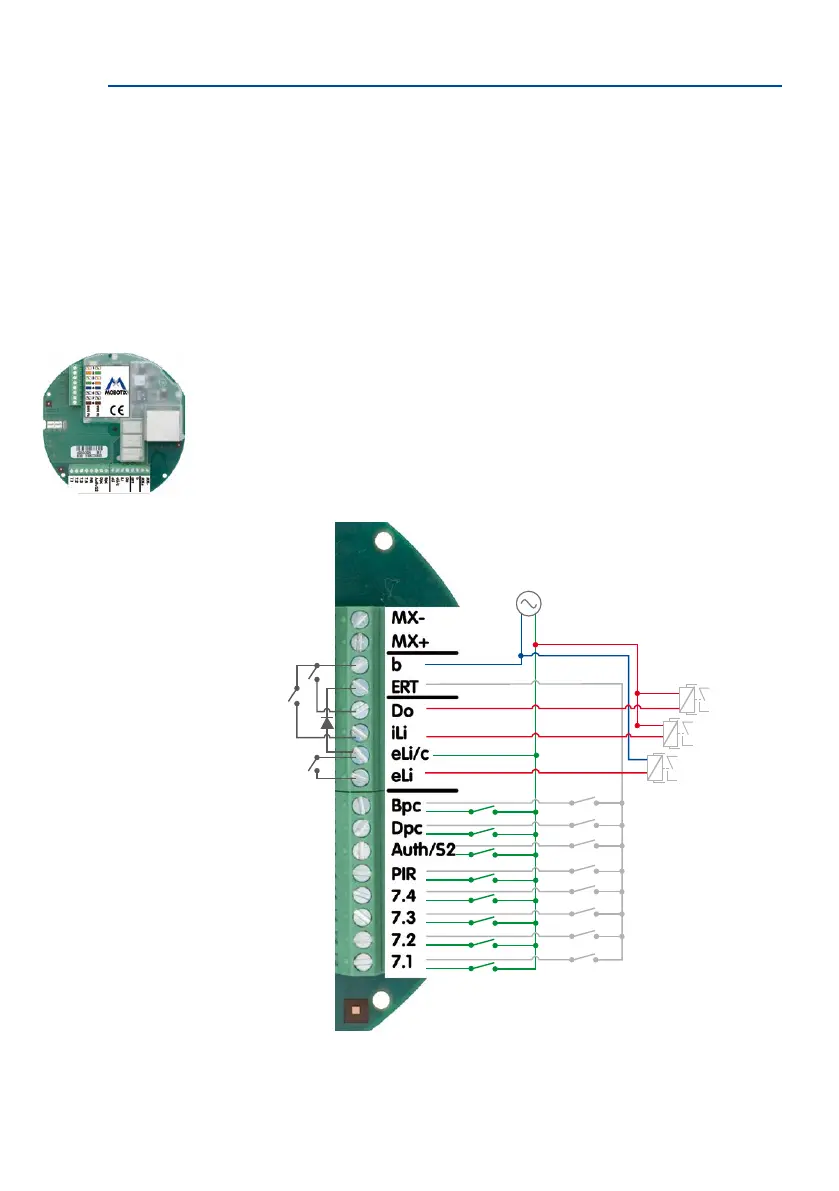
inputs are made available. The inputs can be used for, e.g., bell buttons. The outputs can
be used for external devices such as a doorbell, or for outdoor lights or garage door openers
(via a power relay).
Installing the board and
Ethernet connector:
see Section 2.3.5
IO Module circuit diagram
with 16 button inputs and
3 signal outputs (con-
nected with a relay here)
b c
e.g. 12 V AC



 To Next Page