78
T26 System Manual Part 1: Installation
2.3.7 Attaching the Frame and Connecting the The Protection
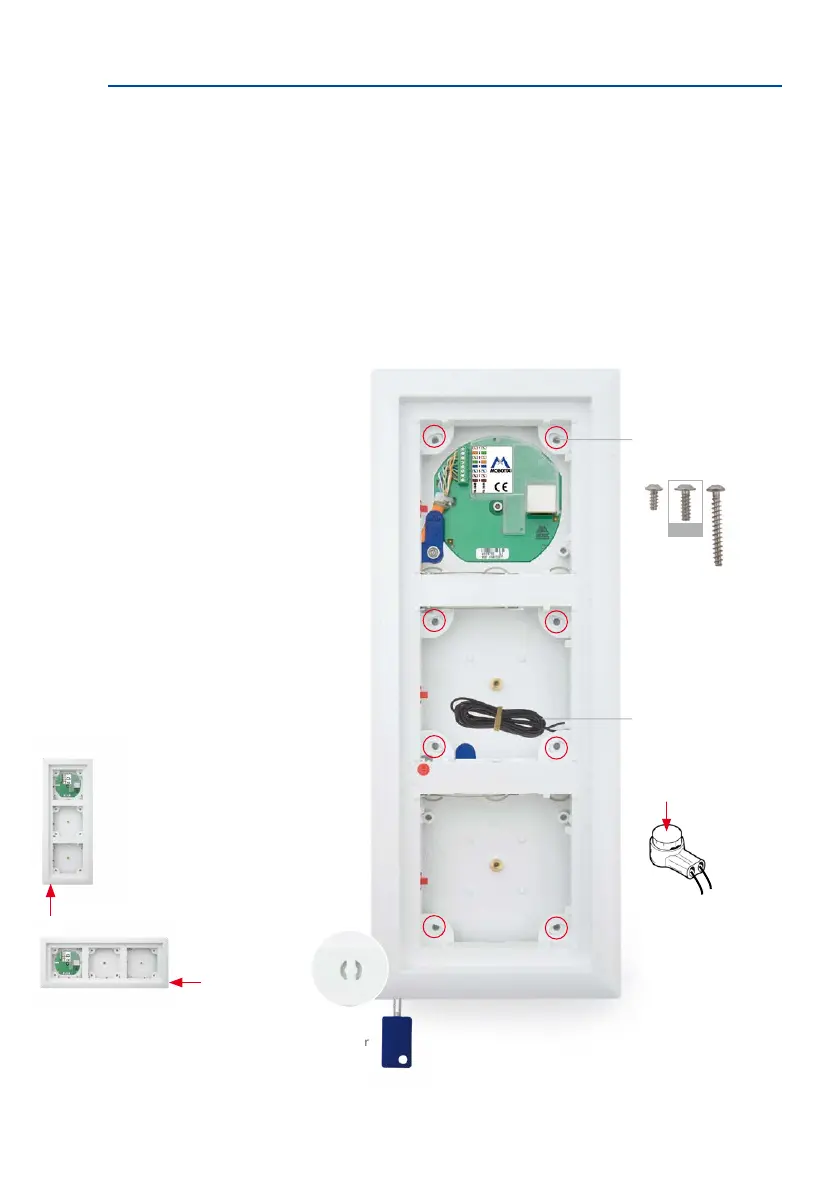
Before the T26 modules can be clicked into the frame, you must screw the frame onto the housing
(recommendation: cross slot PH 2x100) and lay the black the protection cable to the inside of
the building according to your selected connection option, for example, to the MX-DoorMaster
(you may also need to extend the cable). When you attach the frame, make sure that the two
openings for the special MOBOTIX key – which is used to remove the door station modules – are
located either on the bottom le (vertical mount) or on the bottom right (horizontal mount), and
that the maximum torque for the frame screws is not exceeded.
On-Wall (Fig. Triple Housing)
Frame alignment for
vertical and horizontal
mounting (red arrow
points to the keyhole)
8 screws
marked red,
max. 1 Nm
Guide the protec-
tion cable to the
MX-DoorMaster (directly
or extended with the
two individual wire
connectors)
Insert wire (not stripped)
(1) and press down cut-
ting clamp with pliers (2)
Keyhole in bottom le
corner
1
2
12 mm



 To Next Page