115
Installing the Mx2wire+ Indoor Unit
2.6.4 Installation With Surface-Mounted Socket
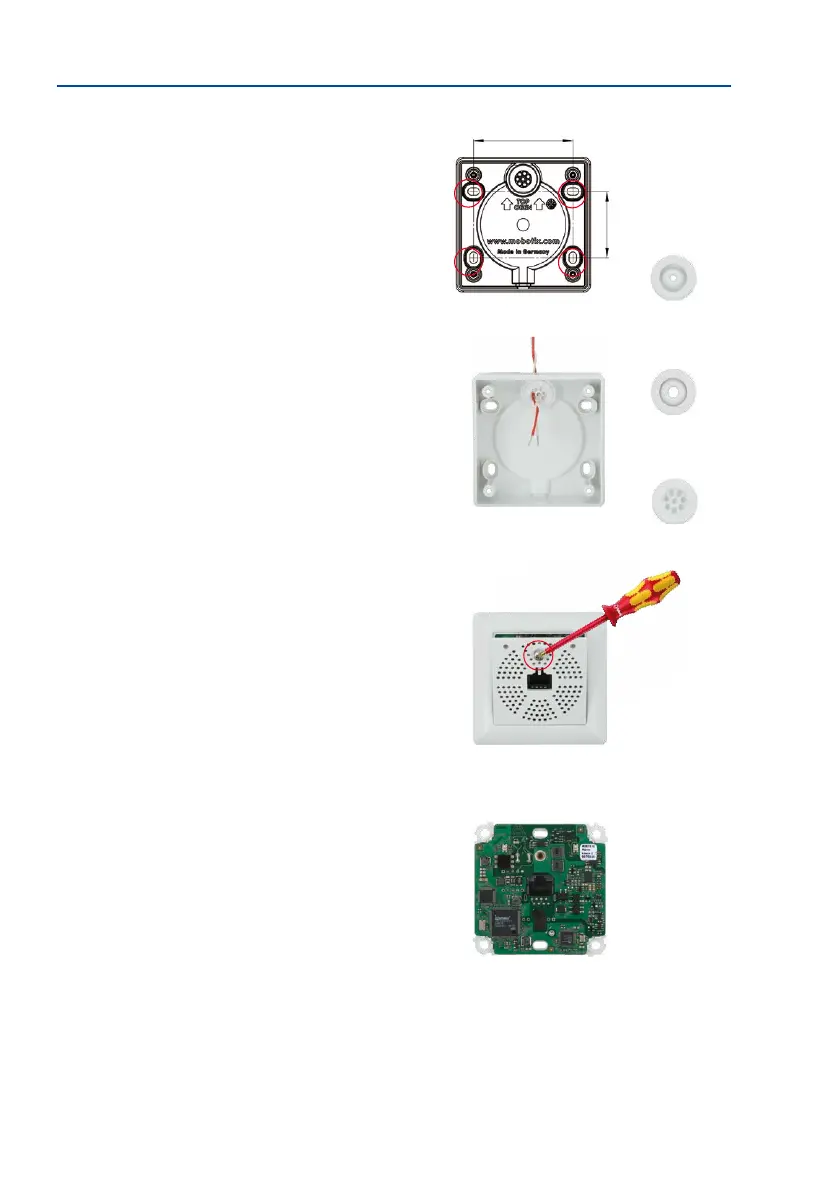
1.
Prepare the surface-mounted socket: Preparation: Please
refer to the gure on the right and use the surface-mounted
socket as a template to mark the drill holes. Make sure
that the alignment and position of the socket in relation
to the two-wire cable are correct (TOP/OBEN arrows).
2. Feed in the two-wire cable (plus optionally the 48 V
connector) and screw on the surface-mounted socket:
Feed the two-wire cable through the opening provided
that is sealed with a rubber plug. Use the 8-wire plug
for multi-wire cables. You only require two of these wires
for Info Module Mx2wire+. The other two plugs with only
one opening are ideally suited to insulated, two-wire
cables of varying thickness. Now use the four Torx
screws to securely fasten the surface-mounted socket
to the screw anchors or directly to the (wooden) surface.
Please ensure that you only use the existing four drill
holes of the surface-mounted socket.
3.
Remove the front panel and frame: In order to protect
the circuit board, the board is attached to the front
panel and frame in the original packaging. To continue
with the installation, however, you must rst separate
the board and housing from the panel and frame. Loosen
the screw in the front panel and li the panel for-
wards.
Now remove the attached frame from the circuit board.
Please note that you will need the stainless steel screw
in the front panel again later.
60 mm/2.36 in
40 mm/1.57 in
Supplied rubber plug for
sealing the two-wire cable:
For cables with 3 to
5 mm diam.
For cables with 5 to
7 mm diam.
For cables with a max-
imum of eight wires
The screw does not need
to be removed completely
from the front panel



 To Next Page