64
T26 System Manual Part 1: Installation
2.2 Remote Stations and Network Connection
2.2.1 Notes on Cable Lengths and Power Supply
The T26 door station can only be powered using the Ethernet port of the door camera. A
MOBOTIX PoE adapter (MX-NPA-PoE) or other similar, high-quality PoE product conforming
to IEEE 802.3af is required to supply the T26 with power (PoE switch). A PoE+ switch (IEEE
802.3at) or a 48 V power supply unit can be used to supply power to the T26 version with
Mx2wire+ technology.
The maximum length of the network cable for power supply over an Ethernet cable is 100 m.
Make sure that you only connect the door station or Mx2wire+ indoor unit to switches or
routers that support the 10/100 Mbps network interface. Check the LED activity of the cor
-
responding port at the switch or router.
2.2.2 Direct Connection of One Remote Station
If the door station is to be connected for operation to one remote station only (computer with
MxManagementCenter or an MxDisplay+ unit), MOBOTIX recommends using a MOBOTIX PoE
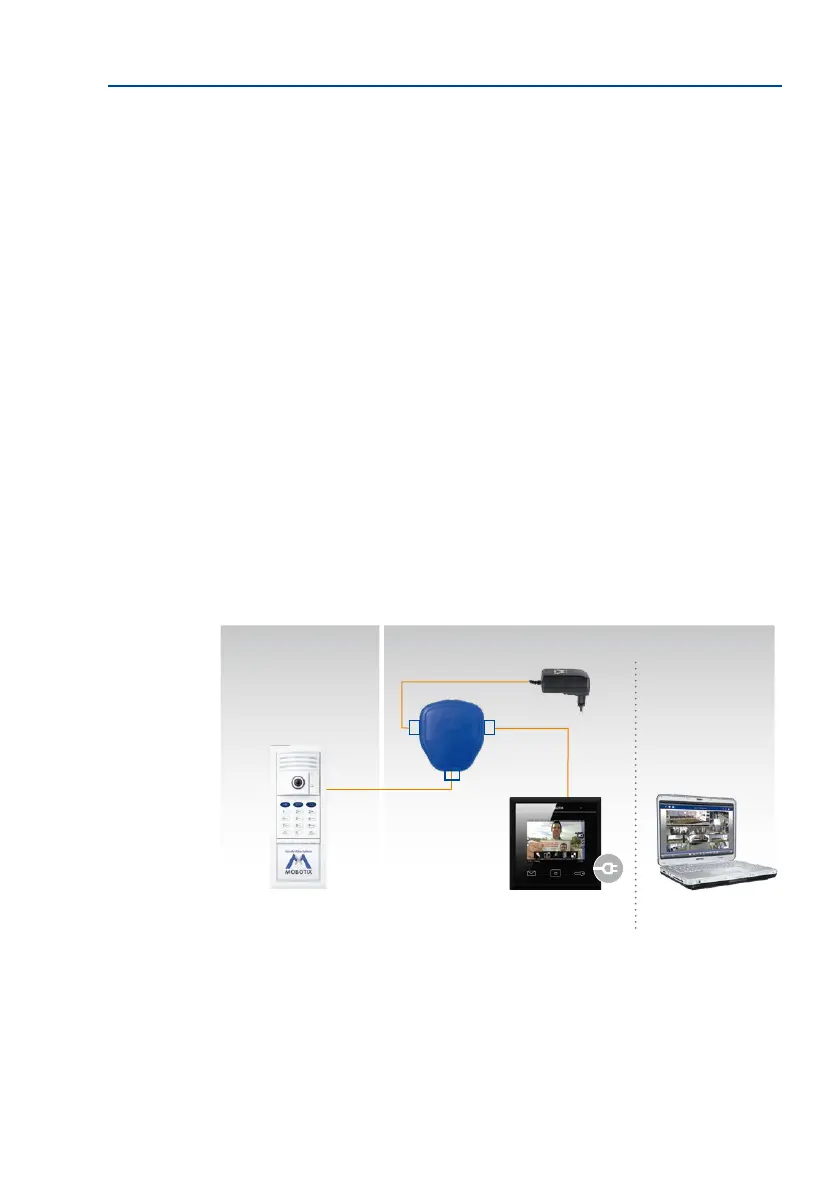
adapter (MX-NPA-PoE) to supply power to the door station. Connect the devices as shown
in the following connection diagram:
Connection Using a MOBOTIX PoE Adapter
The MOBOTIX PoE adapter
(MX-NPA-PoE-SET) features a
crossover function for direct
computer connection, and
can either be connected to
the mains supply or to other
voltage sources (12–57 V)
Outside Inside
MxDisplay+ ComputerDoor station
PC/Power
LAN/Power
Camera
RJ45
RJ45
PoE adapter
(MX-NPA-PoE)
Power supply



 To Next Page