73
Remote Stations and Network Connection
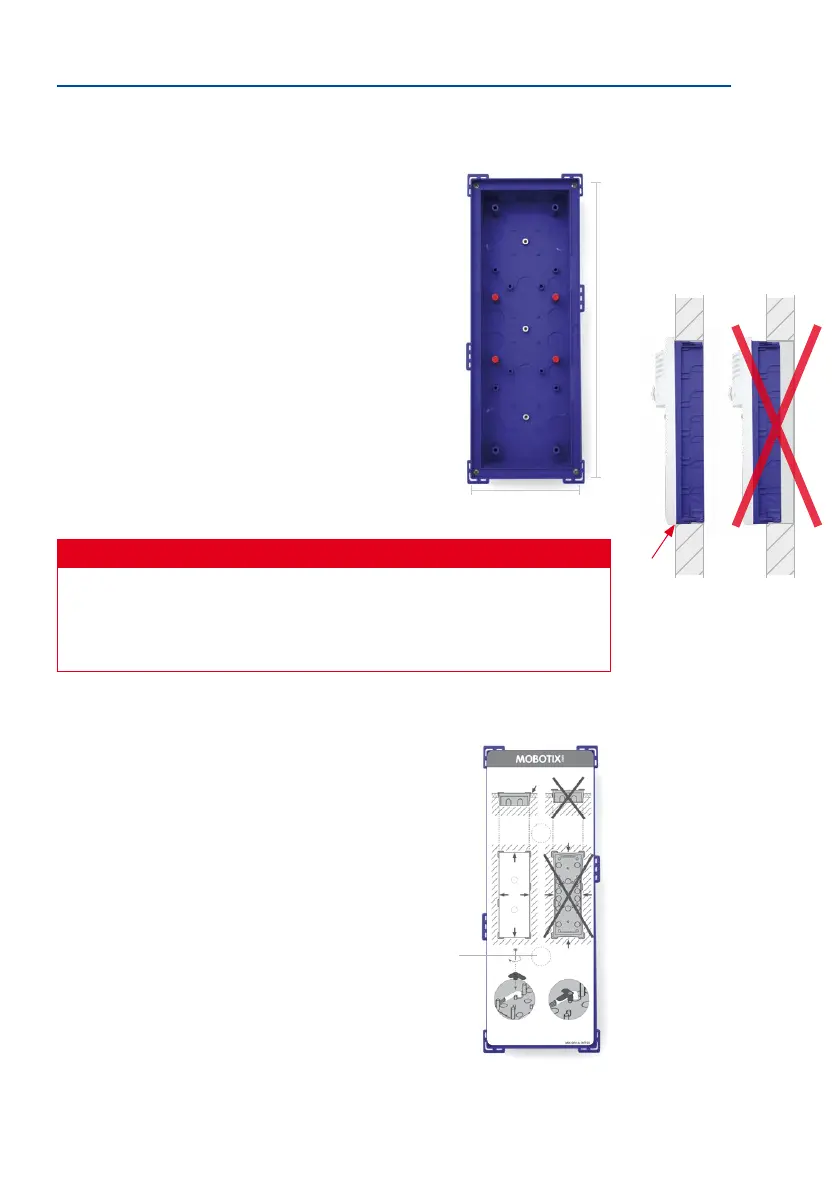
In-Wall (Fig. Triple Housing)
Connect the housing with the subsurface so that the bars tted
to the edge are still visible. The required opening should be
116 x 318 mm. Turn the housing over and use it as a template
to mark the holes.
Dimensions for installation opening (W x H x D):
• Single housing: 117 x 129 x min. 52 mm
• Double housing: 117 x 218 x min. 52 mm
• Triple housing: 117 x 318 x min. 52 mm
Caution
Make sure to install the in-wall housing carefully using the inserted protective card-
board so that it is not deformed by any pressure from the surrounding material.
Otherwise the frame may not be installed properly and may not be sealed against
the weather.
To prevent cement or plaster from soiling the inside of the housing,
insert the supplied protective cardboard again before installing
the housing in the subsurface of the wall. Aer you have secured
the in-wall housing, you can easily remove the protective card-
board by pushing through the pre-punched opening and simply
pulling out the cardboard.
318 mm/12.52 in
Hint: Turn the in-wall
socket over and use it as a
template to mark the hole
Leading edge of hous-
ing ush with wall
Pierce opening hole
and pull out cardboard



 To Next Page