95
Installing the T26 Modules
2.4.5 Installing the Info Module Mx2wire+
The info module with integrated Mx2wire+ technology is used to connect the door station
to the network via a two-wire cable such as a bell wire and has an info eld with permanent
LED backlighting.
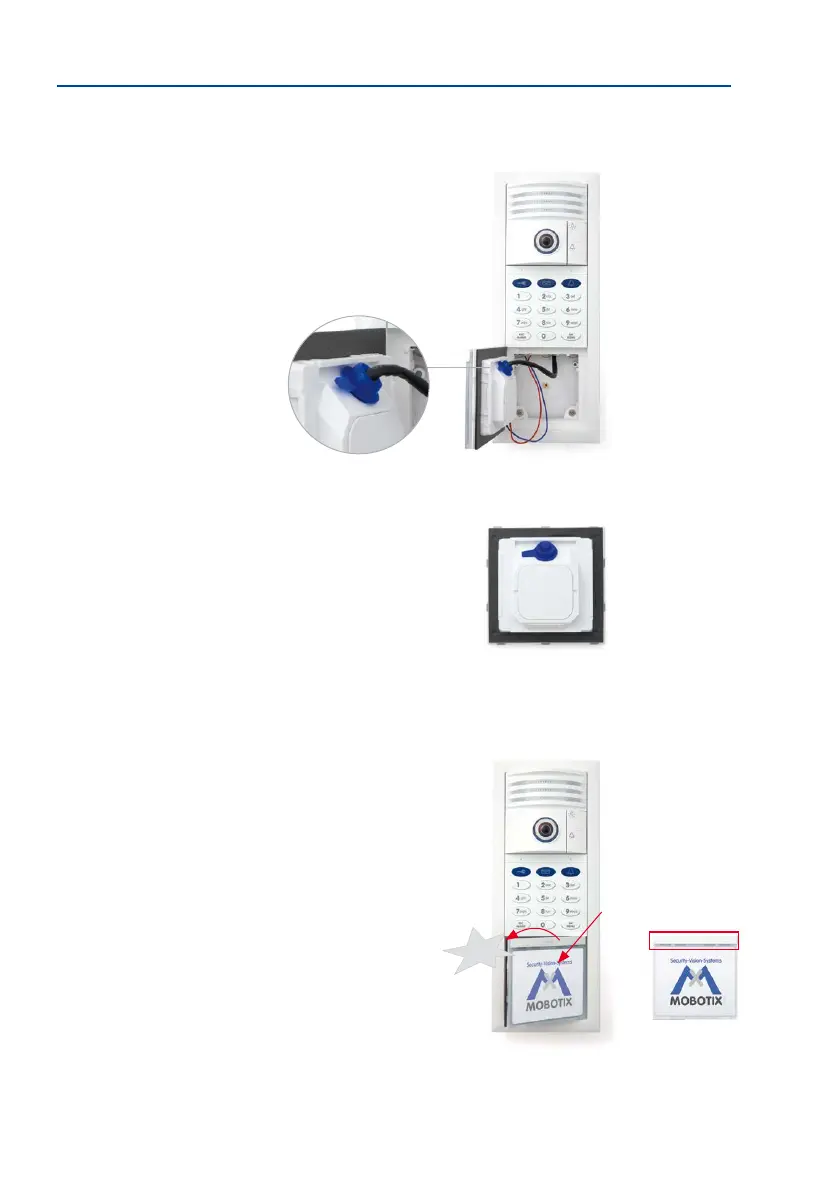
1. Ensure that the gasket is tted to the info module.
2. Loosen the rear cover plate (using a
small screwdriver or similar tool) and remove it. You
now have a clear view of the connectors located directly
on the info module board.
3. Remove approximately 5 mm of insulation from each
of the cables to be connected and feed each cable through
one of the
wire apertures
in the housing (piercing the
rubber membrane with the cable).
4.
Connect the two-wire cable, which leads to the separate
Info Module Mx2wire+ unit in the building, to the board.
– First wire to Data 1 terminal
– Second wire to Data 2 terminal
T26 with KeypadRFID
Cindy Jones
Thomas Jones
The Jones Family
Dr. Jones, MD
T26 with BellRFID
Mx2wire+ indoor unit (for
installation, see Section 2.6)
5. Remove the blue sealing plug on the module. Feed the RJ45 connector of the
(extended) camera patch cable into the housing and insert it into the RJ45 port.
Make sure that the rubber sealing ring on the patch
cable is in the correct nal position.
6. Put the cover plate back on.
7. First of all, insert the right side of the module into
the frame. Then press rmly on the le side, until
the module audibly clicks into place.
Control click: If you do not hear a click, this means that the
module is not properly mounted. In this case, repeat the
last steps, making sure that no cable or foreign object in
the housing is preventing the module from properly clicking
into place.
Click
Always mount the
module so that the bar
with the MOBOTIX let-
tering is at the top



 To Next Page