© Munters AB, 2018 71
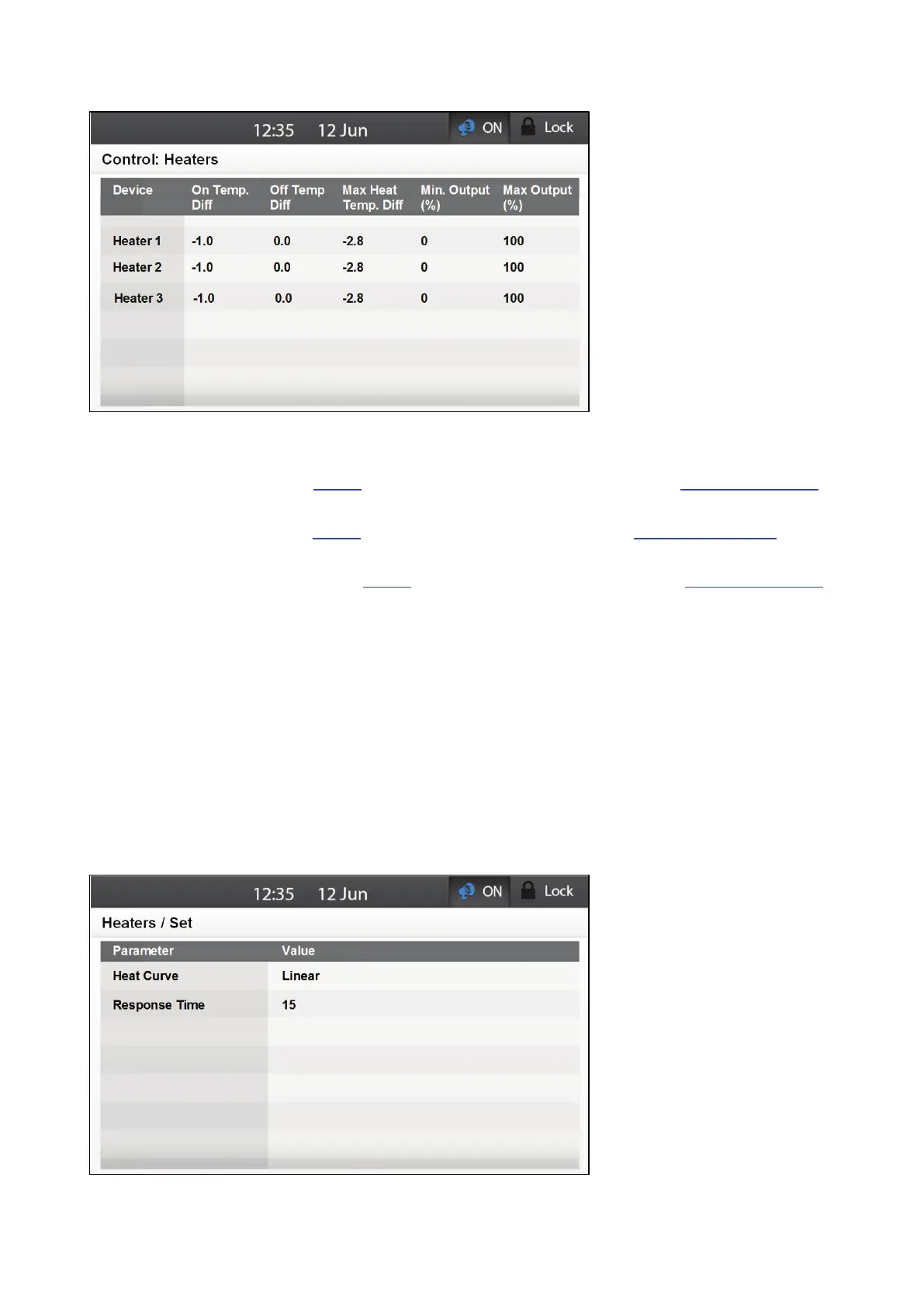
2. Define the following parameters:
o
Device: Read only column. Displays the device number.
o
On Temp Diff: When the actual temperature drops differs from the Target Temperature
by this amount, heaters turn on. Range: -20 to +20. Default: 0.
o
Off Temp Diff: When the actual temperature differs from the Target Temperature by this
amount, heaters turn off. Range: -20 to +20. Default: 0.556C° (-1F°).
o
Max Heat Temp Diff: When the actual temperature differs from the Target Temperature
by this amount, heaters operate at their maximum output. Range: -20.0 to 20.0.
Default: -2.78C° (-5F°)
o
Min Output %: Define the minimum heater output. Range: 1 – 100%. Default: 0
o
Max Output %: Define the maximum heater output. Range: 1 – 100%. Default: 0
After defining the Minimum and Maximum Output Percentages, these
numbers become the goalposts for analog control. For example, if the
Maximum Output is defined as 80%, that number becomes the maximum
amount when calculating the curve.
NOTE On Temp Diff and Off Temp Diff is calculated by average or some sensors of temperature
depends on definition in Temperature Definition Tables for each device.
3. If required, go to Control > Heaters > Set.



 To Next Page