N715-EA Hardware User Guide
Chapter 5 Application Interfaces
Copyright © Neoway Technology Co., Ltd. All rights reserved.
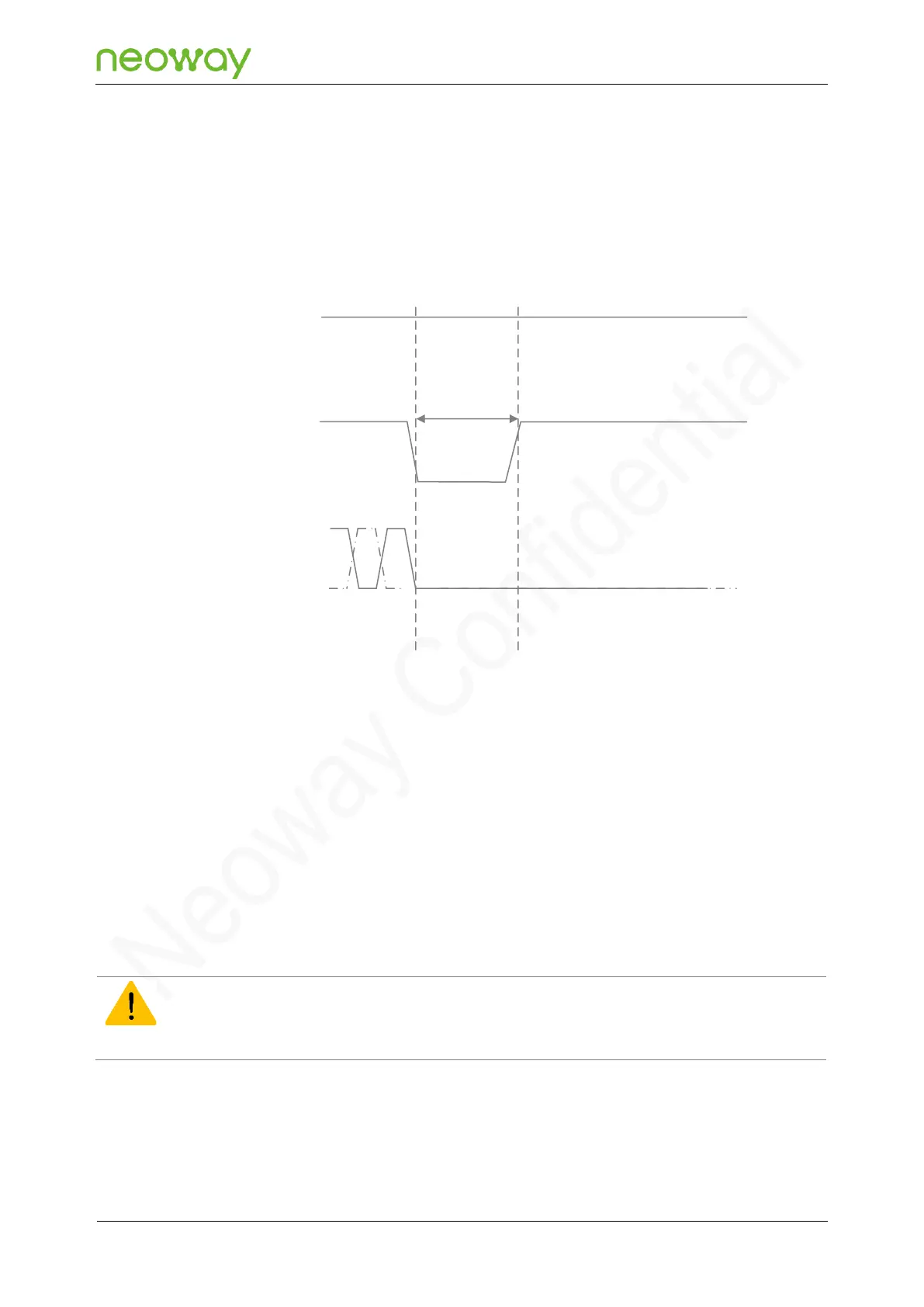
Power-off controlled by PWRKEY_N
Pulling down the PWRKEY_N input pin, which is normally set high by an internal pull-up, for at least
2s, can switch off the module.
The following figure shows the hardware power-off process:
Figure 5-10 Hard power-off process
VBAT
PWRKEY_N
UART
T>2s
InactiveActive
Power-off controlled by AT command
When the module is in power-on mode, it can be switched off after a dedicated AT command is
executed. For details, see Neoway_N715-EA_AT_Commands_Manual.
5.2.3 Reset
When the module encounters an exception (crash, etc.), you can reset the system through the RESET_N pin to
ensure the normal operation of the module. Therefore, it is recommended to add a reset control circuit during
circuit design, and the recommended reference circuit is shown in Figure 5-11 and Figure 5-12.
RESET_N is used to reset the module. When the module is in power-on mode, forcing a low pulse at
RESET_N for more than 50 ms can reset the module. Figure 5-13 shows the reset process.
The following show two recommended reference reset designs of N715-EA:



 To Next Page