N715-EA Hardware User Guide
Chapter 5 Application Interfaces
Copyright © Neoway Technology Co., Ltd. All rights reserved.
Forcible download/upgrade control pin
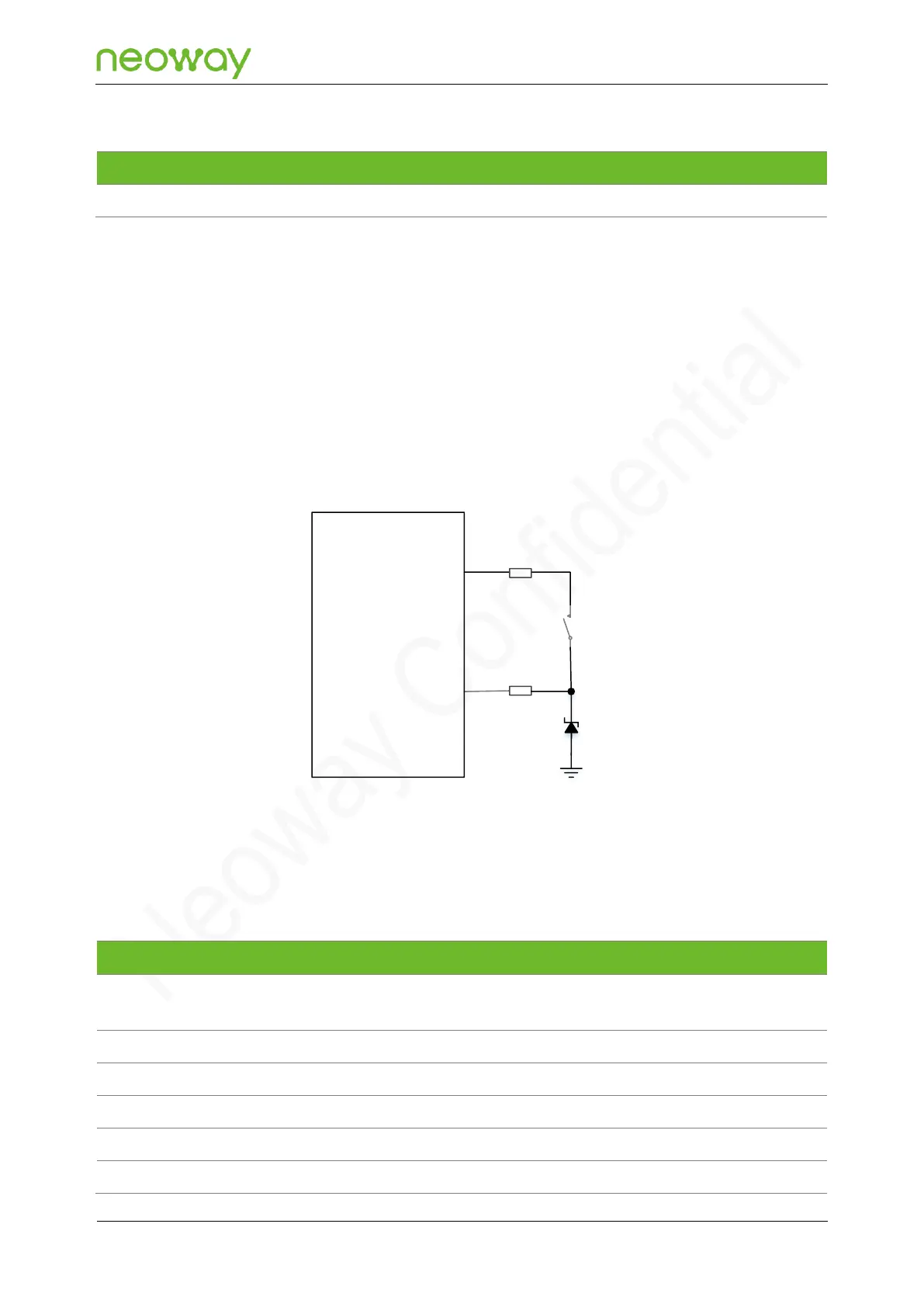
N715-EA provides a USB_BOOT pin. During development, USB_BOOT can force the module to boot
from USB port for firmware upgrade.
To force the module into emergency download mode, you can connect USB_BOOT of the module to
VDD_1P8 through a pull-up resistor in a short time during the module’s power-on process. This is the
last method to handle issues that result in startup or running failures. It is recommended to reserve this
pin to facilitate software upgrades and debugging. The following figure shows the reference design of
this pin. Adding an ESD component to protect USB_BOOT in the circuit is required.
Figure 5-44 Reference design of USB emergency download mode
N715-EA
Module
USB_BOOT
1kΩ
10kΩ
R1
R2
S1
D1
VDD_1P8
5.9.5 Keypad
N715-EA supports a 6x6 matrix keypad. The following shows the pin descriptions.
After the module is started, the
key is used for KEYIN0.
Leave this pin open if unused.
Leave this pin open if unused.
Leave this pin open if unused.
Leave this pin open if unused.
Leave this pin open if unused.



 To Next Page