Step 1: Remove controller canister (duplex)
You remove the failed controller canister so you can replace it with a new one.
Before you begin
• You must use labels to identify each cable that is connected to the controller canister.
• You must have a #1 Phillips screwdriver.
• You have an ESD wristband, or you have taken other antistatic precautions.
Steps
1.
Put on an ESD wristband or take other antistatic precautions.
2.
Label each cable that is attached to the controller canister.
3.
Disconnect all the cables from the controller canister.
Attention: To prevent degraded performance, do not twist, fold, pinch, or step on the cables.
4.
If the controller canister has a HIC that uses SFP+ transceivers, remove the SFPs.
Because you must remove the HIC from the failed controller canister, you must remove any SFPs
from the HIC ports. However, you can leave any SFPs installed in the baseboard host ports. When
you reconnect the cables, you can move those SFPs to the new controller canister.
5. Confirm that the Cache Active LED on the back of the controller is off.
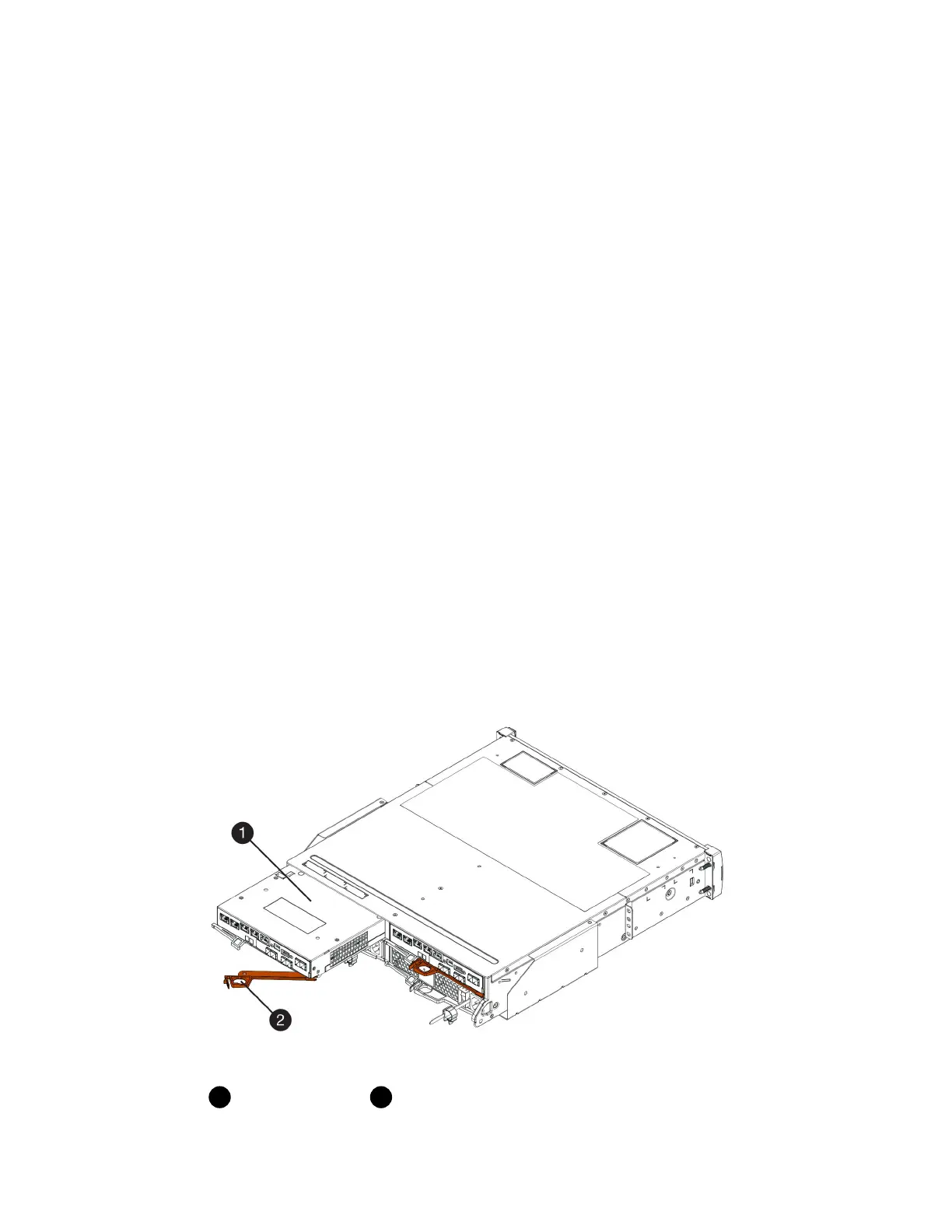
6. Squeeze the latch on the cam handle until it releases, and then open the cam handle to the right to
release the controller canister from the shelf.
The following figure is an example of an E5724 controller shelf:
Controller canister
Cam handle
The following figure is an example of an E5760 controller shelf:
Controllers |
23



 To Next Page