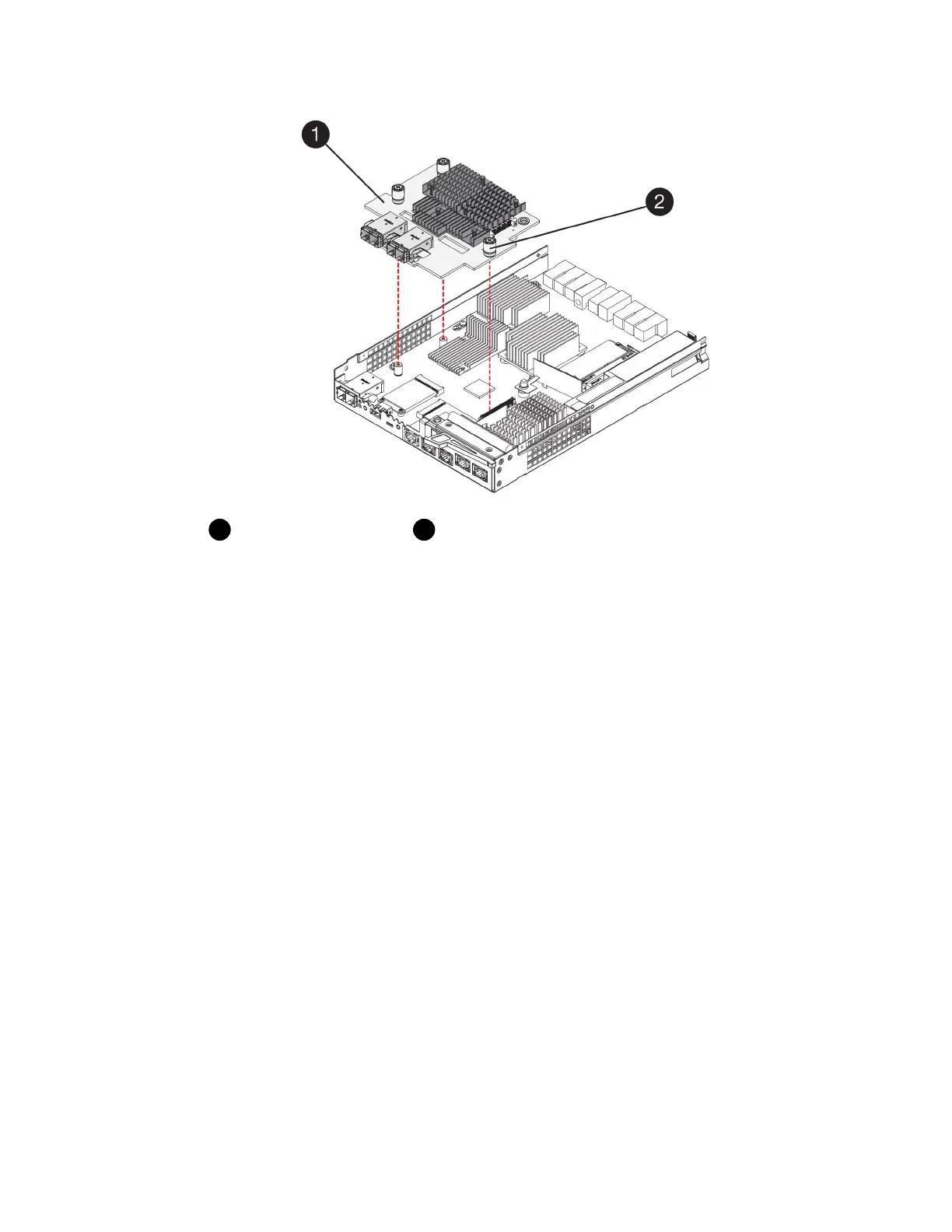
Host interface card (HIC)
Thumbscrews
5. Place the HIC on a static-free surface.
After you finish
Go to
Install new controller (duplex)
on page 27.
Install new controller (duplex)
You install a new controller canister to replace the failed one. Perform this task only if your storage
array has two controllers (duplex configuration).
Steps
1. Step 1: Install battery (duplex) on page 27
You must install the battery into the replacement controller canister. You can install the battery
that you removed from the original controller canister or install a new battery that you ordered.
2. Step 2: Install host interface card (duplex) on page 29
If you removed a HIC from the original controller canister, you must install that HIC in the new
controller canister.
3. Step 3: Install new controller canister (duplex) on page 31
After installing the battery and the host interface card (HIC), if one was initially installed, you can
install the new controller canister into the controller shelf.
Step 1: Install battery (duplex)
You must install the battery into the replacement controller canister. You can install the battery that
you removed from the original controller canister or install a new battery that you ordered.
Before you begin
• You have the battery from the original controller canister.
• You have the replacement controller canister.
Controllers |
27



 To Next Page