Related concepts
Controller overview
on page 18
Requirements for replacing a controller
on page 19
Prepare to replace controller (duplex)
You prepare to replace a controller canister by verifying that the replacement controller canister has
the correct FRU part number, backing up the configuration, and collecting support data. If the
controller is still online, you must take it offline.
About this task
This task describes how to prepare to replace a controller canister in the duplex version (two
controllers) for the following controller shelves:
• E5724 controller shelf
• E5760 controller shelf
Perform this task only if your storage array has two controllers (duplex configuration).
Steps
1. Unpack the new controller canister, and set it on a flat, static-free surface.
Save the packing materials to use when shipping the failed controller canister.
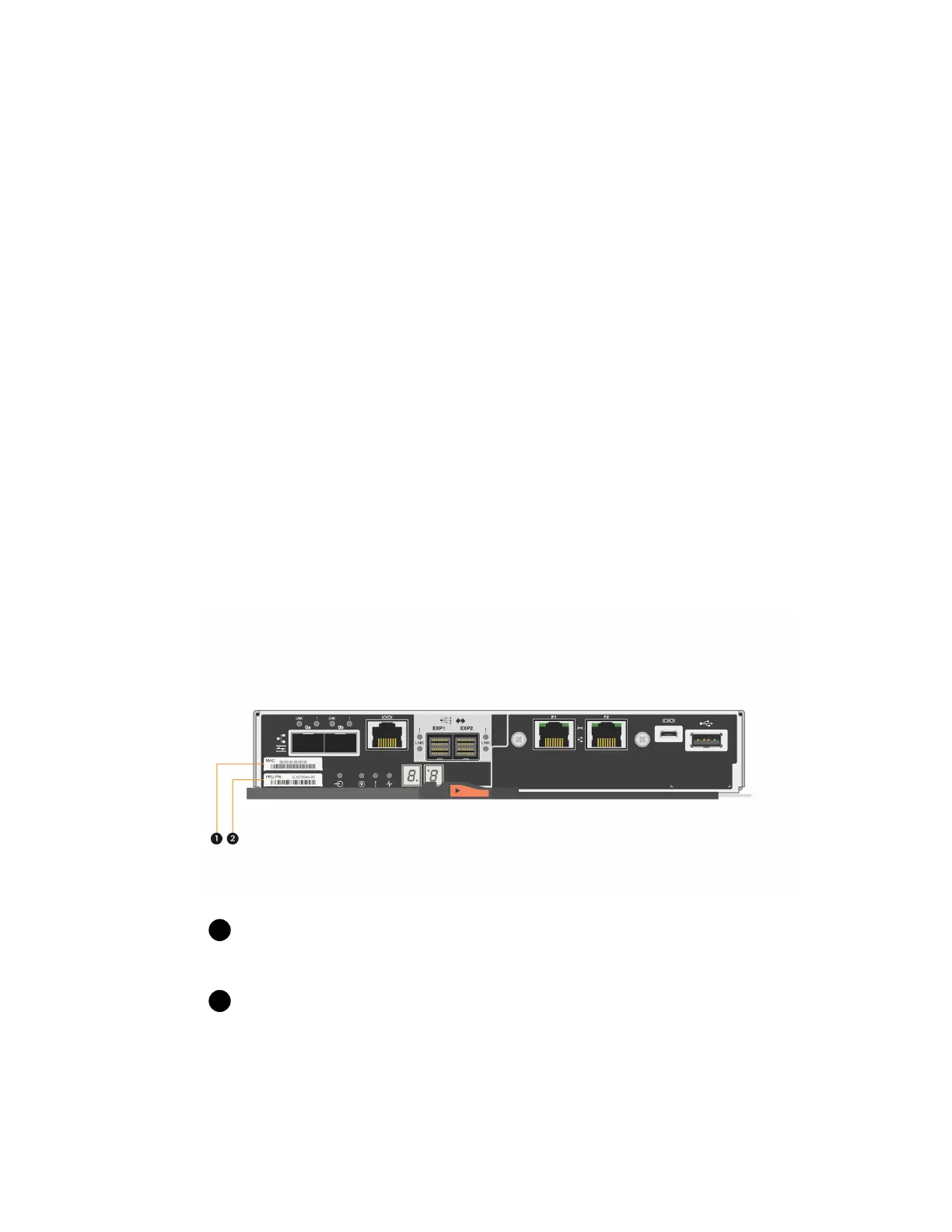
2. Locate the MAC address and FRU part number labels on the back of the controller canister.
MAC address: The MAC address for management port 1 (“P1”). If you used DHCP to
obtain the original controller's IP address, you need this address to connect to the new controller.
FRU part number: This number must match the replacement part number for the currently
installed controller.
3. From SANtricity System Manager, locate the replacement part number for the controller canister
you are replacing.
When a controller has a fault and needs to be replaced, the replacement part number is displayed
in the Details area of the Recovery Guru. If you need to find this number manually, follow these
steps:
20
| Maintaining E5700 Hardware



 To Next Page