Steps
1. Unpack the new HIC and the new HIC faceplate.
2. Press the button on the cover of the controller canister, and slide the cover off.
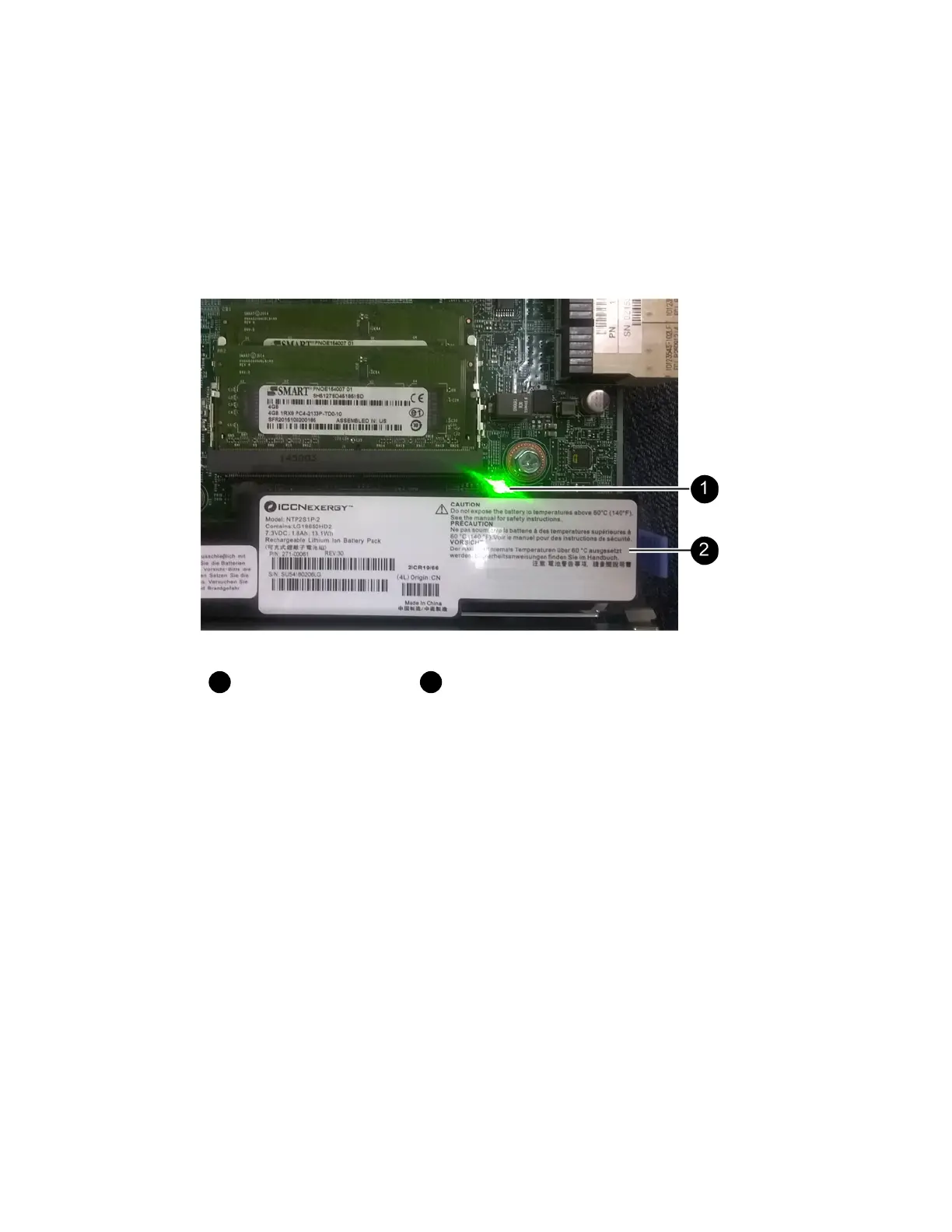
3. Confirm that the green LED inside the controller (by the DIMMs) is off.
If this green LED is on, the controller is still using battery power. You must wait for this LED to
go off before removing any components.
Internal Cache Active LED
Battery
4. Using a #1 Phillips screwdriver, remove the four screws that attach the blank faceplate to the
controller canister, and remove the faceplate.
5. Align the three thumbscrews on the HIC with the corresponding holes on the controller, and align
the connector on the bottom of the HIC with the HIC interface connector on the controller card.
Be careful not to scratch or bump the components on the bottom of the HIC or on the top of the
controller card.
6. Carefully lower the HIC into place, and seat the HIC connector by pressing gently on the HIC.
Attention: Possible equipment damage – Be very careful not to pinch the gold ribbon
connector for the controller LEDs between the HIC and the thumbscrews.
Host interface cards |
89



 To Next Page