19. Connecting to the VDR for configuration of the system
In the event the VDR is available in a fully operational state - the method to connect to the VDR
is as follows.
1. With an Ethernet cable, physically connect to the VDR (Core Module (CM); data port)
with any PC (or laptop, notebook) with a Windows Operating System.
2. Change the IP address of the PC to be within the IP-range of the VDR and set it to
172.16.8.199.
3. Open a web-browser and go to the URL 172.16.8.2 or https://nw6000.orolia.local.
4. If necessary, download & install the Player & Conversion Software as well as the Manual
for these from the VDR to the PC. The VDR Playback software can also be obtained
from the Netwave Systems extranet. For login details, please check with Netwave
Systems (service@netwavesystems.com).
5. Run the Playback software and select the configuration TAB for configuring the system.
19.1 Physically connecting to the VDR
The VDR’s Ethernet ports on the Core Module are auto-sensing and you should not have to
change your Ethernet cable, however, if you encounter problems obtaining access to the VDR
Core Module, check the following:
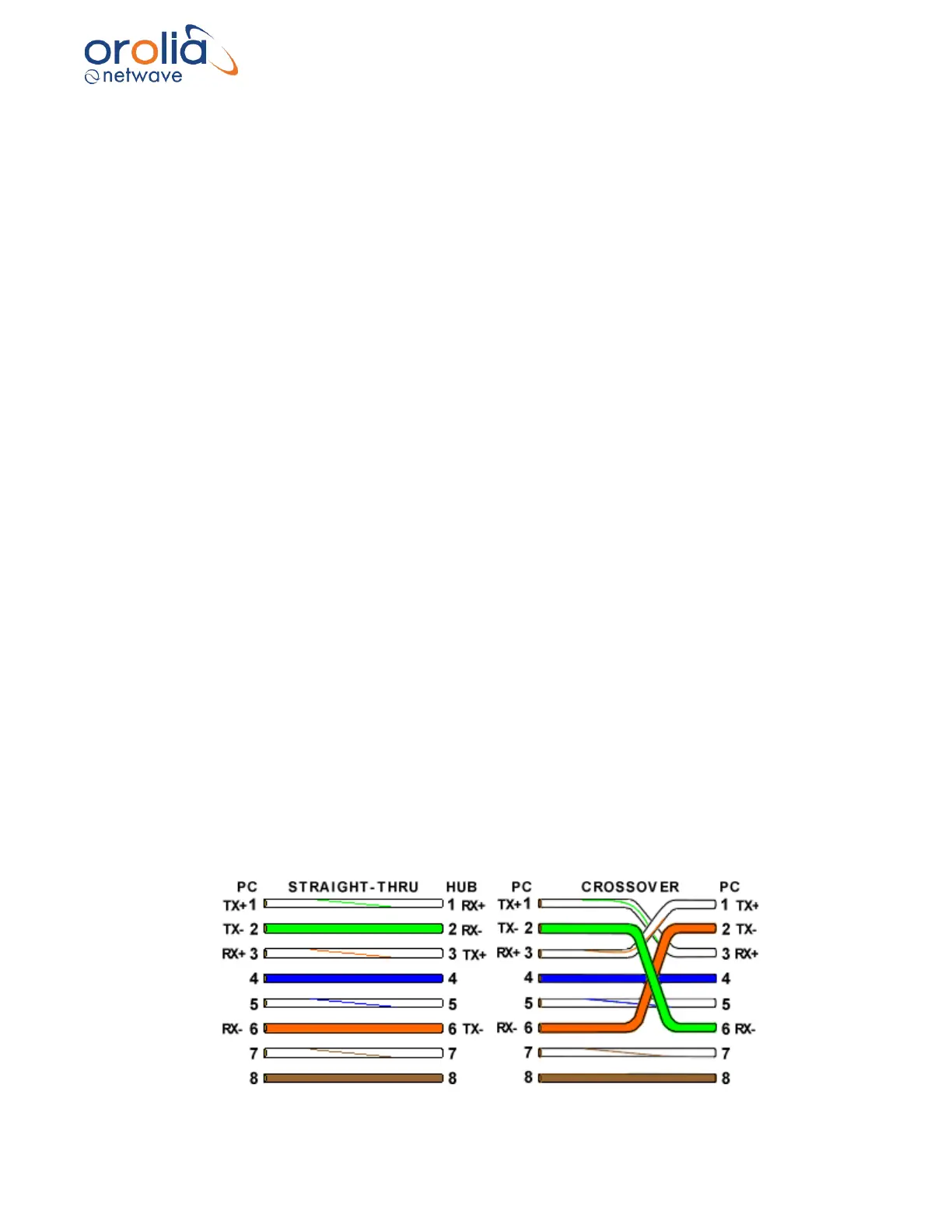
a. The Ethernet cable between the PC (Laptop, notebook computer) and the CM should be
a standard, readymade patch-type cable to overcome potential straight-thru vs. crossover
Ethernet cabling issues. Change the cable if required.
- A straight-thru cable has identical ends.
- A crossover cable has different ends.
- A straight-thru is used as a patch cord in Ethernet connections.
- A crossover is used to connect two Ethernet devices without a hub or for connecting two
hubs.
- A crossover has one end with the Orange set of wires switched with the Green set.
- Odd numbered pins are always striped, even numbered pins are always solid colored.
- Looking at the RJ-45 with the clip facing away from you, Brown is always on the right,
and pin 1 is on the left.
- No more than 1/2" of the Ethernet cable should be untwisted otherwise it will be
susceptible to crosstalk.



 To Next Page