24.2 Browser Compatibility with VDR Web Server
Access core module versions 1.5.17 and lower
http://nw6000.orolia.local/
http://nw6000.orolia.local/
http://nw6000.orolia.local/
Access core module versions v1.6.3 and higher
Requires enabling the Windows certificate store. See below steps.
Access with: https://nw6000.orolia.local/
https://nw6000.orolia.local/
https://nw6000.orolia.local/
24.2.1 Firefox Compatibility
When using Firefox some additional steps are required to configure the browser for use with the
NW6000.
This requires enabling the NW6000 certificate in the Firefox certificates database.
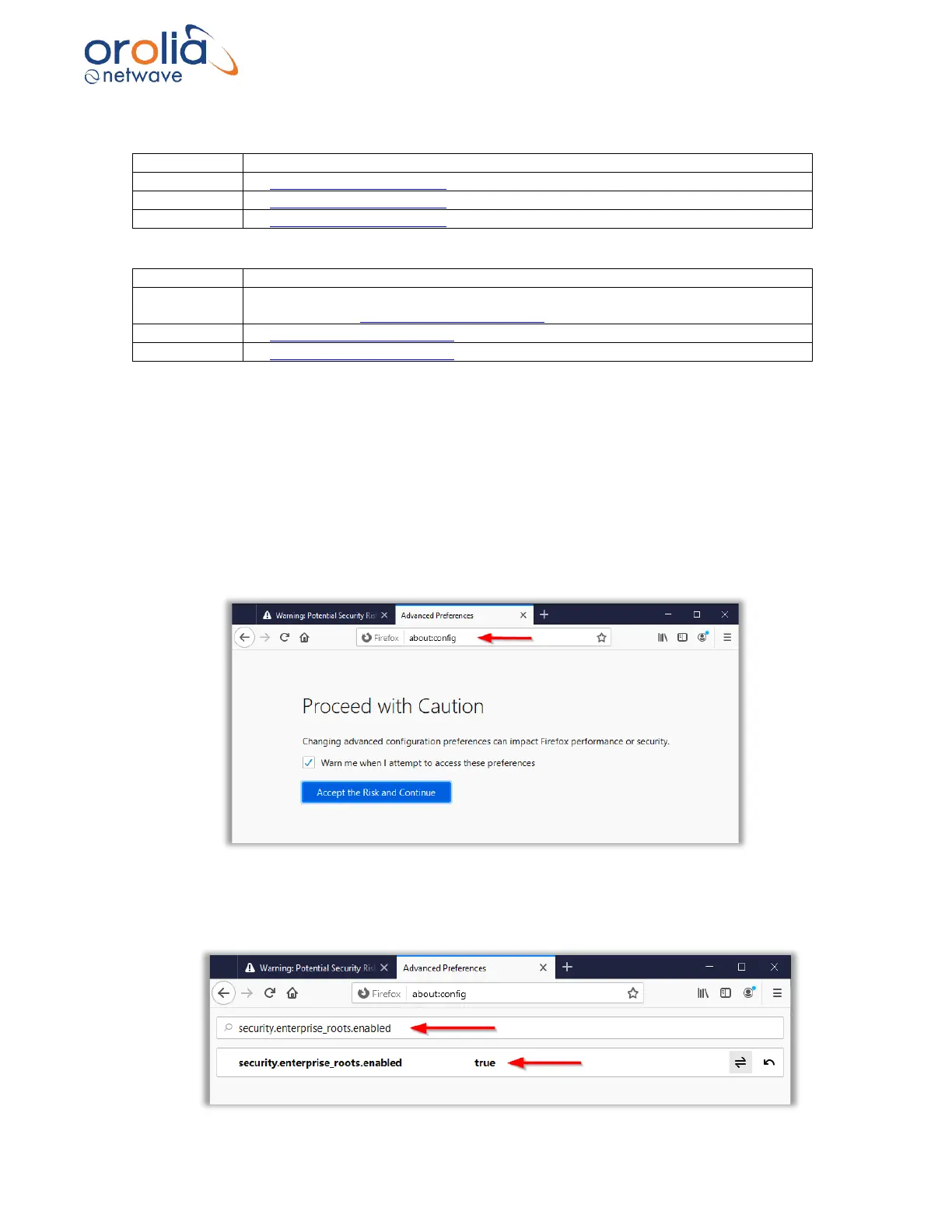
Enabling the Windows certificate store trust can be done following the below steps.
i) Type about:config in the Firefox address bar. This will open a Firefox settings page.
• In the search bar type “security. enterprise_roots.enabled”. Set the found setting to
true.



 To Next Page