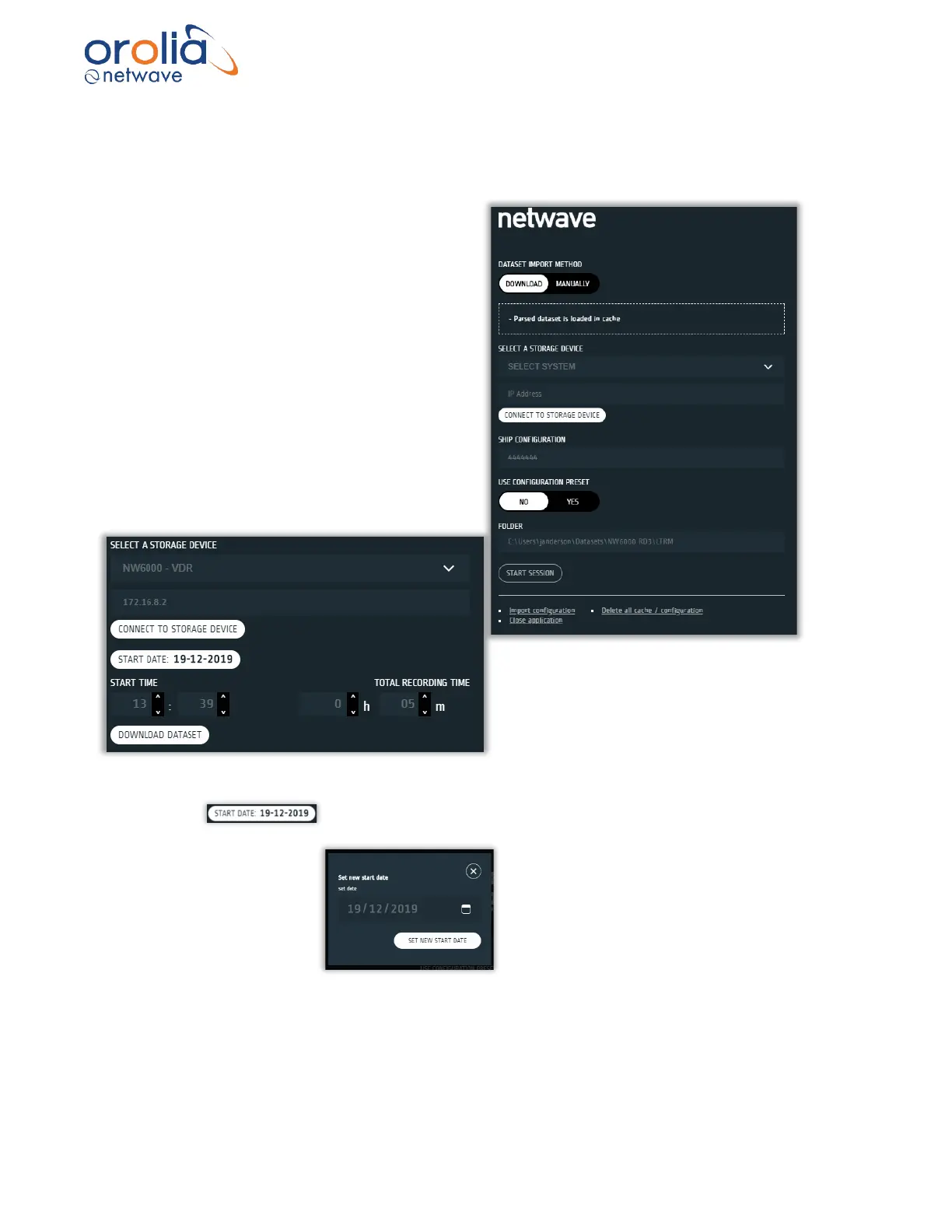
5.6 Downloading a Dataset from Recording Medium
After pressing the START APP button, oo download a dataset from one of the final recording
mediums (FRM, FFRM or LTRM) select the DOWNLOAD button.
Select a storage device to download from
using the dropdown menu.
The IP address of the VDR will be shown in
the box under the stroage device selection.
This is for reference only and cannot be
modified.
Once the CONNECT TO STORAGE DEVICE
is pressed the Player will search for the
previously selected storage device on the VDR
network.
Then the Player will present the time selection
for the dataset to be downloaded.
NOTE: The player will automatically
position the download time to be the last 5
mins of data from the storage medium.
As shown above there are several items that can be used to control the dataset time selection:
1) The control is used to select the date.
Click on this to set a different date e.g.
2) The START TIME is used to set the hours and minutes to start downloading from.
3) The TOTAL RECORDING TIME is the time duration of the dataset that will be
downloaded.



 To Next Page