2.5.1 IP address for assignment
The VDR network is configurable with an address range of 172.16.0.1 to 172.31.255.254 with a
16-bit network address mask.
The assigned IP address is fixed during normal operation of the VDR, including powering the
equipment down and up.
The VDR does not rely on (external) DHCP functionality and to overcome IP-address conflicts,
caution must be observed not to connect a DHCP server (with the same IP range enabled) into
the (VDR) network.
This VDR uses the following (default) IP addresses.
Core module 172.16.8.2
Microphones 172.16.10.1 to 172.16.10.254
Data acquisition devices 172.16.15.1 to 172.16.15.254
Video interfaces* 172.16.20.1 to 172.16.20.254
Gateways 172.16.25.1 to 172.16.25.254
Reserved for future use 172.16.30.1 to 172.16.30.254
(subnet mask: 255.255.0.0)
*networks outside this range are also permissible and are detected during the initial probe. It is
not required to set the IP address of an LWE source to be within the VDR network .
2.5.2 Specifications for video using Light Weight Ethernet (IEC-61162-450)
This VDR is prepared for recording of video, using the IEC-61162-450 standard. Connection of
video devices, using this protocol, can be achieved using the Ethernet ports on the switch.
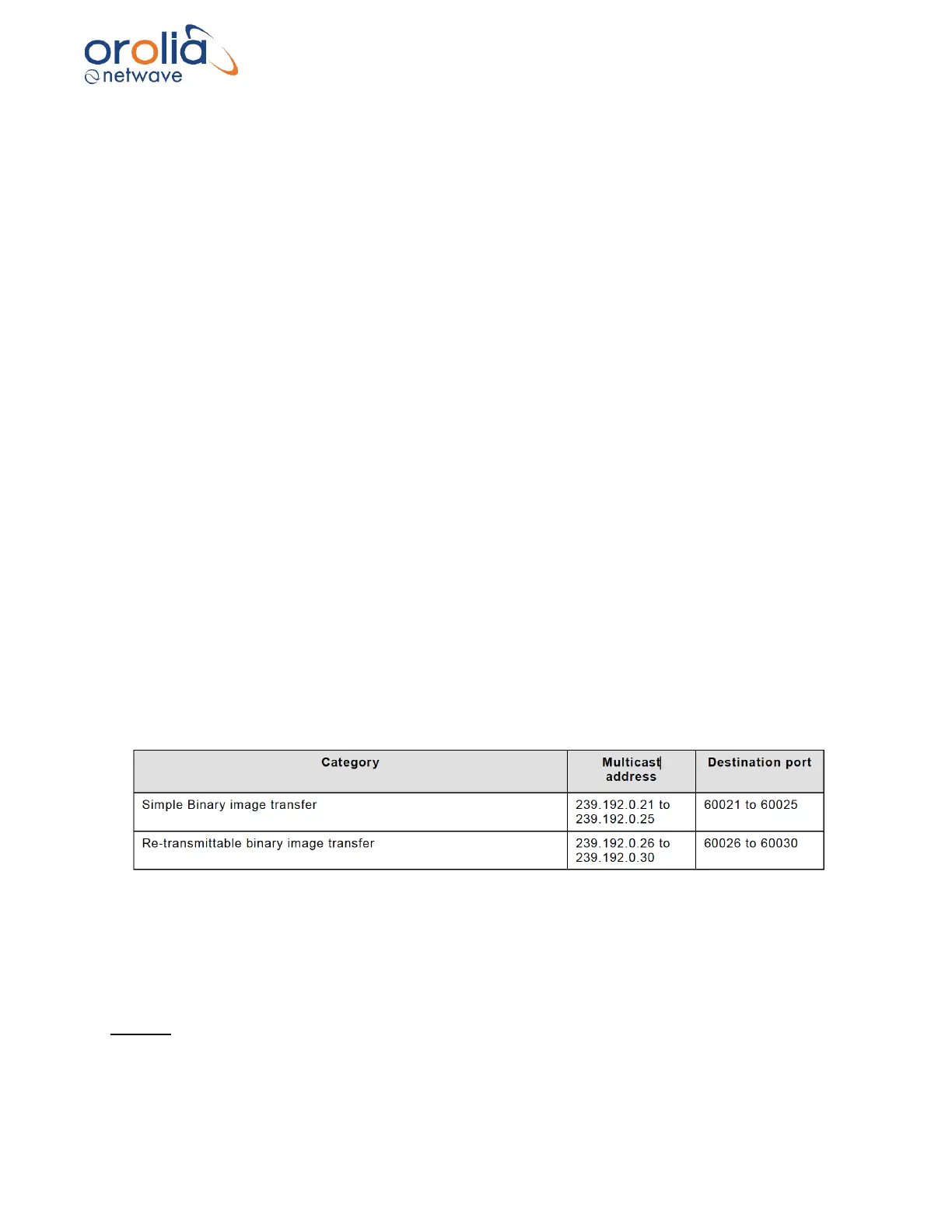
Available IP and port range:
Maximum datagram input rate, per second and with a maximum size of 1472 bytes each:
- For processing by the VDR: 4096 datagrams
- Received but not intended for the VDR: 8192 datagrams
- Received but not intended for the VDR (50% performance rate): 4096 datagrams
Logging
All errors can be viewed in the appropriate logs and are available via the BCU (error log) and via
download of the Long-Term Storage medium (coremod log, error log, lwe-sys log).



 To Next Page