SHAPING THE FUTURE OF SATELLITE COMMUNICATIONS
RS485 RS232
Pin Name Function Pin Name Function
1 GND Shield ground 1 GND Shield ground
2 Not connected 2 Rx-D Receive Data (input)
3 Tx-A Send Data A (input) 3 Tx-D Transmit Data (output)
4 Rx-A Receive Data A (output) 4 DTR Data Terminal Ready
(output)
5 GND Signal ground 5 GND Signal ground
6 Rx-B Receive Data B (output) 6 Not connected
7 Not connected 7 RTS Request to send (output)
8 Not connected 8 CTS Clear to send (input)
9 Tx-B Send Data B (input) 9 Not connected
Table 2 - Pin Configuration
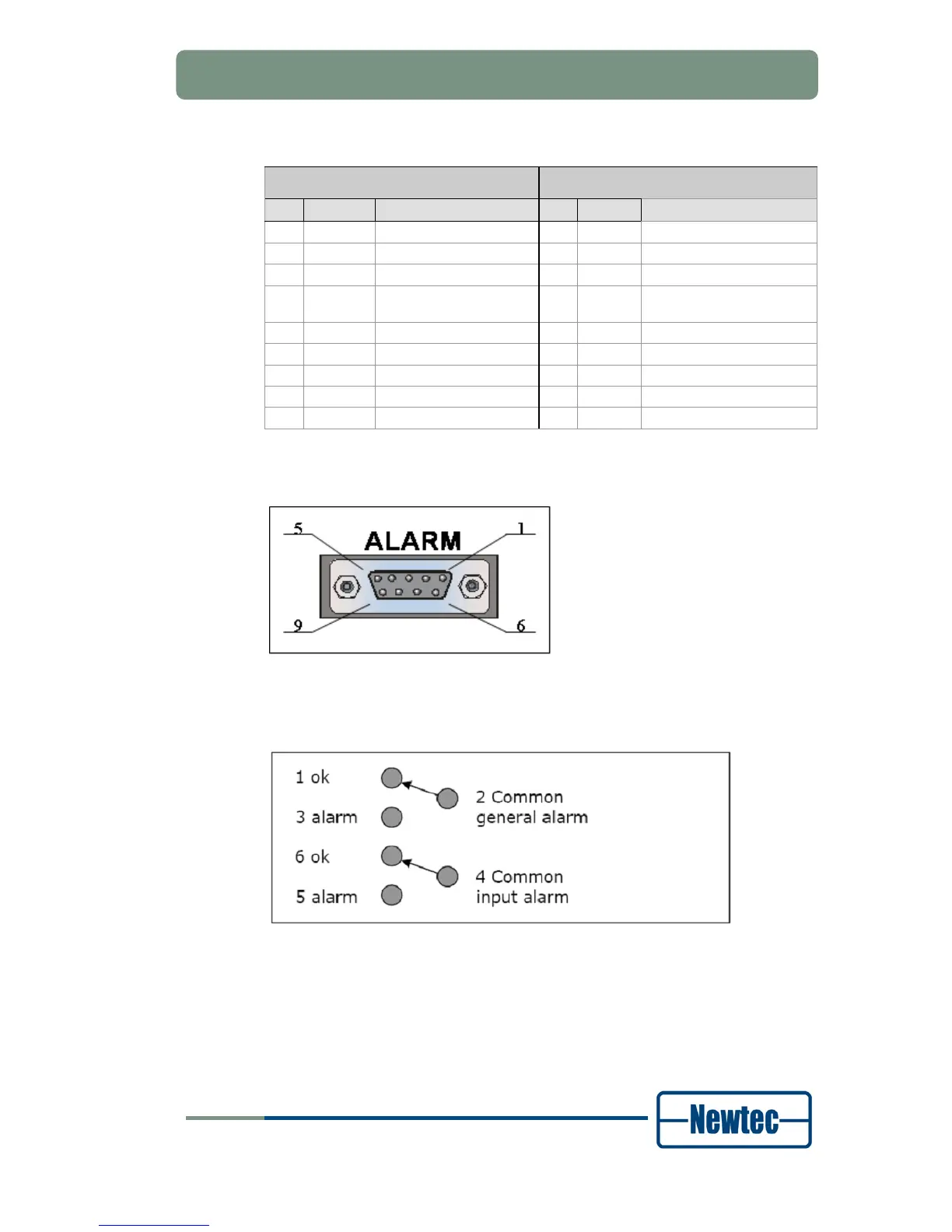
Contact Closure Alarm Outputs
Figure 19 - Contact Closure Alarm Outputs
You can use the dry contact closure alarm to connect to redundancy switching
systems.
Figure 20 - Contact Closure Alarm Connections of the EL170 and EL470
• The common general alarm is flagged when the device is not working properly.
For example: power failure or self test alarm.
• The common input alarm is flagged when the device does not receive an input
signal.



 To Next Page