NMC-WOLLARD 2021Truax Blvd., Eau Claire, WI 54703, Phone (715) 835-3151, Fax (715) 835-6625
M140 Tow Tractor Manual No. 46054
PAGE 5-97
CHAPTER 5 MANUFACTURER’S INFORMATION
5
NexSysLink
®
2" Stand-Alone CAN Display Operation Manual SAE J1939
© 2011 Beede Electrical Instrument Co., Inc.
• Maintenance Hours or Vehicle Trip
Depending upon the conguration of the instrument, either Maintenance Hours or Vehicle Trip appears
as the rst Main Menu function� See "Trip Mode" on page 31 for setting hours or trip as the rst Main
Menu function�
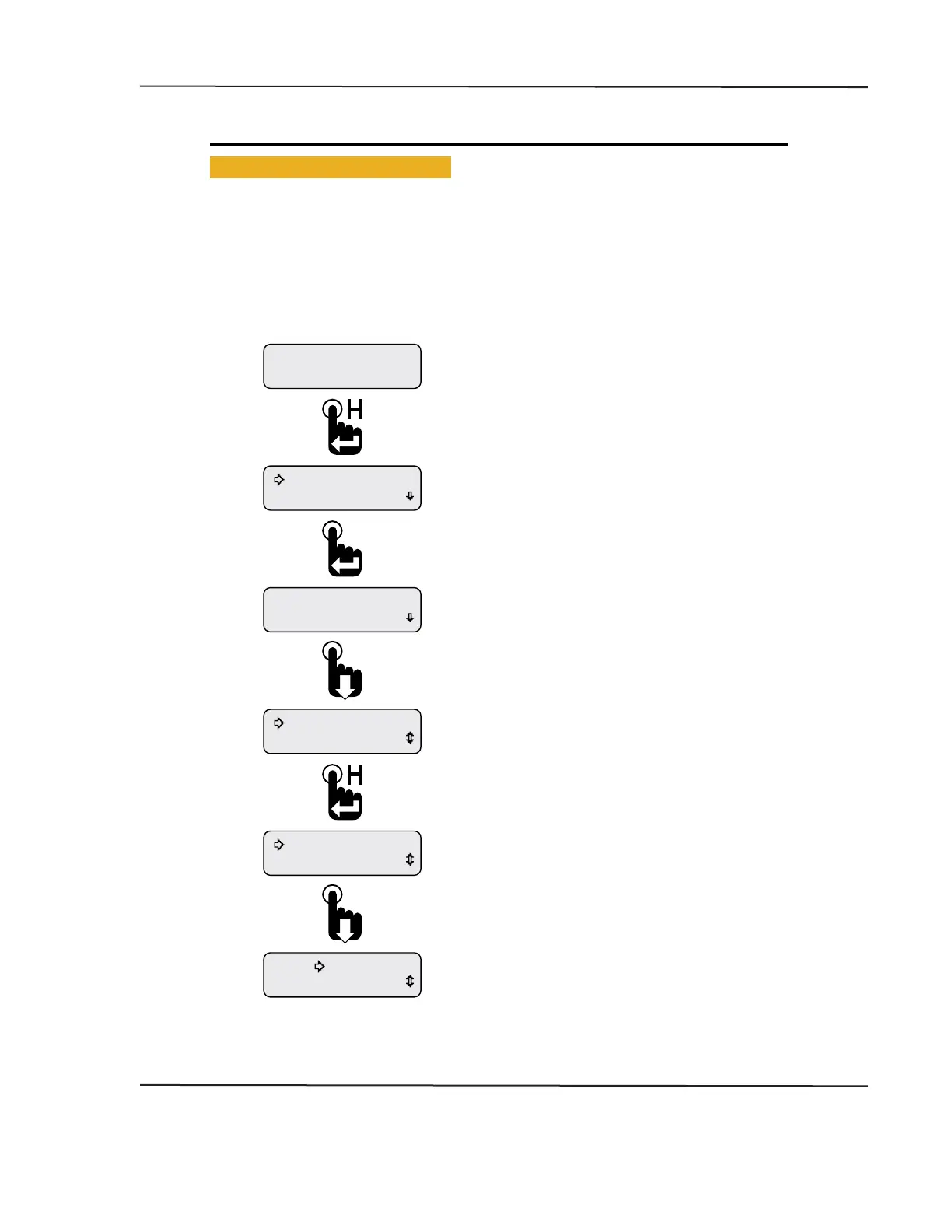
The instrument provides two resettable maintenance hour and vehicle trip logs� The Maintenance
Hours or Vehicle Trip function allows users to view and reset any of the hour or trip logs�
Figure 1-4: Accessing and Resetting Maintenance Hours and Vehicle Trip Logs
Exit
Return
308.0Hour2
0.0Hour1
308.0Hour2
1049.3Hour1
308.0Hour2
1049.3Hour1
Faults Active
Maintenance Hours
Engine Hours
1049.3
Scroll down to place the selection arrow cursor next
to the Return option then press the Enter switch
to access the Main Menu.
Scroll down to place the selection arrow cursor next
to the Exit option then press the Enter switch to
return to the last displayed CAN parameter screen.
Hour1 log reset to zero.
Hour2 log may be reset by moving the selection
arrow cursor down to Hour2 log then pressing and
holding the Enter switch.
Selection arrow cursor appears next to Hour1 log.
Press and hold Enter switch to reset Hour1 log or press
the Down switch to place selection arrow cursor next
to Hour2 log.
Maintenance hour log screen appears.
Press Down switch to select an hour log.
Note: Maintenance Hour and trip log displays do not
time out after 30 seconds and return the last
CAN parameter displayed like most menu displays.
First Main Menu screen appears with the selection
arrow cursor next to Maintenance Hours.
Press the Enter switch to display maintenance hour logs.
Note: Instrument may be congured for vehicle trip
instead of maintenance hours.
With a CAN parameter displayed, press and
hold the Enter switch to open the Main Menu.
Engine Hours CAN parameter shown as an example only.
CAN DISPLAY MANUAL
OCTOBER 01, 2015



 To Next Page