NMC-WOLLARD 2021Truax Blvd., Eau Claire, WI 54703, Phone (715) 835-3151, Fax (715) 835-6625
M140 Tow Tractor Manual No. 46054
PAGE 5-111
CHAPTER 5 MANUFACTURER’S INFORMATION
19
NexSysLink
®
2" Stand-Alone CAN Display Operation Manual SAE J1939
© 2011 Beede Electrical Instrument Co., Inc.
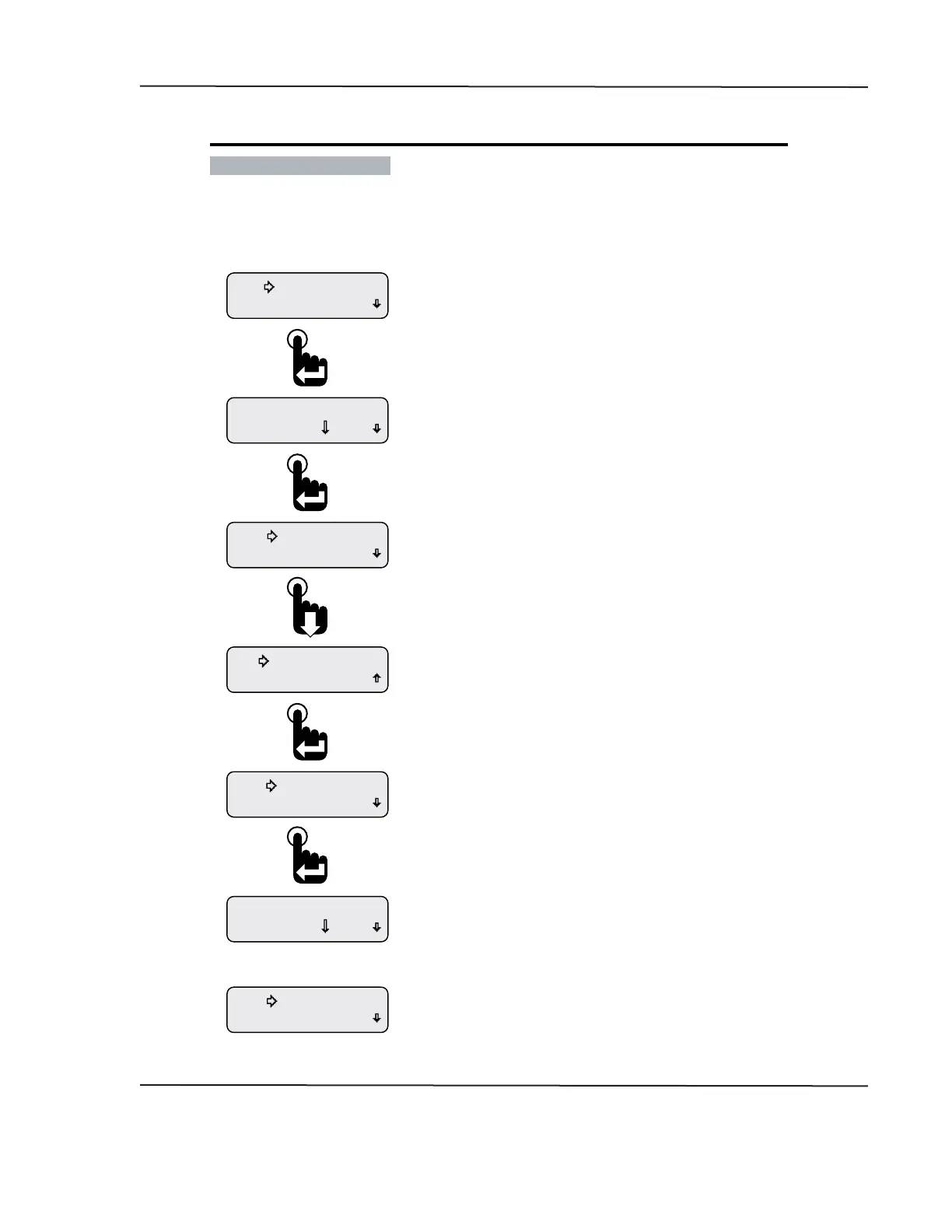
• Deleting Alarms
The Edit Alarms function is also used to delete existing alarms�
Figure 1-18: Deleting an Alarm
Return
Add Alarm
Change? 10.0 V
A1 Baery Volts
Confirm Delete
No Change
Delete Alarm
Delete Alarm
Edit Alarm
Change? 10.0 V
A1 Alternator Volts
Return
Edit Alarms
Or
If No Change is selected above, the previously displayed
Alarm conguration screen appears.
If Conrm Delete is selected, the next congured alarm appears.
If no other alarms were congured, the Add Alarm and Return
menu options appear.
After selecting Delete Alarm, users must either cancel the delete
request by selecting No Change or conrm the deletion by selecting
Conrm Delete.
With the selection arrow cursor next to the Delete Alarm option,
press the Enter switch.
After choosing the displayed alarm to delete, the selection arrow
cursor appears next to the Edit Alarm option.
Press the Down switch to place the selection arrow cursor next to the
Delete Alarm option then press the Enter switch.
Pressing the Enter switch displays the rst previously congured
CAN parameter for alarm notication, A1.
The prompt “Change?” appears in the lower left corner of the display.
To delete the displayed alarm conguration, press the Enter switch
to accept the prompt to change the alarm. Otherwise, press the
down switch until the desired alarm to delete appears on the
display then press the Enter switch to accept the change prompt.
From the Alarms Menu place the selection arrow cursor
next to the Edit Alarms option, Main Menu-Alarms-Edit Alarms,
then press the Enter switch to begin editing alarms.
CAN DISPLAY MANUAL
OCTOBER 01, 2015



 To Next Page