NMC-WOLLARD 2021Truax Blvd., Eau Claire, WI 54703, Phone (715) 835-3151, Fax (715) 835-6625
M140 Tow Tractor Manual No. 46054
PAGE 5-124
CHAPTER 5 MANUFACTURER’S INFORMATION
33
NexSysLink
®
2" Stand-Alone CAN Display Operation Manual SAE J1939
© 2011 Beede Electrical Instrument Co., Inc.
• Firmware Information
Firmware part number, revision and release date are available when selecting the Information option
from the Main Menu�
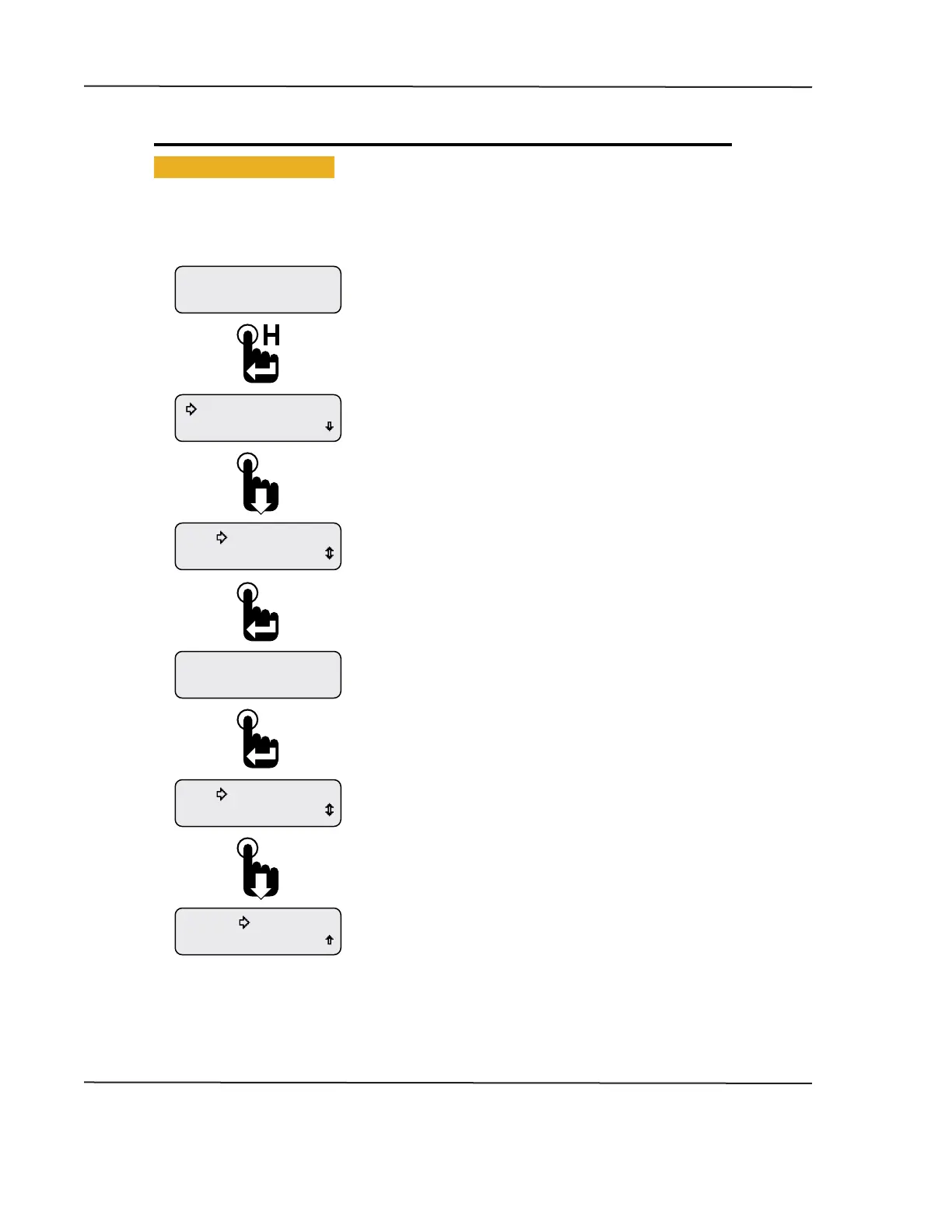
Figure 1-33: Viewing Firmware Revision
Exit
Exit
Information
861449B 4.28.11
Information
Exit
Information
Faults Active
Maintenance Hours
Engine Hours
1049.3
Scroll down to the Exit option and press the Enter switch or
wait 30 seconds for the last displayed CAN parameter to appear.
Pressing the Enter switch returns the Information Main Menu
option.
The information screen displays the rmware part number,
revision and release date.
Press the Enter switch to exit the information display or wait
30 seconds for the last displayed CAN parameter to appear.
Scroll down to place the selectio arrow cursor next to the
Information option of the Main Menu.
Press the Enter switch to view rmware information.
First two Main Menu options appear with the selection arrow
cursor next to the Maintenance Hours option.
Note: Instrument conguration may show vehicle trip.
With a CAN parameter displayed, press and hold the Enter switch
to open the Main Menu.
Engine Hours parameter shown as an example only.
CAN DISPLAY MANUAL
OCTOBER 01, 2015



 To Next Page