83
Loading and saving preset measuring routines
To load previously developed parameter routines, follow the directions listed below.
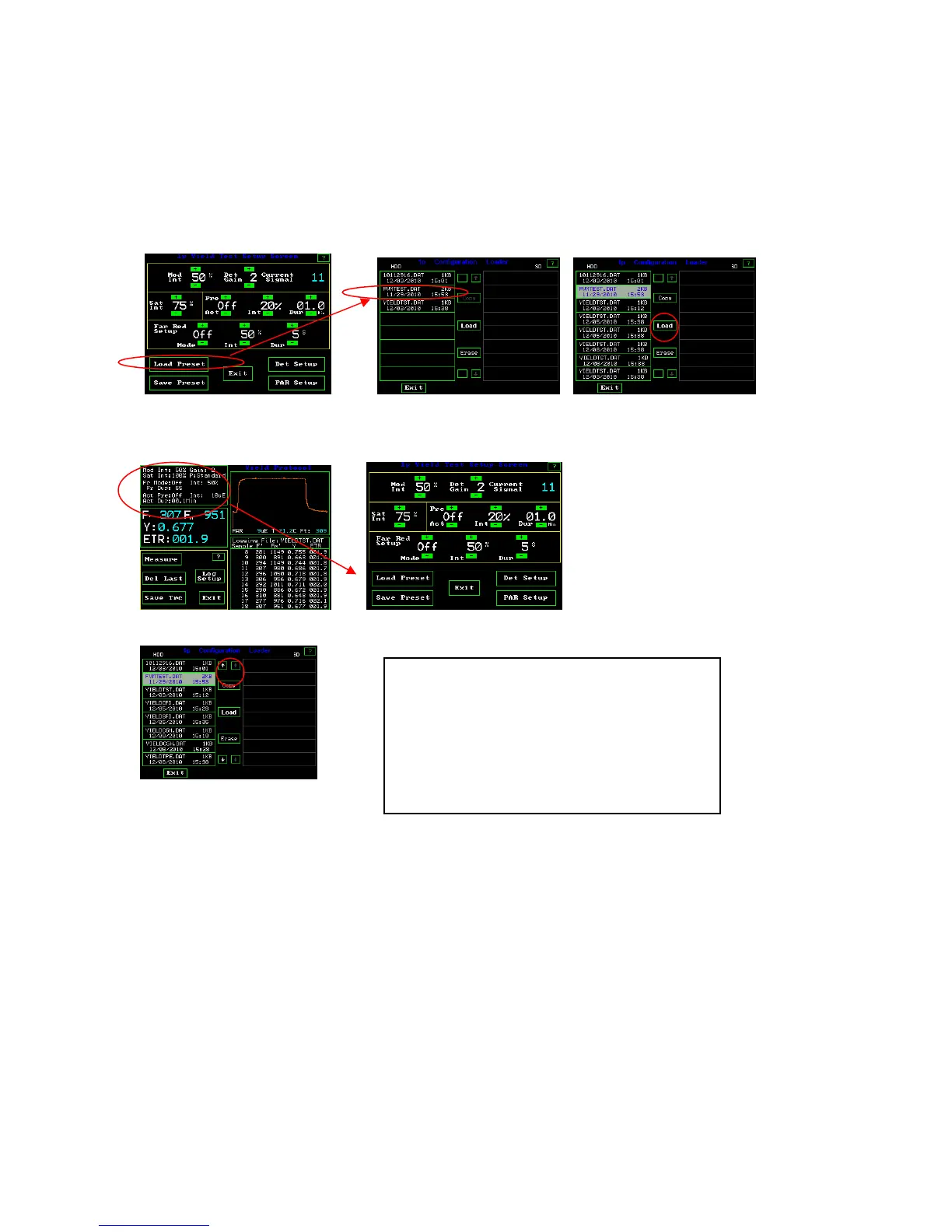
Yield Test Setup Screen Configuration Loader Screens
Y(II) Measuring Screen Yield Test Setup Screen
When the parameters have been adjusted for a specific set of conditions, the test setup
can be saved by pressing “Save preset” while in the Test setup screen. A pop up appears
asking if you want to make a new file or use an existing one. Next a key board screen
will appear if the new option is selected, and the test set up can be named and it is saved
when “Ent” is pressed. To load previously created tests, press “Load preset”. Press the
test of interest. After it is highlighted in light blue, press load. To erase a test, highlight
the test and press “Erase”. The number of tests that can be saved is almost unlimited. Use
the up and down arrows to scroll through the tests if there are more than are shown on the
screen. Exit if there is no action.
Loading preset measuring parameter files –
Highlight test by touch, and press load.
Arrows for scrolling appear when there are more
tests than can be viewed on the screen.
Copy only works when an SD card is inserted
into the side of the OS1p.



 To Next Page