EasyManua.ls Logo

OTC DP-400 - Page 37

Default Icon
80 pages
Print Icon
To Next Page IconTo Next Page
To Previous Page IconTo Previous Page
Loading...
No. P10355
|35 |
10. OPERATION (continued)
Crater
Initial
Current
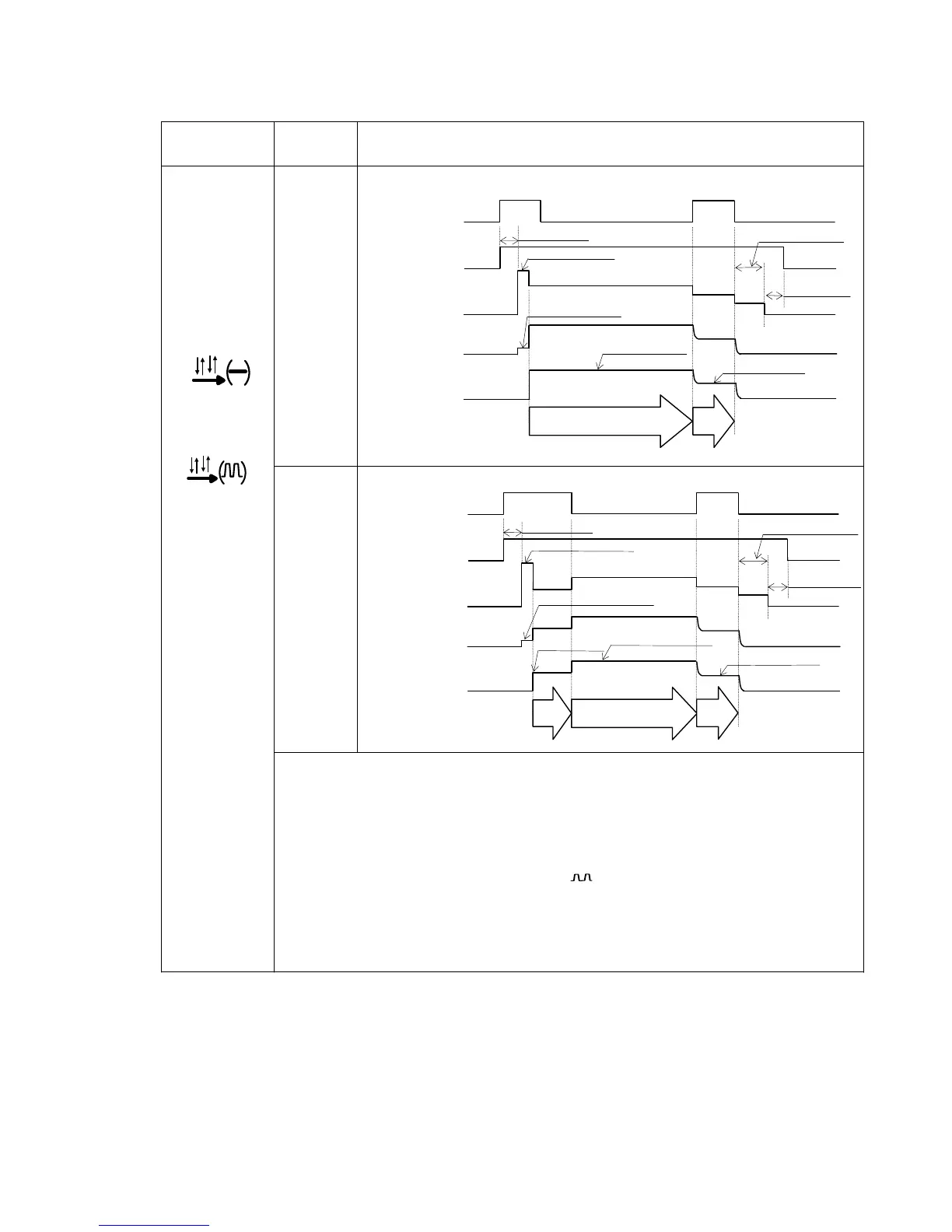
Timing Chart
OFF
ON
ON
or
ON
x
Even if the torch switch is switched off during welding, start signal will be self-hold.
The torch switch should be kept pressed and held during the INITIAL and CRATER
times.
x
Even if the CONSTANT PENETRATION switch is set to "ON" during the CRATER
time, constant penetration will not be carried out.
x
Setting the CRATER-FILL key [7] to “ON( )” or “ON(-)” after selecting “DC PUSLE”
or “DC WAVE PULSE”, pulse welding is performed during the CRATER time.
x
When selecting “ON(-)”, no-pulse welding is performed during the CRATER time
regardless of the settings of the welding method.
x
Welding method at the INITIAL time is the same as that at the MAIN WELDING.
Slow-down speed
Anti-stick (Burnback) time
Gas Flo

w
Welding Voltage
Wire feed speed
Pre-flow time
No-load voltage
Post-flow time
MAIN WELDING
OFF
ON
ON
OFF
CRATER
Welding current
Crater Current
Initial current
INITIAL
Slow-down speed
Anti-stick (Burnback) time
Pre-flow time
No-load voltage
Post-flow time
MAIN WELDING
OFF
ON
ON
OFF
CRATER
Welding Current
Crater Current
Torch Switch
Voltage Between
Output Terminals
Torch Switch
Gas Flo
w
Voltage Between
Output Terminals
Wire feedpeed
Welding current

Table of Contents

Related product manuals