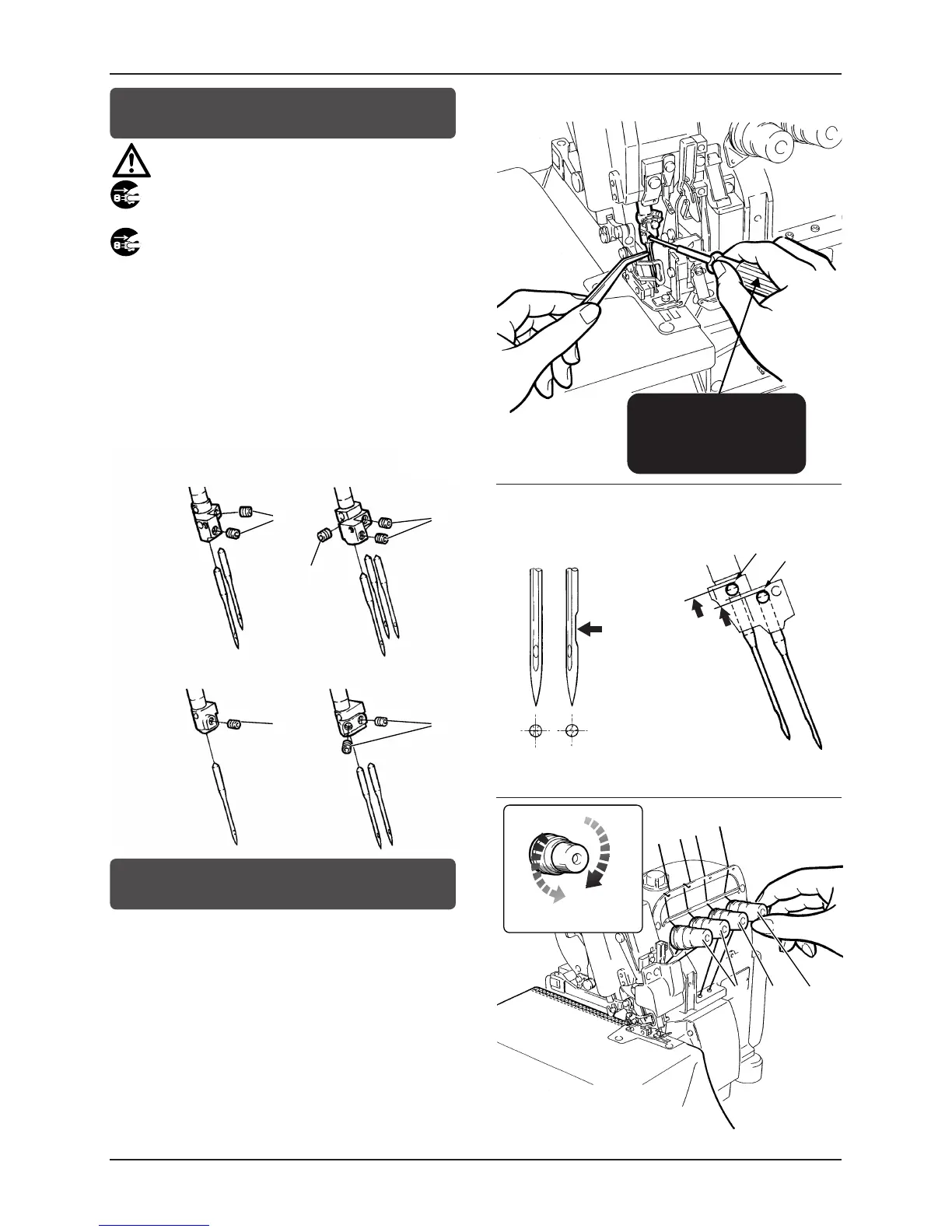
Replacing the needle
CAUTION
Always turn off the power and unplug the machine when you
replace the needle(s).
1
1
To replace the needle, loosen screws
1
first by referring to the
illustration below
(do not remove the screws).
Turn the scarf to the rear of the machine as seen from the front
of the machine, insert the needle to the proper depth, and fasten
screws
1
securely. (Fig.12,13)
Adjusting the thread tension
2
3
4
To obtain the proper thread tension, adjust needle thread tension
knobs
2
, top
cover thread tension knobs
3
and looper thread
tension knob
4
.
To tighten the thread, turn each knob clockwise.
To loosen the thread, turn each knob counterclockwise.
Each thread tension should be as light as possible, yet be sufficient
to produce balanced and beautiful stitches.
図 11
Fig.11
図 13
Fig.13
図 14
Fig.14
図 12
Fig.12



 To Next Page