5-62 DA80F/DA95F AddressRight™ Printers Service Manual (SV61962 Rev. A)
5 • Removal and Replacement
DA95F (WF96) - Printer Parts Removal
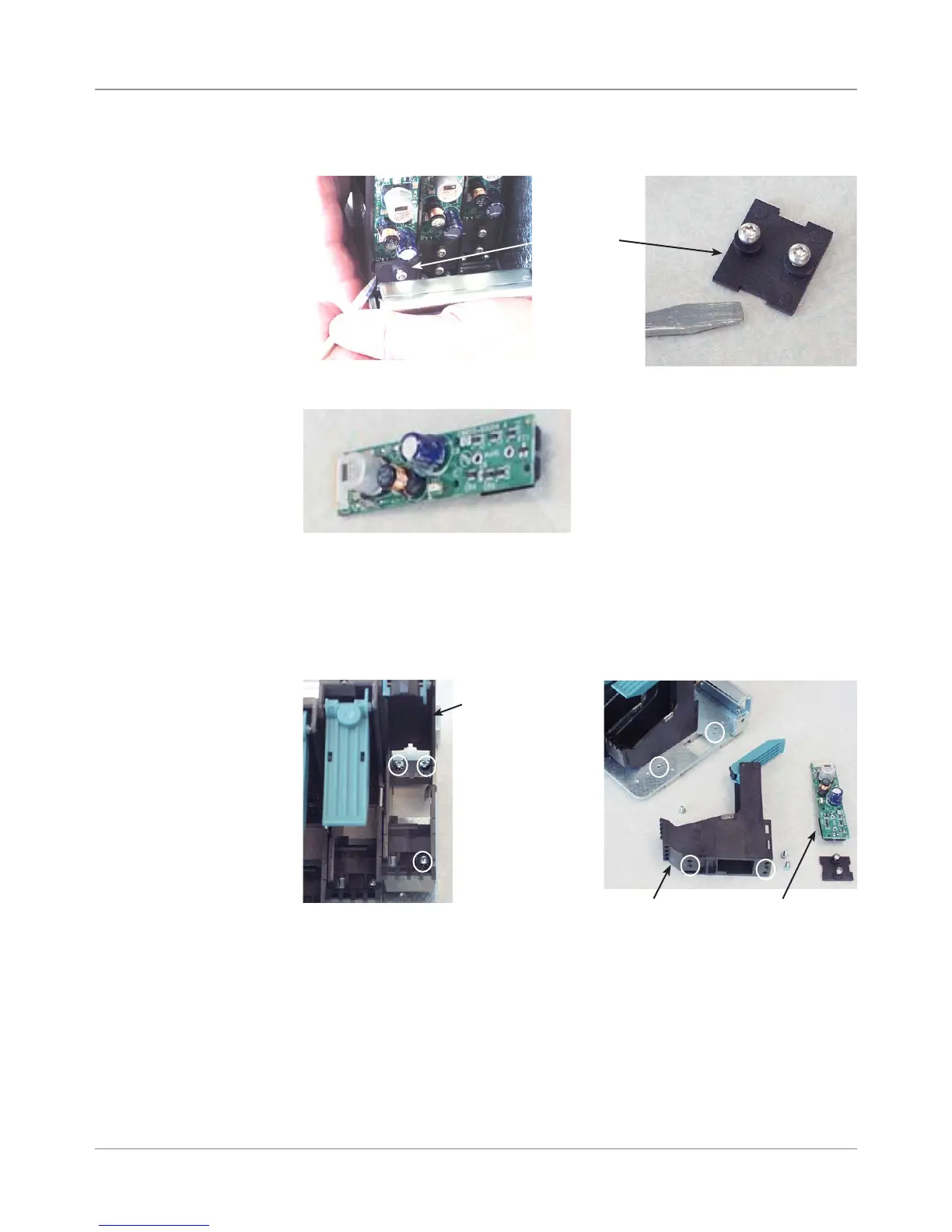
12. Insert a screwdriver to pry off retainer plate while holding plate and screws.
Retainer
Plate
13. Insert a screwdriver and pry off print head board.
Print Head Board
5.36 Print
Head Cables
and Print
Head Boards
(continued)
14. (Optional) If you need to remove the print head stall, unfasten three
screws (figure below left is looking from the top down).
NOTE: When reinstalling the stall, ensure that the plastic pins on the bot-
tom of the stall engage the locating holes (see figure, below right). This
is critical for proper print head alignment.
<--Three
Screws
(Circled)
Print Head
Stall
Print Head Stall Print Head Board
Locating
Holes -->
for Stall
(Circled)



 To Next Page