Proxima, Libra firmware ver. 2.12.xx
rev. 2.12.01
If a call directed to your telephone fails to be answered within 20 s, the server will
direct such a call to the number you have selected (e.g. an extension, an external or
a voicemail number).
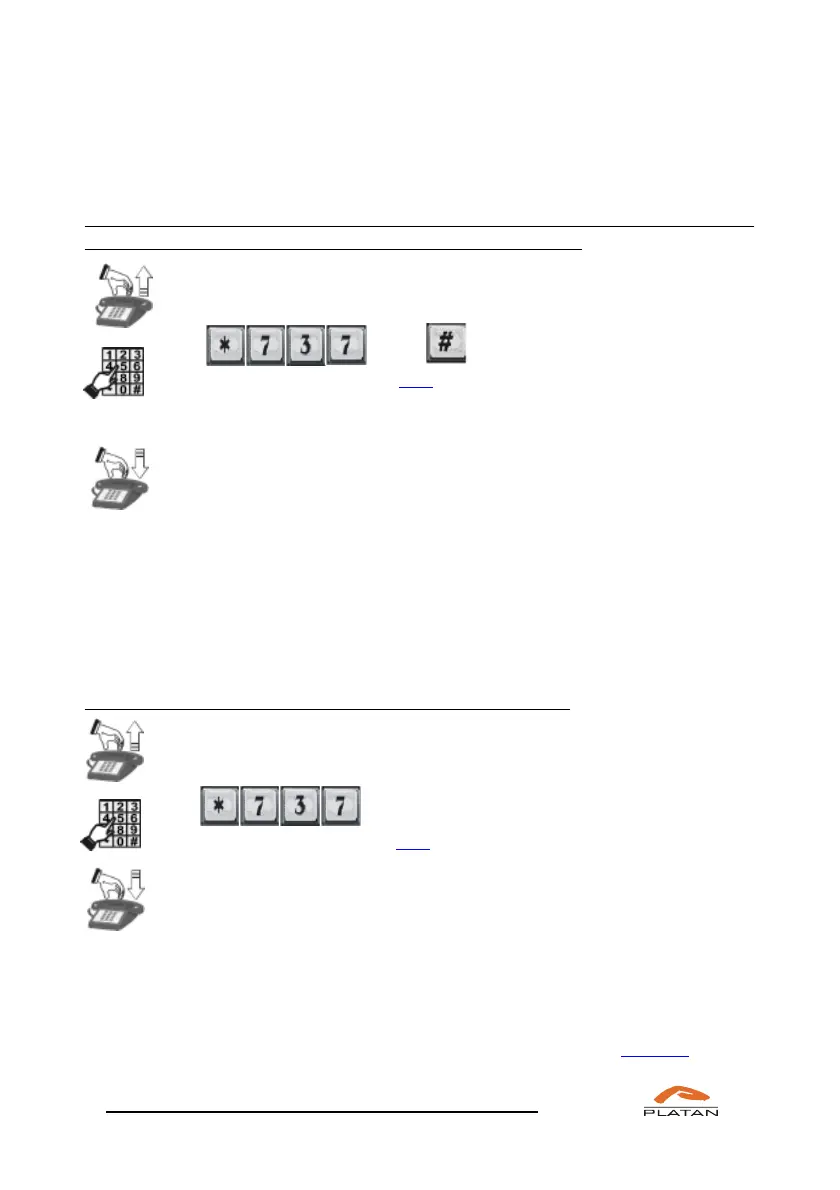
If you want the calls directed to your extension number to be forwarded to the
telephone you select if they fail to be answered within tt time:
Pick up the phone.
Dial TEL tt,
You will hear a confirmation tone,
TEL stands for the telephone number to which you forward calls;
tt – time [s] after which the forward is to be carried out.
Hang up the phone.
When the call directed to your telephone fails to be answered for tt seconds, the
server will forward the call to the number you have selected.
The tt time may be between 5 s and 80 s (5 s interval). The server rounds up the
entered time, i.e. if the value of 31 s is selected, the server will forward calls after
35 s. If you want the forwarding to be activated after 5 seconds, enter 05.
If you want to cancel the “when no answer” call forwarding:
Pick up the phone.
Dial
You will hear a confirmation tone.
Hang up the phone.
The server will cancel the “when no answer” call forwarding.
If the function of forwarding calls to an external number is used, each call is rated
as a regular outgoing external call.
All functions connected with forwarding calls to either your or another telephone
may also be defined, modified and cancelled in the computer
program (menu:
Extensions → Call forwarding).



 To Next Page