I
Select
lime
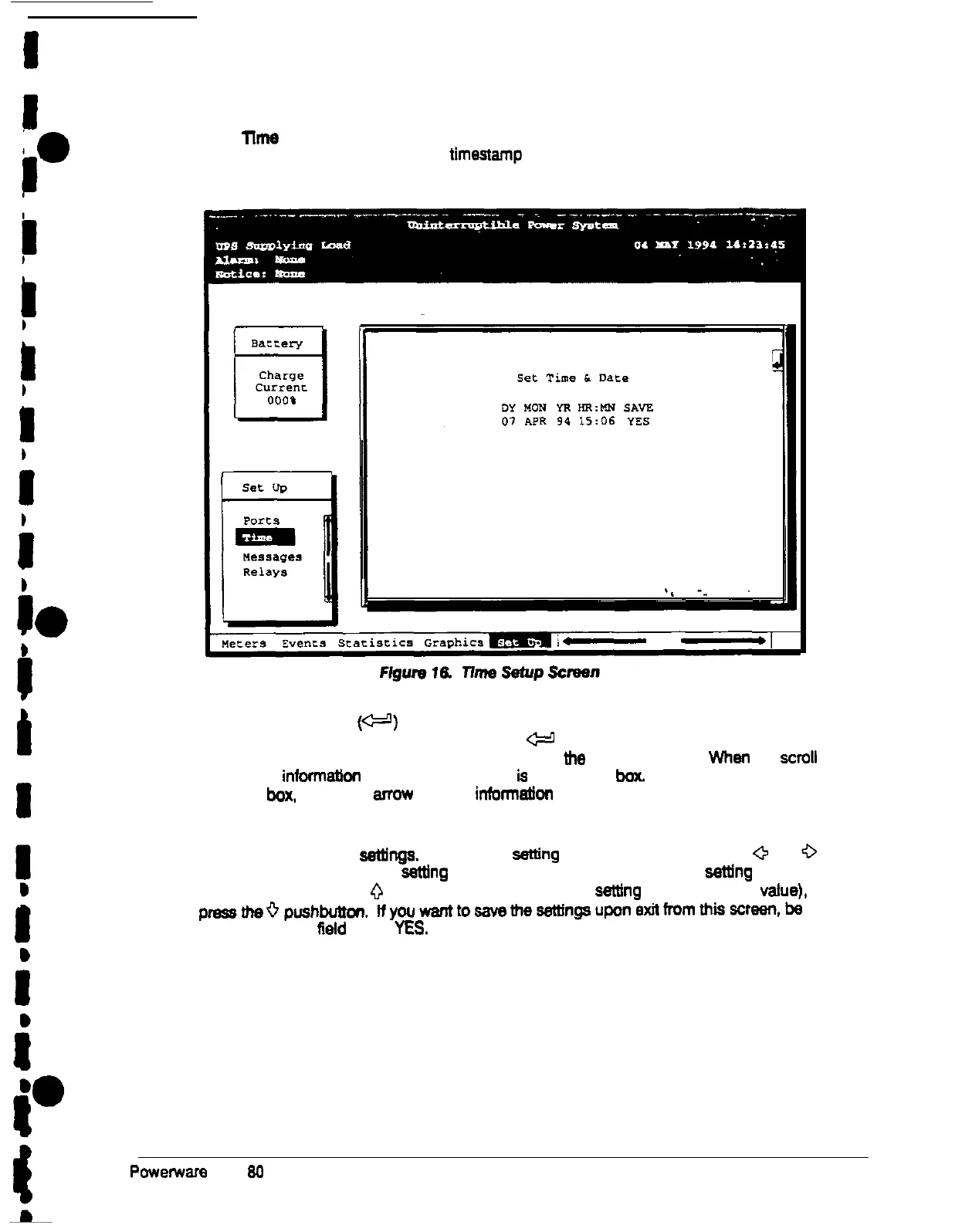
from the Setup menu to display the Time Setup screen The Time Setup
screen allows you to set the internal timestamp of the UPS. The timestamp is used for
logging events in the Event History Log. Figure 16 shows the Time Setup screen.
The small return arrow
(W)
appears in the upper right comer of the Time Setup screen.
This arrow is a reminder that you can press the
W
pushbutton on the Monitor Panel to
toggle the pushbuttons between the menu box and
tf?e
information area When the
scroll
bar is in the
informatlon
area, the return arrow
ls
in the menu
box.
When the scroll bar is in
the menu
box.
me return armw is in me
inforrnatfon
area.
When the scroll bar appears in the information area, you can use the pushbuttons to
change the time-stamp
settinga.
To change a
setting
in the timestamp, press the
0
and
0
pushbuttons to highlight the
sethng
you want to change. To increase the
setting
(make it a
higher value), press the
0
pushbutton. To decrease the
setting
(make it a lower
value).
pmssthe~pushbutton.
nywwanttosavemeseningsuponexittromthisscreen,be
sure me SAVE
Reid is set to
YES.
Powerware
Plus
64
UPS Operator’s Manual
29











 To Next Page