Psion Teklogix 7535/7530 Hand-Held Computer User Manual 25
Chapter 2: Basic Checkout
Configuring An IEEE 802.11 Radio In The Unit
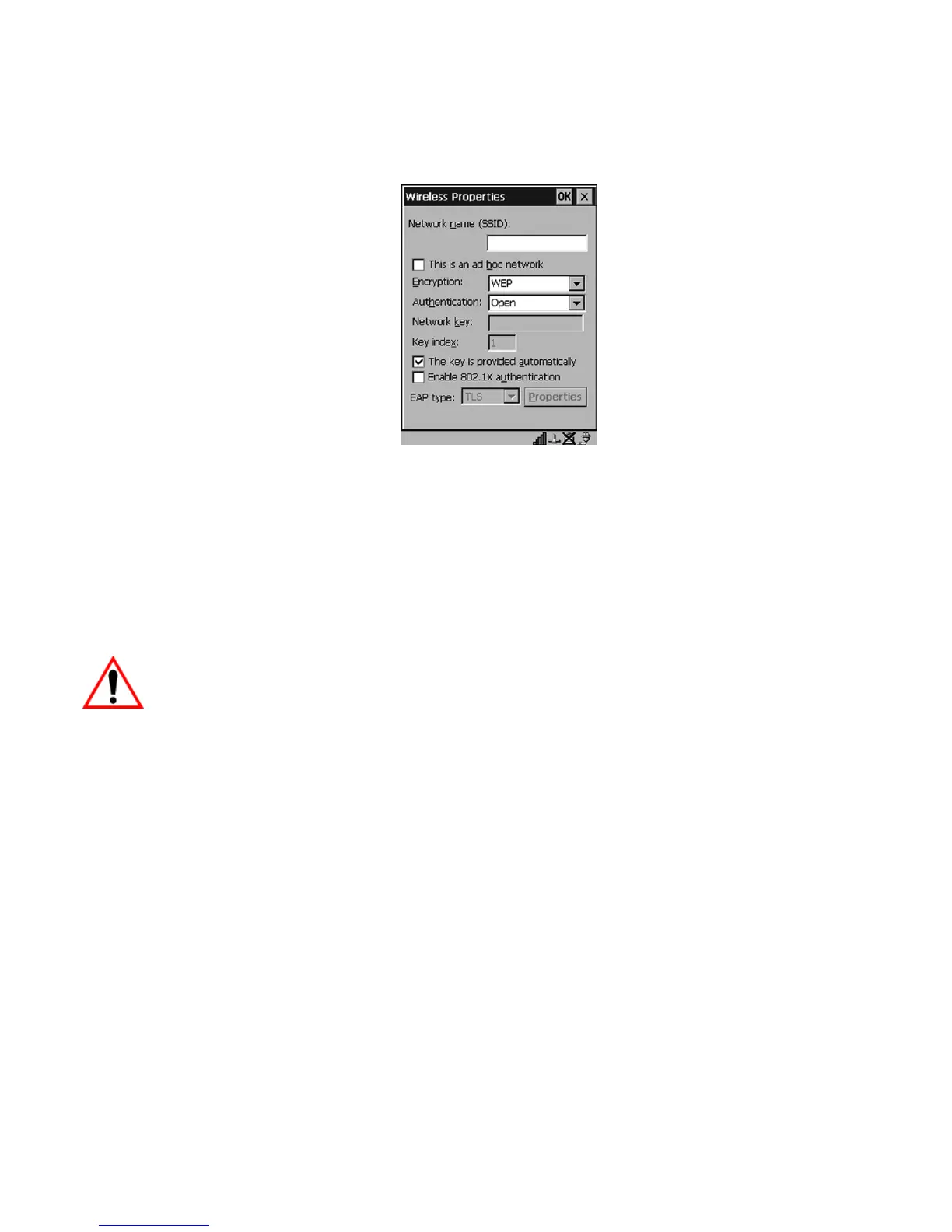
5. Wireless Properties
Figure 2.9 Wireless Properties Dialog Box
Network name (SSID):
• Type the appropriate SSID (Service Set Identifier) in the Network name
(SSID) text box at the top of this dialog box.
The Network name field can contain a maximum of 32 characters. The
name assigned here is listed as a preferred network.
Important: Keep in mind that the 7535/7530 will only communicate with
access points that are configured with the same SSID.
Ad Hoc And Infrastructure
If you are using an Infrastructure network – one in which 7535/7530s must
pass data through an access point – leave the checkbox next to This is an
ad hoc network blank.
If you are using an Ad Hoc network – a network in which 7535/7530s pass
data directly to other 7535/7530s without an access point – highlight This is
an ad hoc network, and add a checkmark in the checkbox to enable
Ad Hoc.
Encryption
WEP (Wired-Equivalent Privacy) encryption prevents others from acciden-
tally accessing your network. If you are not using encryption, you can
choose Disabled from the dropdown encryption menu. Otherwise, leave
this field as is.



 To Next Page