SECTION 1
GETTING ACQUAINTED
10
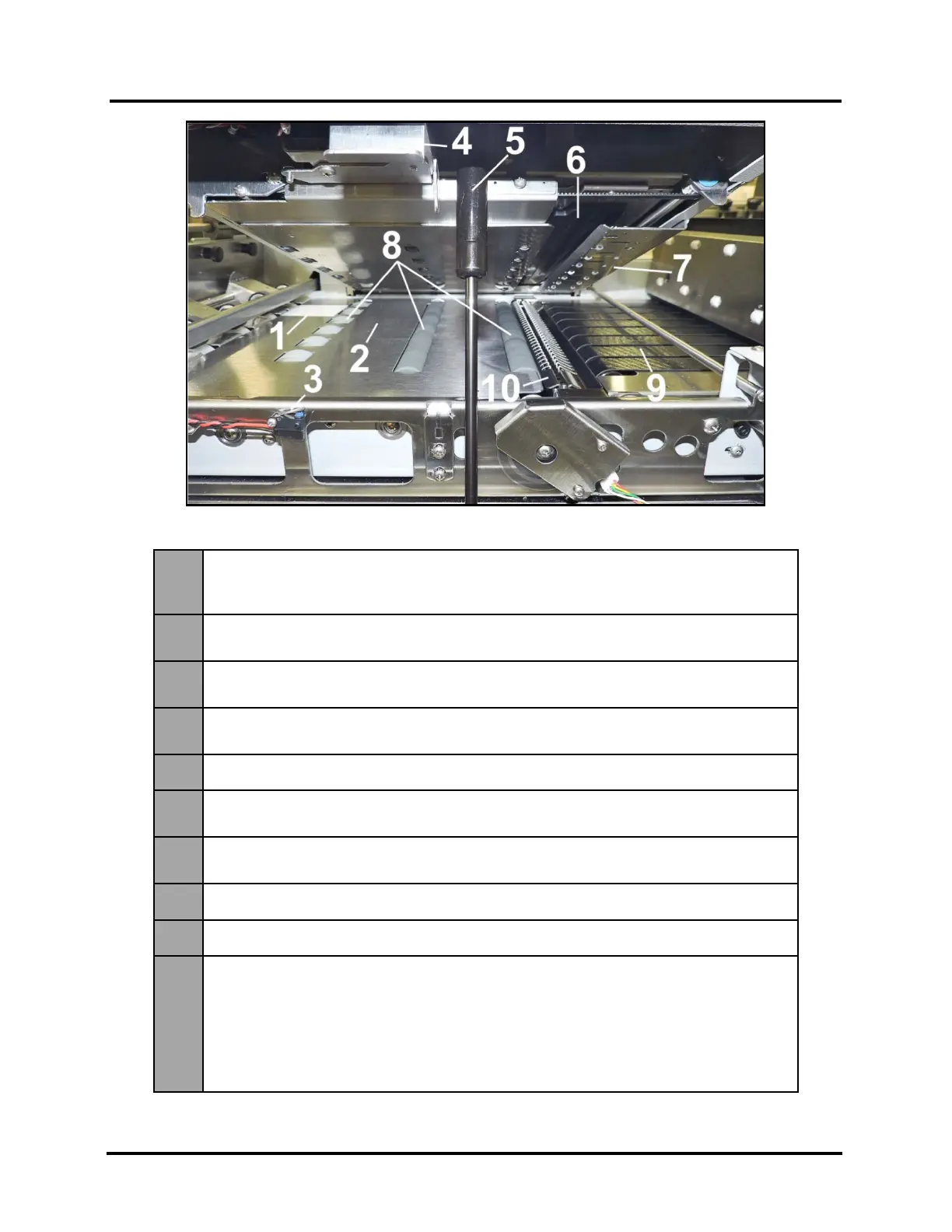
Print Zone View (Under Clamshell)
1.
Entry Sensor Reflector – Reflects sensor beam back to Media Entry Sensor.
The leading edge of the media is detected as media passes between Entry Sensor
and Reflector.
2.
Paperpath Surface – Flat metal surface supports media for smooth transport
through Print Area.
3.
Clamshell "Open" Switch – Signals Printer when Clamshell Latch is released, and
Clamshell is opened.
4.
Clamshell Latch – Used to release and open Clamshell to clear media jams,
install/exchange Print Platen & Drip Tray and cleaning. Pull Latch out to release.
Clamshell Support – Holds up Clamshell during maintenance and service.
6.
Printhead Opening – Printhead will be presented in this opening during printing
and during “Inspect Sled” event.
7.
Exit Starwheel Assembly – Starwheels allow for media, with freshly printed image,
to be transported smoothly from print area with minimal image transfer.
Media Transport Rollers – Keep media moving through Print Area.
Media Transport Belts – Moves printed media out of the Printer.
10.
Print Platen & Drip Tray – Located under Printhead.
Print Platen supports media during printing process.
Two different Print Platens (High and Low) are provided with printer.
Drip Tray catches any excess ink during printing and purging process.
CAUTION! Make sure this assembly has been properly installed before you power-
up and start using the printer. Be careful not to spill ink when removing assembly.
This assembly must be removed and cleaned routinely to avoid ink overflow.



 To Next Page