SECTION 3
OPERATING PRINTER
81
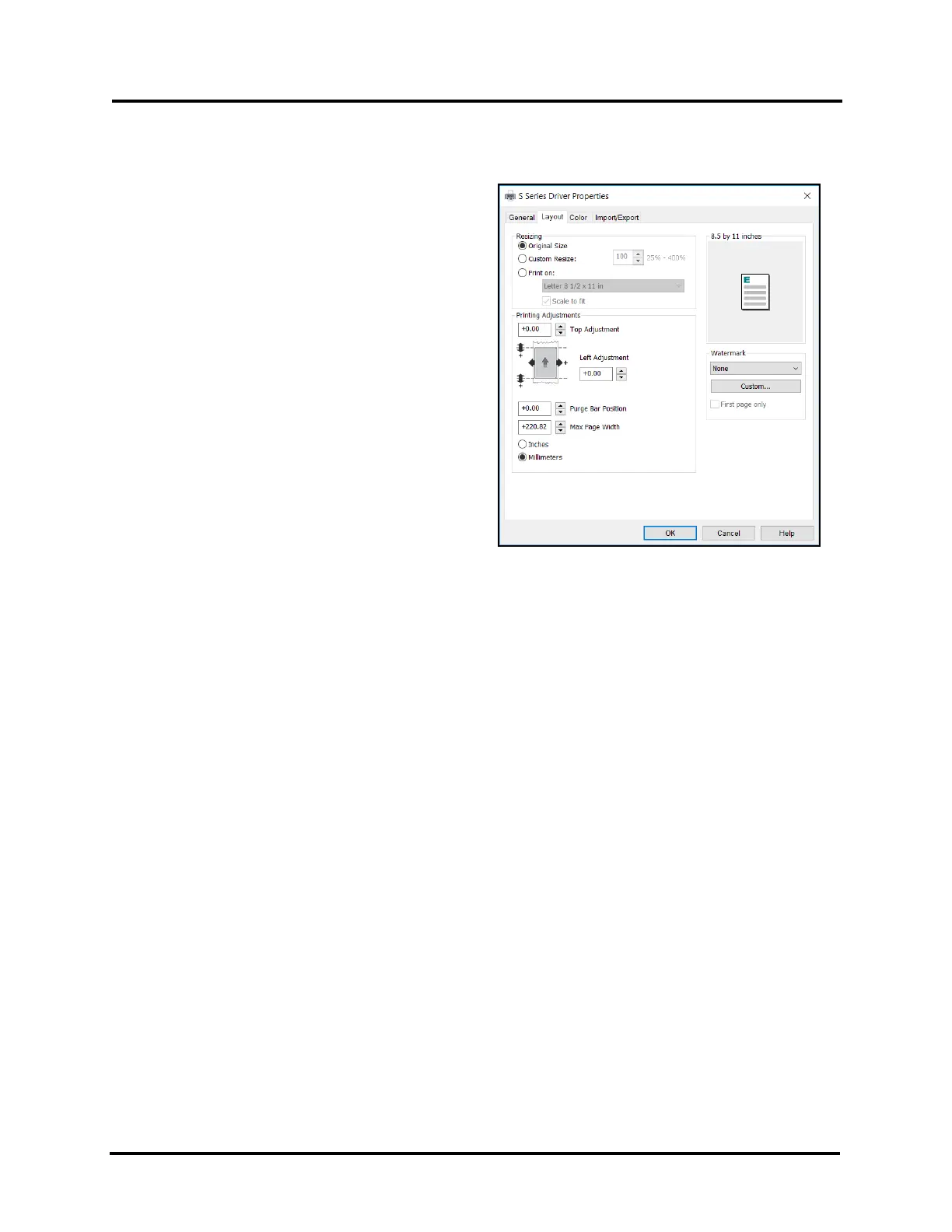
Layout Tab
Layout allows you change how document prints without
changing original document.
• Resizing:
Original Size – No change to size.
Custom Resize - Resizes original as a % of
normal size. Printer prints document in size you
selected regardless of paper size selected.
Print on - Specify particular size of paper to print
on regardless of size of original document.
Checking “Scale to Fit” automatically resizes
document to fit on new page size.
• Printing Adjustments: Make minor positioning
changes to print area, in relation to media,(if
needed).
Values can be shown in Inches or Millimeters.
Please see “Using Layout Tab Printing
Adjustments” on next page for details.
• Watermark: A watermark appears as lightly
printed “text”, such as the word “DRAFT” that is
added to and printed with the original job being
sent / printed.
Select “None” (default), if you don’t want a “watermark” to be printed. All other choices will print the
selected “watermark”.
Custom - button lets you create a new watermark or edit an existing watermark, including font selection,
color, size and printing angle.
First page only – Unchecked (default) prints selected water mark on all pages. Selecting (checking) prints
watermark on first page, but not subsequent pages.



 To Next Page