APPENDIX
129
Appendix D – Small Media Guide Kit
The Small Media Guide Kit (part # 47-900-05) is an optional
accessory. It allows for feeding of smaller, narrower media such as
business cards (2” W x 3.5" L, 50.8 mm W x 88.9 mm L).
NOTE: 3.5” minimum length may not work with all applications.
3.75” is minimum media length for positive roller to roller contact.
Recommended Printer Settings:
Fast Feeding OFF. Over Speed OFF. Print Quality Best or
Print Quality Normal with Half Speed ON.
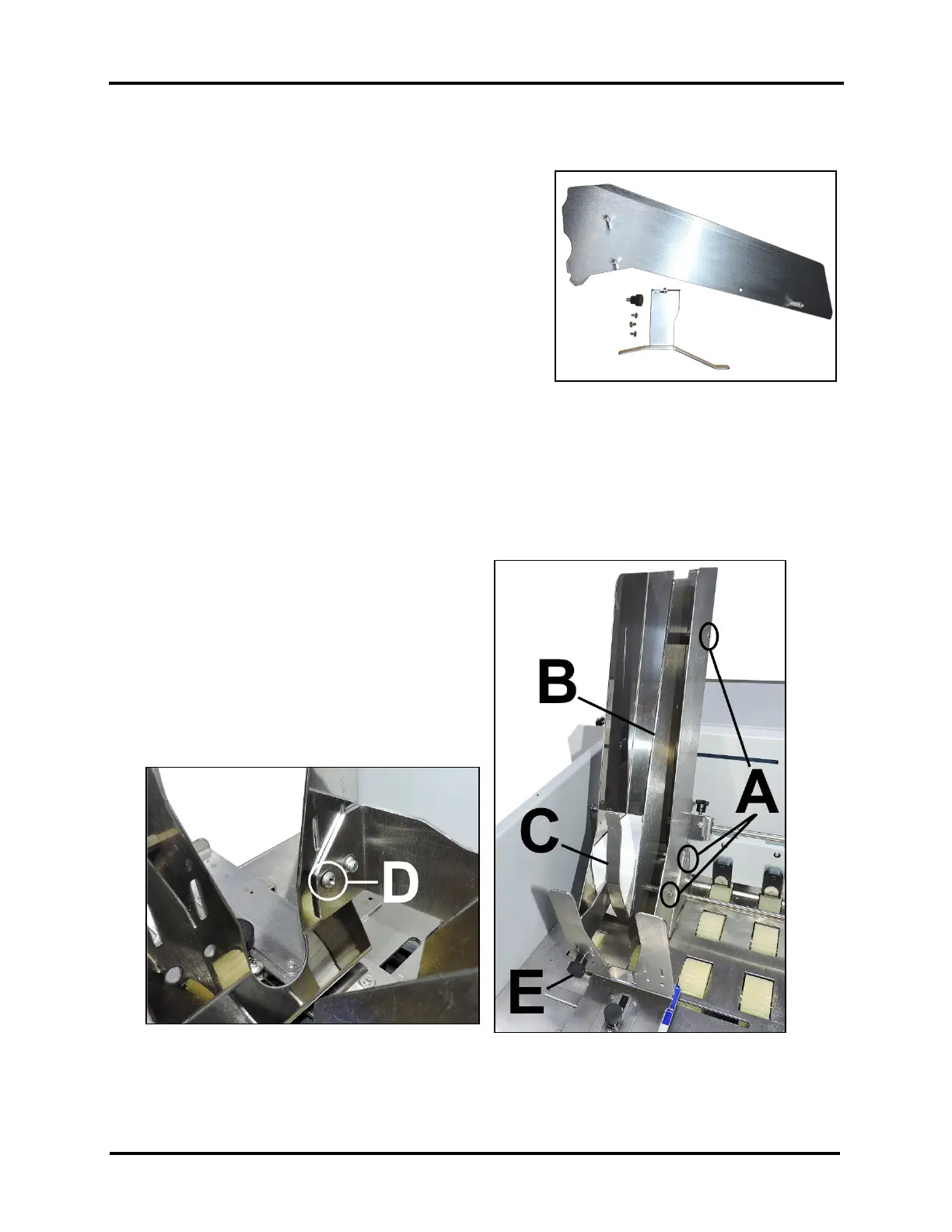
The Kit includes:
(1) Side Guide Extension Assembly
(1) Narrow Rear Guide
(1) Thumbscrew
(3) Phillips head screws
Tools Needed: #2 Phillips screwdriver
How to Install the Small Media Guide Kit
1. [A] Use the three (3) screws (included) to attach
the Side Guide Extension Assembly [B] to the
inside of the right-hand Side Guide using the (3)
predrilled holes in the Guide.
2. Install the Narrow Rear Media Guide [C] by
aligning the screw/pin with the hole on the left-
hand side of the Rear Guide [D].
3. Secure the Narrow Guide to the Rear Guide using
the Thumbscrew Knob [E] included in the kit.



 To Next Page