SECTION 2
INSTALLING PRINTER
15
Removing Shipping Materials
1. Open the Printhead Door.
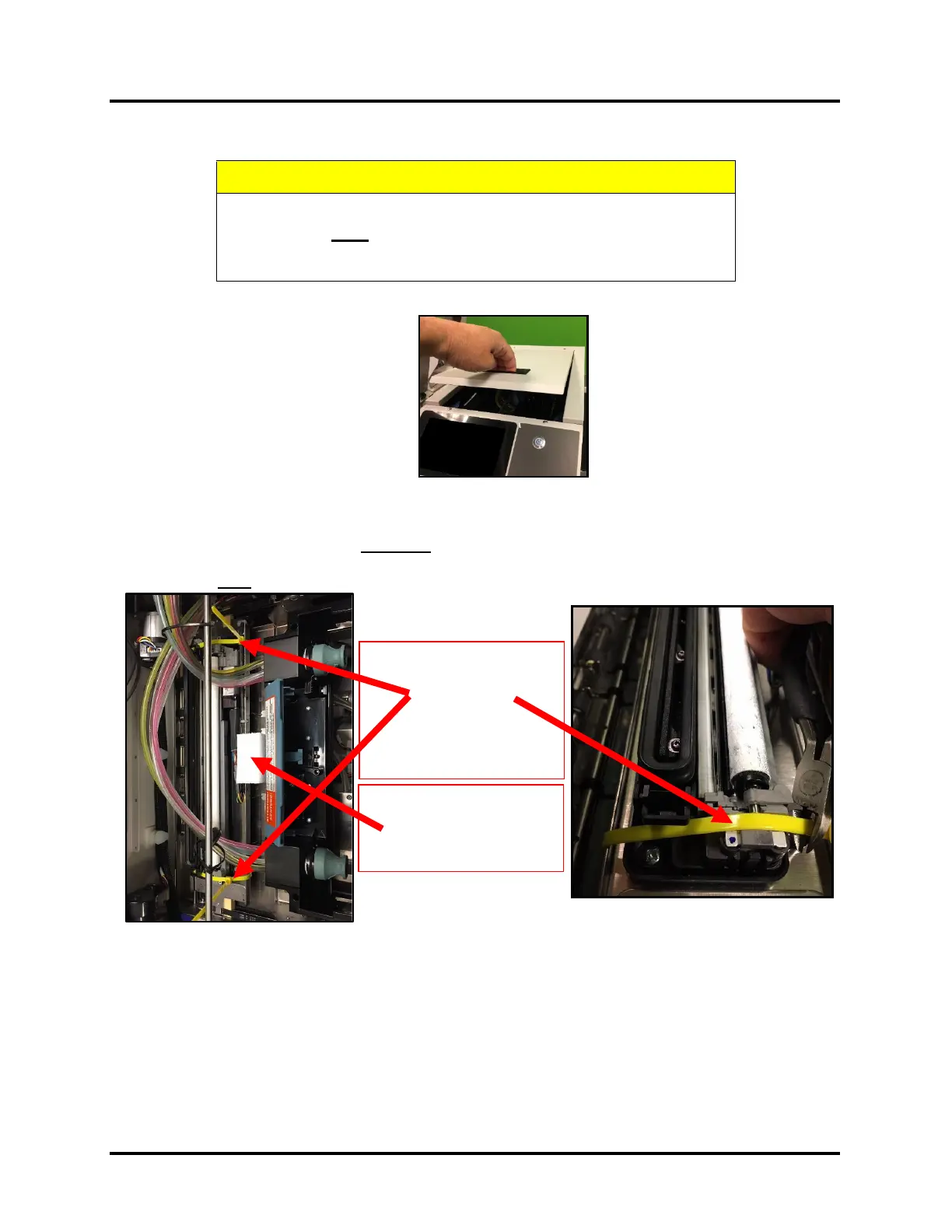
2. Locate and Remove the Foam Shipping Block, shown below. Color of foam block may vary.
NOTE: Foam Shipping Block is used to secure Service Station Sled position during transport.
3. Locate, Cut and Remove the two YELLOW Zip-Ties, shown below.
NOTE: Zip-ties are used to secure the wiper motor assembly to the service station sled during transport.
Do NOT cut the white or black zip-ties used to control the position of the ink tubes.
4. Be sure to remove all pieces of cut yellow zip-ties from the printer.
5. Gently close the Printhead Door.
6. Remove protective film from Touchscreen display.
7. Remove masking tape, used to secure the Guide mounting Screws during transport.
TO AVOID POSSIBLE DAMAGE TO PRINTER,
DO NOT PLUG-IN OR POWER-UP PRINTER
UNTIL ALL SHIPPING MATERIALS HAVE BEEN REMOVED.
Zip-Ties
(two, yellow)
Shipping Block
color may vary



 To Next Page