APPENDIX
135
Appendix I – Catch Tray
The Catch Tray (part # DT-420) is an optional accessory.
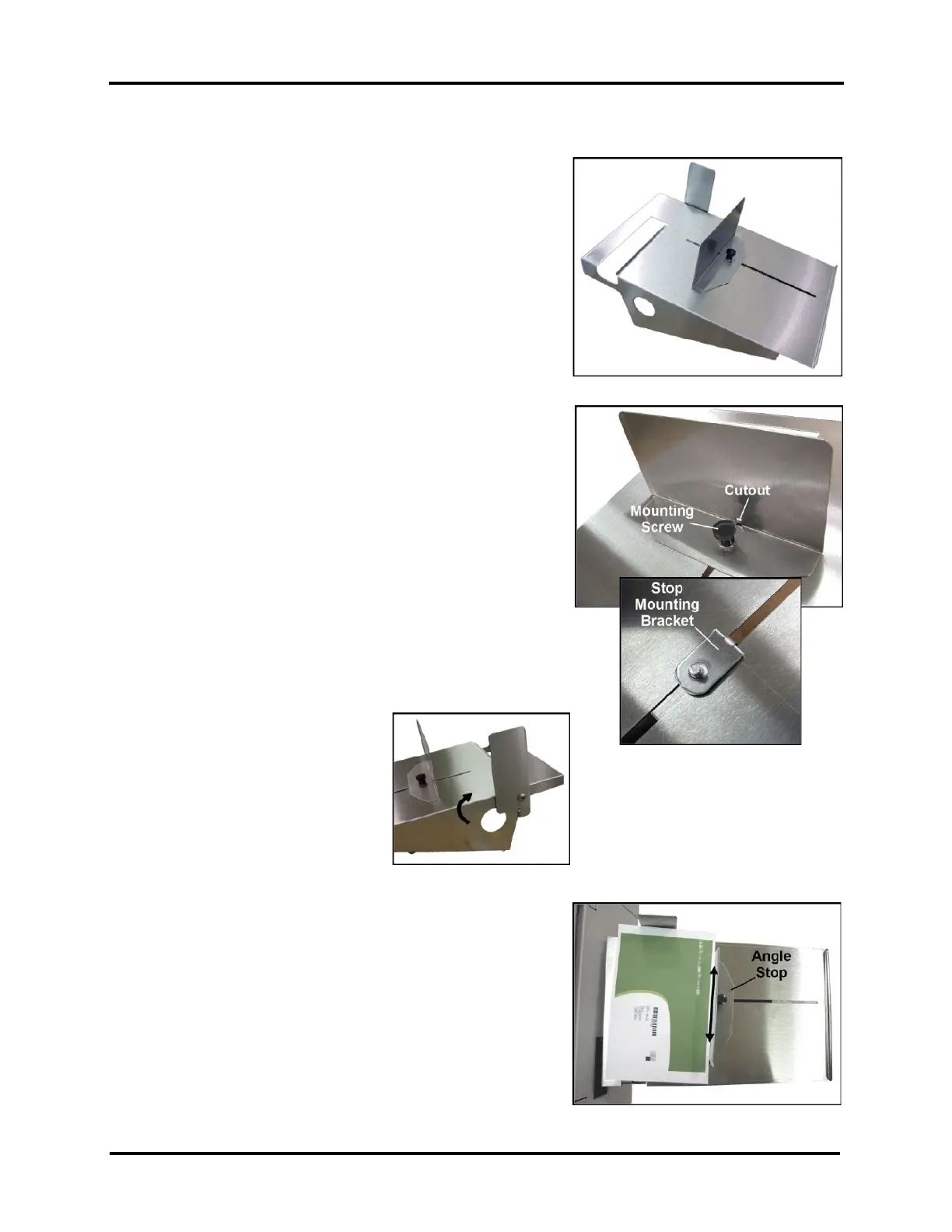
DT-420 Catch Tray includes:
• Catch Tray
• Stop (Media Stop)
• Stop Mounting Bracket
• Mounting Screw (Thumb Screw)
Tools Needed: None
Attach Media Stop and Position Catch Tray
1. With Catch Tray upright, reach under high side of Catch Tray with
Stop Mounting Bracket. Position tab on Stop Mounting Bracket so
it is at the high side of the Catch Tray and sticking through slot in
Catch Tray, as shown.
NOTE: Picture of Stop Mounting Bracket is from under-side of
Catch Tray.
2. While holding Stop Mounting Bracket in position, align Media
Stop so tab on Mounting Bracket fits into Cutout in Media Stop.
Align hole in Media Stop with threaded hole in Mounting Bracket.
3. Secure Media Stop using Mounting Screw (Thumb Screw) as
shown.
4. Swing Side Guide up into position.
5. Place Catch Tray at exit end of Printer.
6. Loosen the Mounting Screw (Thumb Screw) and adjust Media Stop
to accommodate Media length.
Tip: For best performance, Media Stop should be set at a slight
angle as shown.



 To Next Page