10 Chapter 1 Getting Started
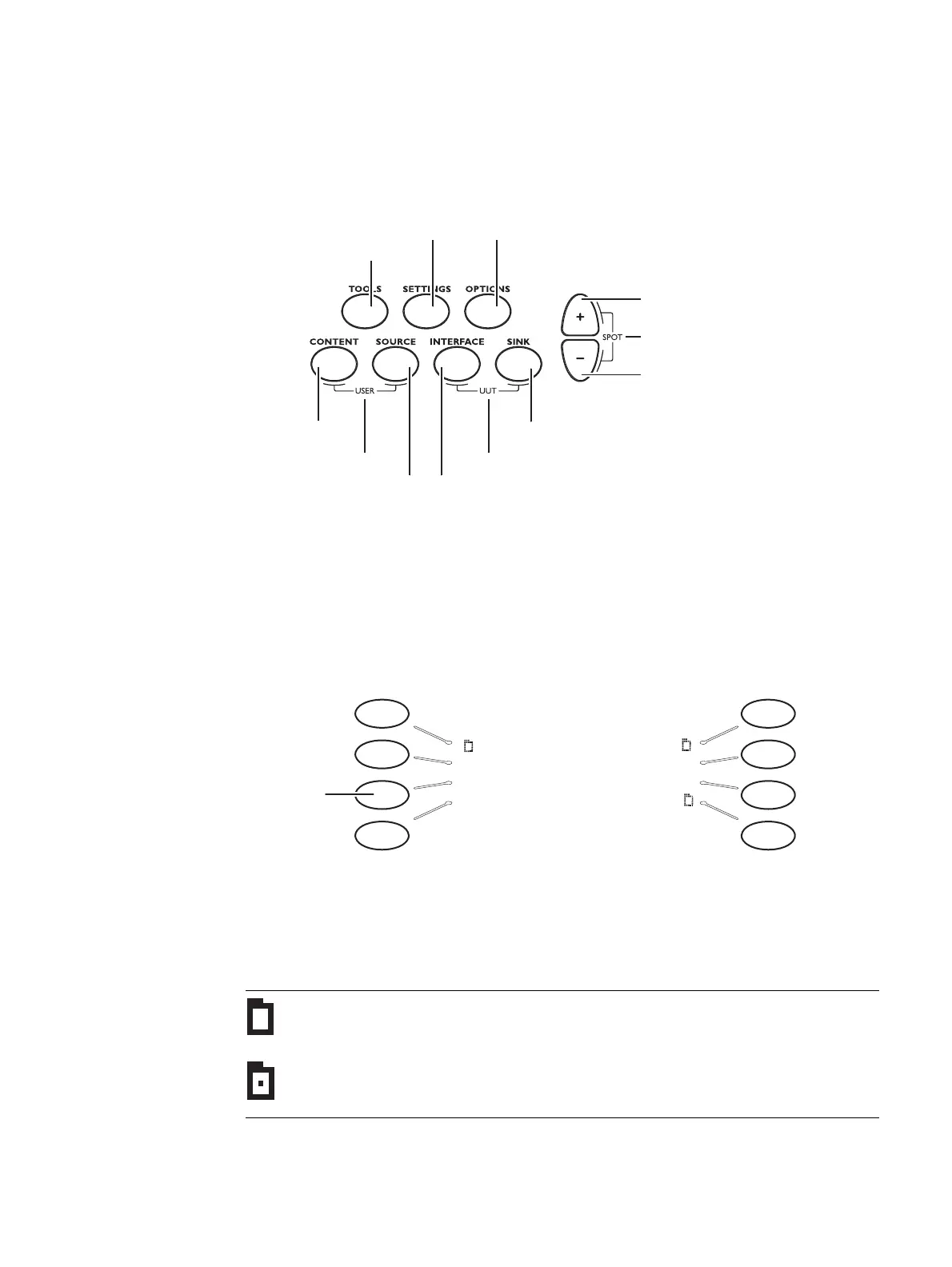
Menu selection keys
You can access the 882’s menus using the menu selection keys depicted below.
Selecting menu items
When you press a menu selection key, a menu appears on the 882’s display. Each menu
item corresponds to a key located adjacent to the item. These keys are called “soft keys”
because their functions change depending on the items that appear on the 882’s display.
For example, for the menu shown below, the soft key at the upper left corresponds to the
System item on the 882’s display.
Pressing a soft key either selects an item, enables or disables the item, or causes
additional information about the item to appear on the 882’s display. An icon located next
to an item provides additional information about the item. Following is a list of icons and
their meanings.
Icon Meaning
Folder containing related items.
Recently visited folder.
Displays information about UUT
Select device type
Go to selected item
Page down,
decrease value
Page up,
increase value
Select output
Select image
Select format
Select tool
Set advanced parameters
for current items
Set basic options
for current item
Select user profile
Press this
ey to select
Probe
System Reports
Sequence ImgShift
Probe Analyzer
AFC CEC



 To Next Page