RED RAVEN OPERATION GUIDE
COPYRIGHT © 2016 RED.COM, INC 955-0127_V6.3, REV-E | 85
FILE STRUCTURE OF RECORDED AVID CODEC FILES
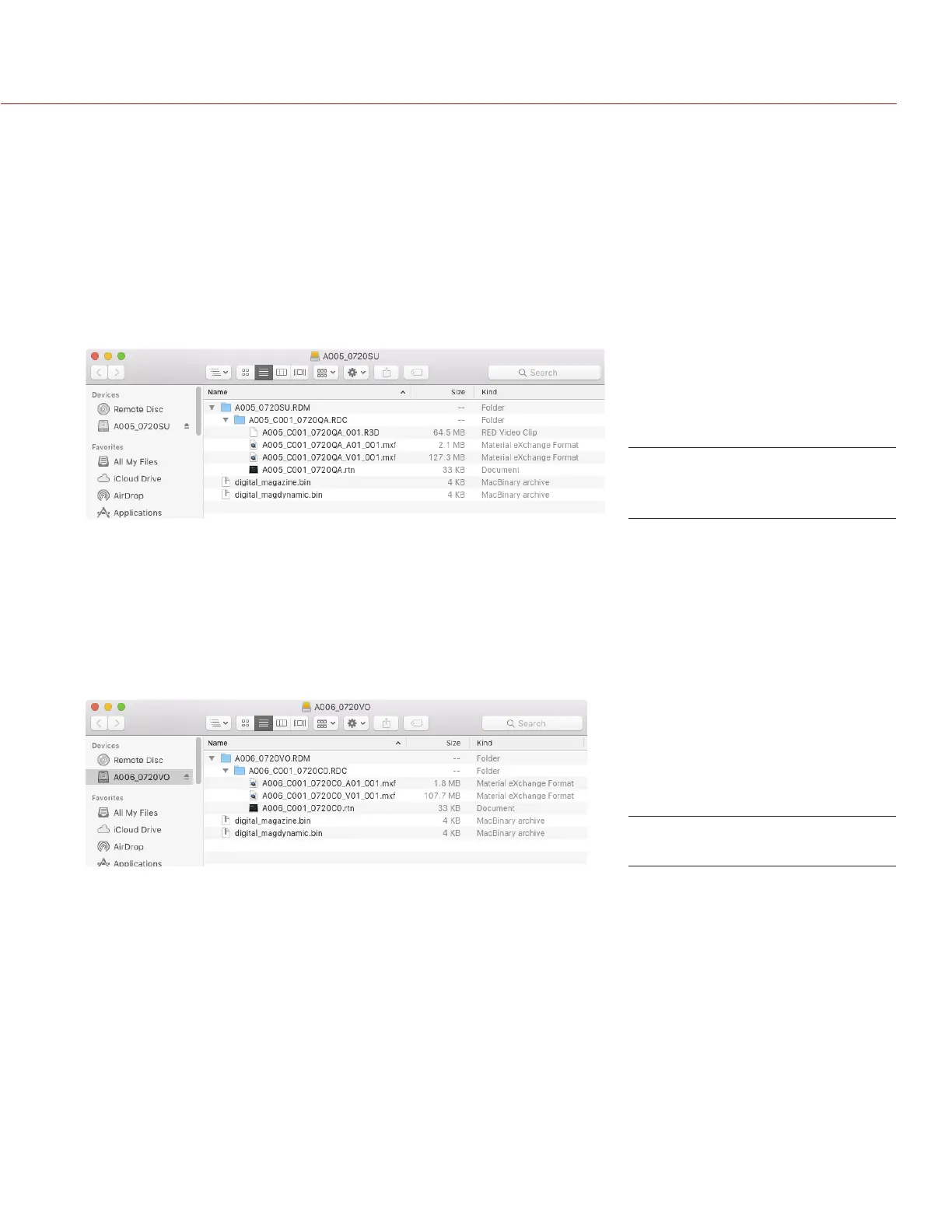
When recording R3D + Avid DNxHD/HR, this is the file structure of the recorded files on the RED MINI-MAG:
.RDM Folder
‒ .RDC Folder
‒ .R3D
‒ .mxf (audio file, marked with an “A”)
‒ .mxf (video file, marked with a “V”)
‒ .rtn (RED Thumbnail file)
NOTE: The camera creates mulitple .mxf files, similar to how the camera creates multiple R3D files.
∂
When recording Avid DNxHD/HR only, this is the file structure of the recorded files on the RED MINI-MAG:
.RDM Folder
‒ .RDC Folder
‒ .mxf (audio file, marked with an “A”)
‒ .mxf (video file, marked with a “V”)
‒ .rtn (RED Thumbnail file)
NOTE: The camera creates mulitple .mxf files, similar to how the camera creates multiple R3D files.
File Structure:
REDCODE RAW + DNxHD/HR
File Structure: DNxHD/HR



 To Next Page