SERVICE PROGRAM MODE
C252 5-4 SM
5.1.5 MAIN MENU NO.3: TEST MODE
No. Name Function
3-1
Firmware Suffix
Information
"5.1.6
3-4 All Indicators ON
Turns on all the indicators on the operation panel by pressing
the master making key.
3-5 Test Pattern Print
Print the thermal head test pattern by pressing the master
making key.
3-6 Ink Detection Specifies whether ink detection is done.
0: OFF
1: ON (Default)
The setting value returns to default value in power switch off.
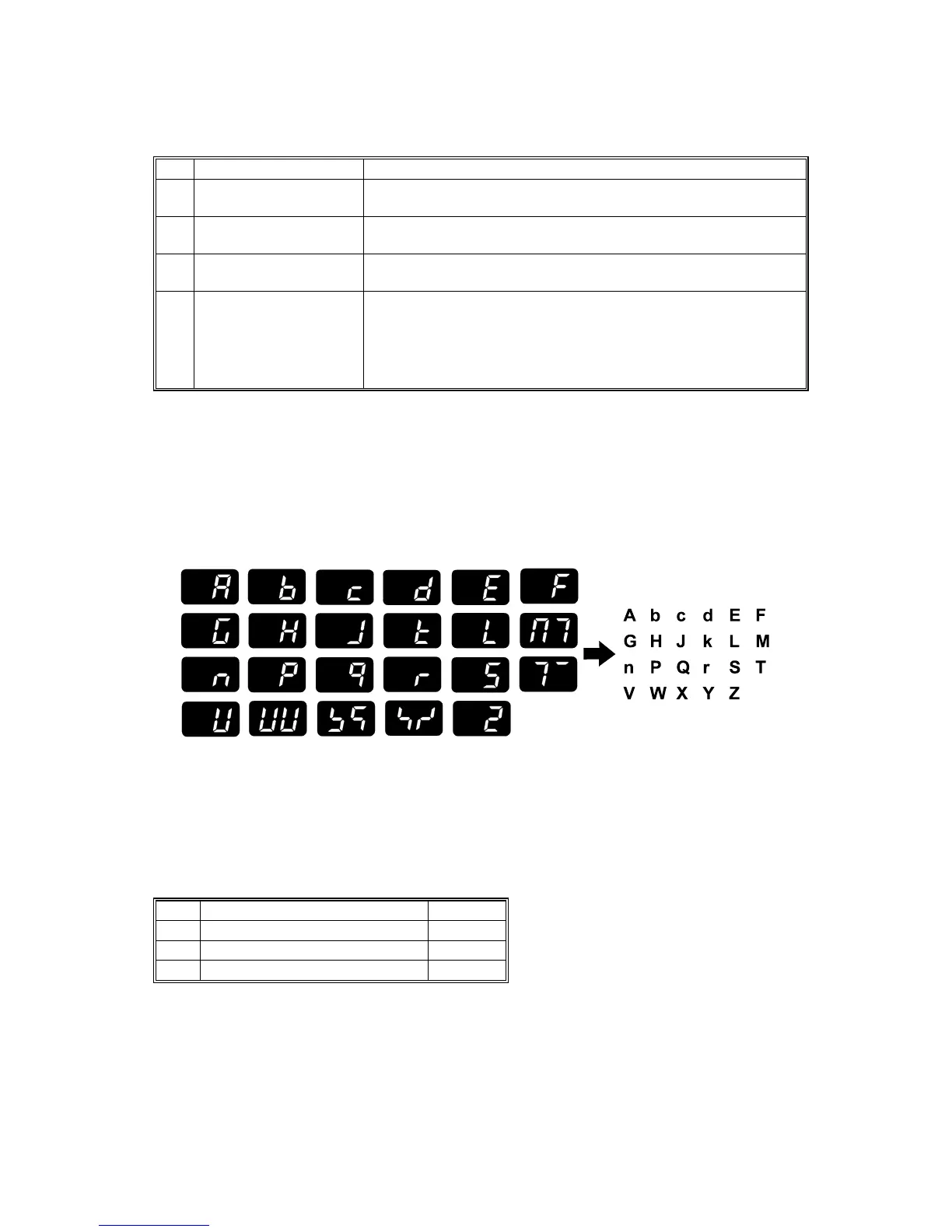
5.1.6 SP3-1: FIRMWARE SUFFIX INFORMATION
This model has no LCD, so the suffix is displayed as shown below instead of in
Latin letters.
NOTE: The letters “i”, “o” and “u” are always skipped.
5.1.7 MAIN MENU NO.6: ADJUSTMENT MODE
No. Name Function
6-40 Ink Detection Adjustment "3.9.6
6-41 Master End Sensor Adjustment "3.5.4
6-42 Image Adjustment Pattern Print "5.1.8
C252S900.WMF











 To Next Page