MASTER FEED
SM 3-11 C252
Replacement
and
Adjustment
3.5.3 THERMAL HEAD VOLTAGE ADJUSTMENT
CAUTION
This adjustment is always required when the thermal head or PSU has been
replaced.
Purpose: To maintain master making quality and extend the lifetime of the thermal
head.
Standard: Refer to the voltage value (X) printed on the thermal head. The value
varies from one thermal head to another.
The adjustment voltage should be between X and X - 0.1 V.
Tools: Circuit tester
• Rear cover (!3.2.2)
• Read the voltage value on the decal on the thermal head.
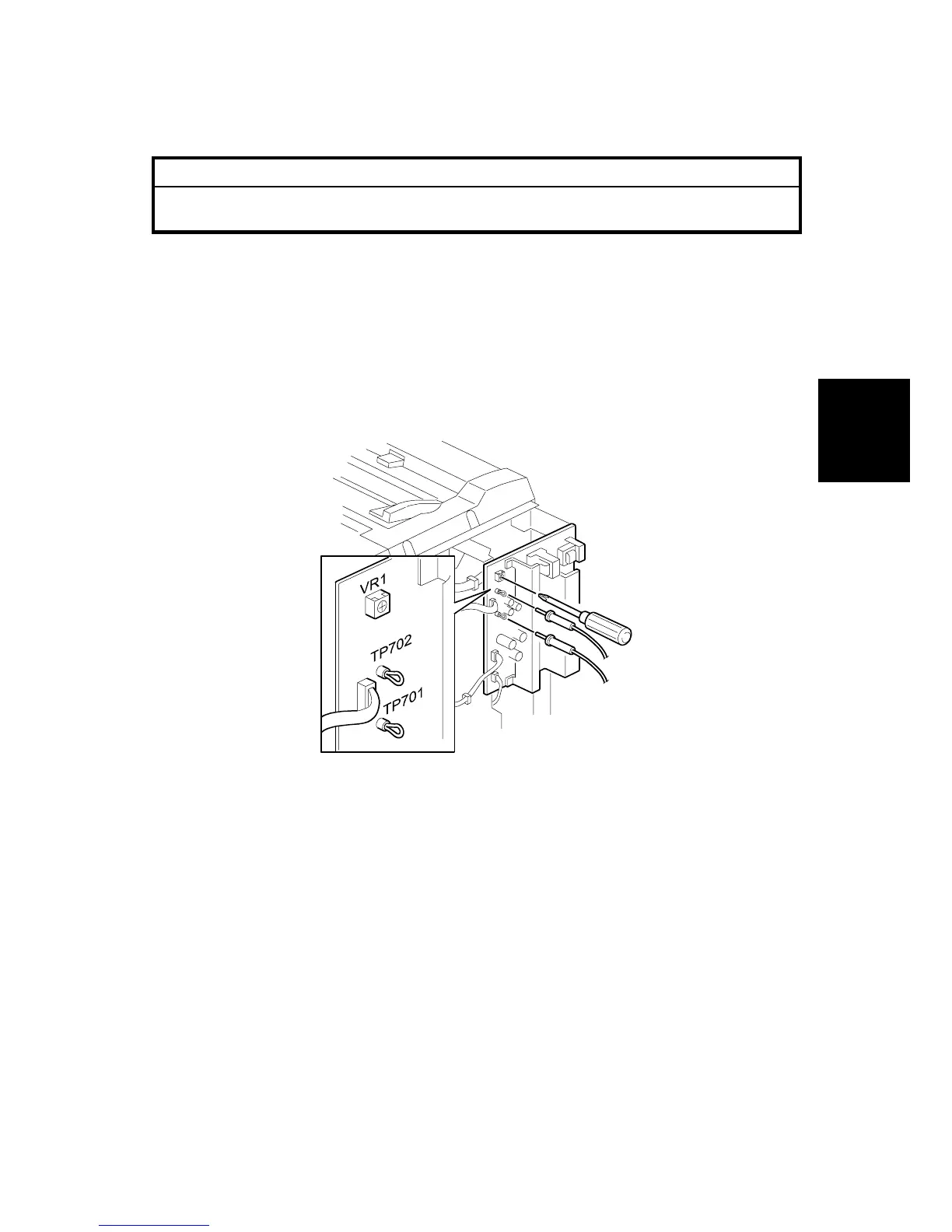
1. On the power supply unit (PSU), connect the positive terminal of a circuit tester
to TP701 and the negative terminal to TP702 on the PSU.
CAUTION: If the output and ground terminals touch each other, the board will
be damaged.
2. Connect the power plug, and turn on the main switch to access SP mode.
(!5.1.1)
3. Select SP2-41 (Thermal head signal output). (!5.1.4)
4. Press the # key. Power is continuously supplied to the thermal head, which
could damage the thermal head, so press the clear/stop key if you cannot finish
the adjustment quickly. Wait several seconds and repeat the procedure.
A beeper sounds while the power is being supplied.
5. Measure the voltage, and turn VR1 on the PSU until the value is between “+0”
and “-0.1” volts from the value on the thermal head decal.
C252R012.WMF











 To Next Page