DRUM
SM 3-23 C252
Replacement
and
Adjustment
Installation
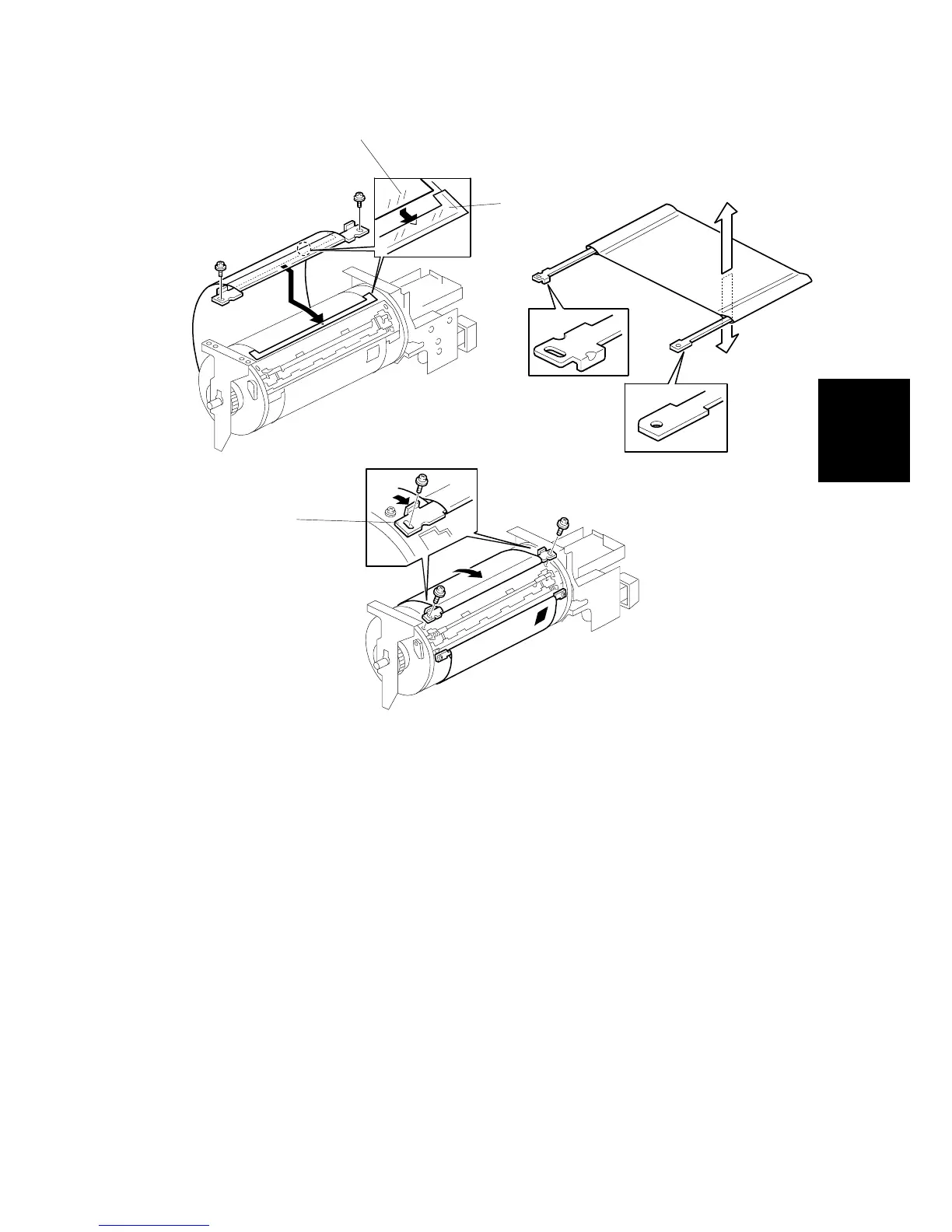
• Do not scratch the cloth screen or metal screen.
• Properly insert the edge of the mylar [A] on the cloth screen under the mylar [B]
on the metal screen, as shown above.
Otherwise, ink will leak from the trailing edge of the master on the drum during a
long printing run.
• Make sure that the correct side of the screen is facing up. In addition, make sure
that the stays for securing the cloth screen are positioned correctly. (Refer to the
upper right illustration.)
• When replacing the cloth screen, spread the screen around the metal screen
while strongly pulling the stay [C]. Adjust the stay so that it is parallel to the
master clamper, then tighten the screws.
• Make sure that the cloth screen is not wrinkled while spreading it around the
drum.
C252R908.WMF
C252R907.WMF
C252R906.WMF
Inside
[A]
[B]
Outside
[C]











 To Next Page