Saving the Log to a USB Flash Memory Device
1. Insert a USB flash memory device into a USB port on the side of the display.
Insert only one USB flash memory device.
For details about how to connect a USB flash memory device, see page 27 "Inserting a USB Flash
Memory Device".
2. Display Administrator Settings, and then touch
, the Log Collection icon.
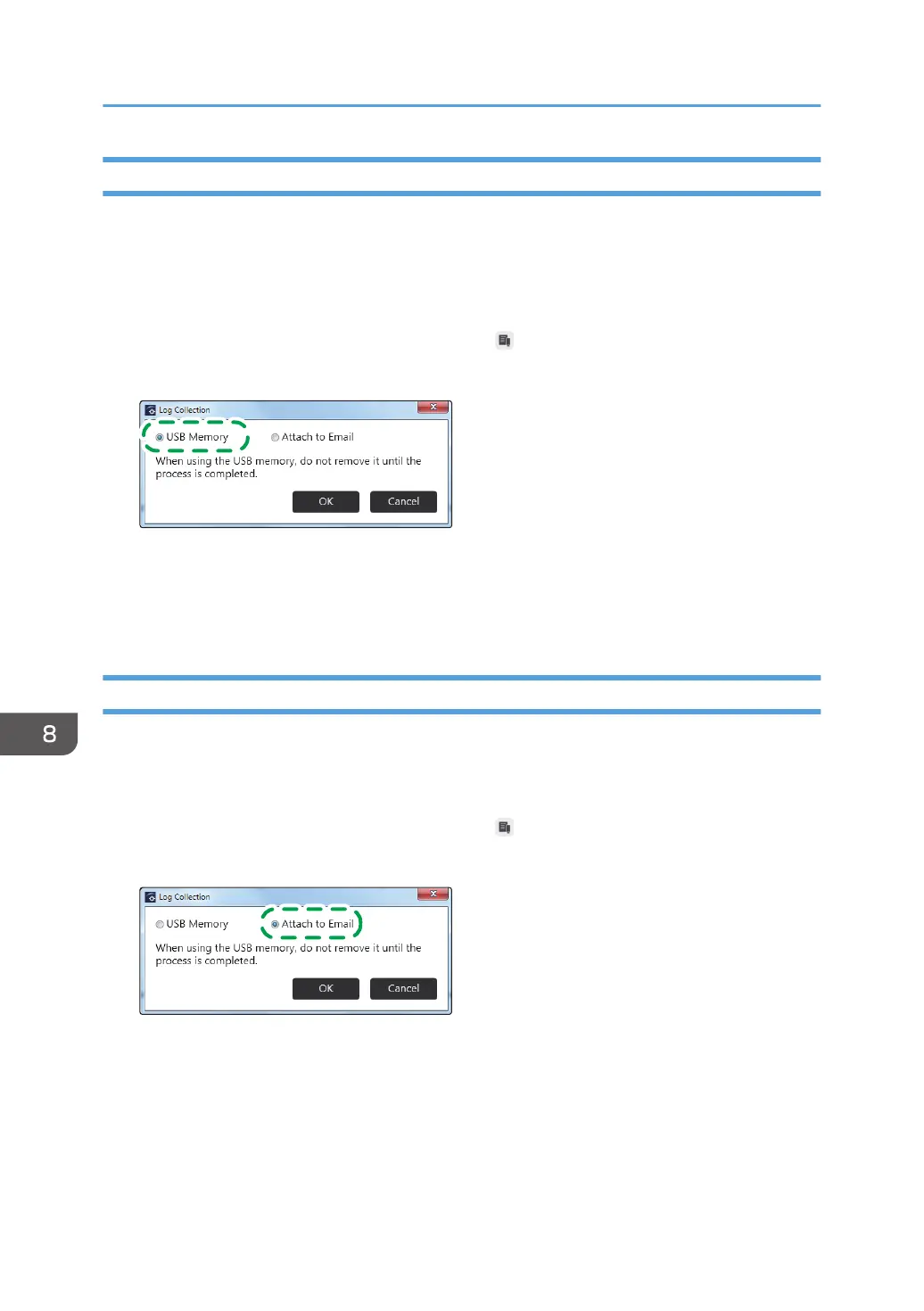
3. Select "USB Memory".
4. Touch [OK].
The log is saved to the root directory (the topmost directory) of the USB flash memory device.
5. Touch [OK].
Attaching the Log to E-mail
You must first configure the network and SMTP server settings to send a log by e-mail. For details about
how to configure the Network Settings, see page 132 "Configuring Network Settings". For details about
how to configure the SMTP Server Settings, see page 140 "Configuring SMTP Server Settings".
1. Display Administrator Settings, and then touch
, the Log Collection icon.
2. Select "Attach to Email".
3. Touch [OK].
4. Enter the destination e-mail address.
5. Touch [Send].
6. Touch [OK].
8. Changing the Interactive Whiteboard Settings
156


 To Next Page