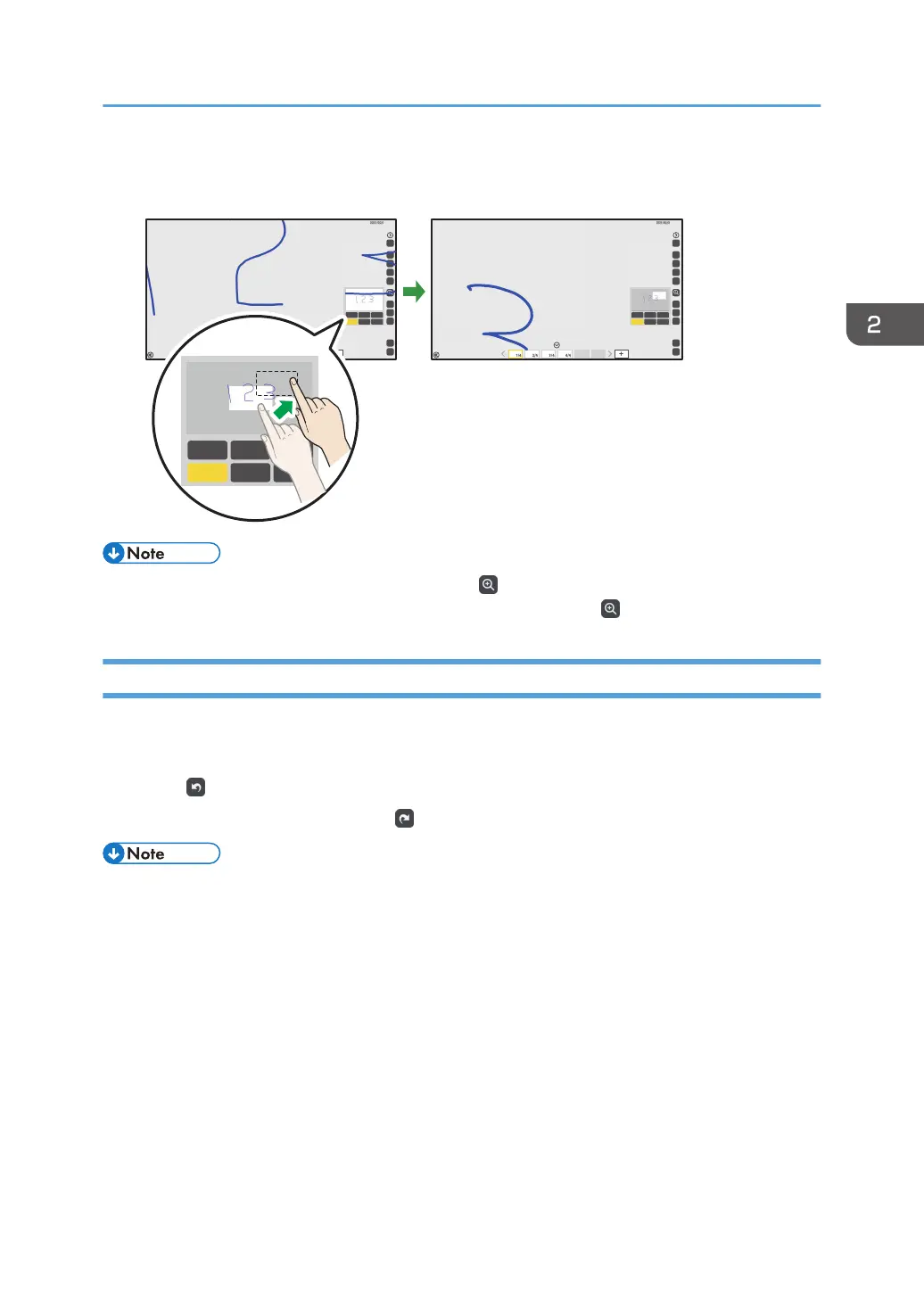
3. To move the display area, touch and press down on the display area with your finger.
While pressing down with your finger, drag it across the area.
100%200%300%
400%500%600%
100%200%300%
400%500%600%
100%200%300%
400%500%600%
DQS036
• If no operations are performed in the submenu of , the Loupe icon, for ten seconds, the submenu
will disappear automatically. To hide the submenu manually, touch , the Loupe icon, again.
Undoing Operations
You can undo an operation in which a stroke is drawn, edited, or deleted. You can also redo operations
that were undone.
1. Touch , the Undo icon.
To redo the undone operation, touch , the Redo icon.
• When participating in a remote whiteboard session, you can only undo or redo the strokes drawn,
edited, or deleted on your machine.
• After capturing an externally input image, you cannot undo or redo any of the operations
performed on the captured page.
• After copying a captured page, you cannot undo or redo any of the operations performed on the
copied page.
• When participating in a remote whiteboard session in compatible mode, you cannot undo or redo
any operations.
• When switching pages after writing text or drawing figures on a page and perform "Undo", the
previous page on which you have written text or drawn figures will be undone. Displayed pages
will not be switched although "Undo" is applied to a hidden page.
• You can undo up to 100 operations.
Basic Operations
45



 To Next Page