5. Troubleshooting
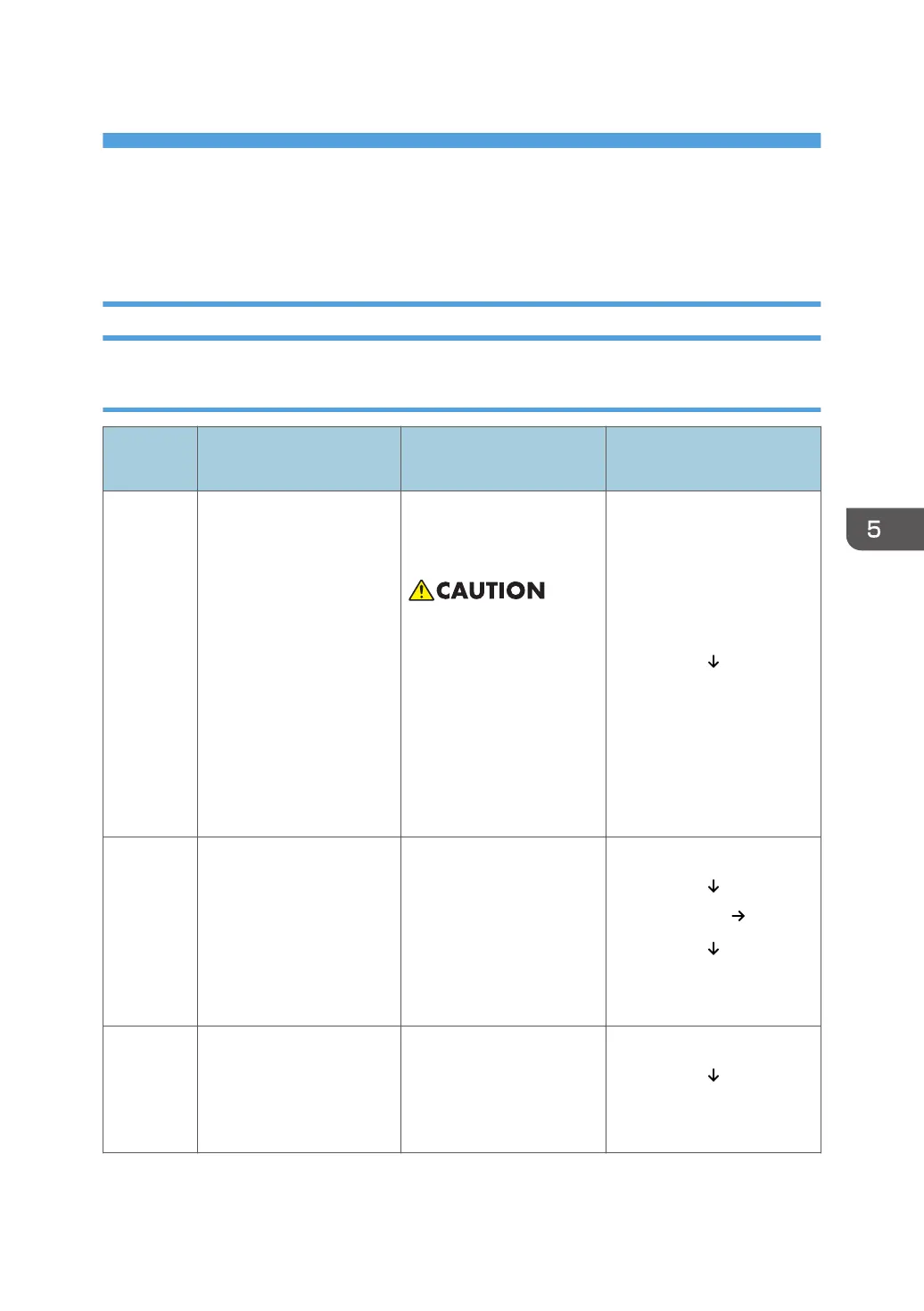
Self-Diagnostic Mode
Service Call Codes
Service Call Conditions
Pattern Display How to reset
SC call or SC alarm in
customer support system
A
The SC is displayed on the
operation panel, and the
machine cannot be used
(safety-related SC).
Execute CE reset SP mode,
and switch main power
from OFF to ON.
• When canceling a
fusing unit SC,
(SC544-00/
SC554-00/
SC564-00/
SC574-00), perform
part replacement in
accordance with the
above procedure.
Occurrence & alarm count
Immediate alarm
B
When a function is
selected, the SC is
displayed on the operation
panel, and the machine
cannot be used (down-
time mitigation).
Switch the user reset power
key or main power switch
OFF to ON.
Occurrence & alarm count
Power OFF ON
Alarm count and alarm only
if recurrence
C
No display on the
operation panel, and use
is permitted.
Count only logging.
Occurrence
Logging count & alarm
count
441



 To Next Page