Home
Ricoh
Finishers
SR3270
Page 112
Ricoh SR3270 - Page 112
128 pages
Manual
Save Page as PDF
To Next Page
To Next Page
To Previous Page
To Previous Page
Loading...
2.Replace
ment and
Adjustment
106
3.
Remove
saddle stitch u
nit front cov
er [A].
4.
Remove
connectors (
×1,
×4,
×
4, ground plate×
1).
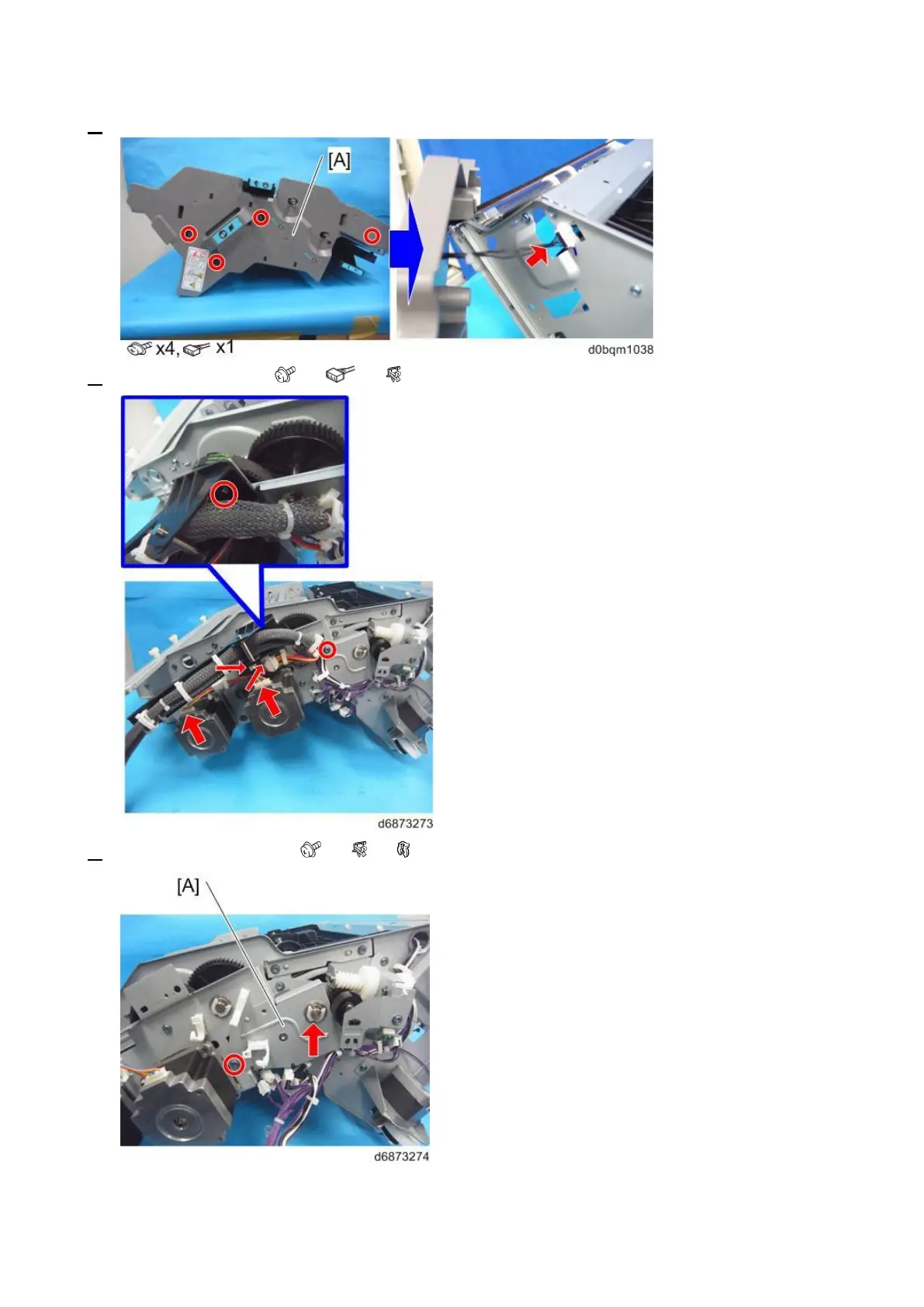
5.
Remove
the bracket [A]
(
×1,
×3,
×1).
111
113
Table of Contents
Main Page
Default Chapter
7
Table of Contents
7
1 Detailed Descriptions
10
Changes from the Previous Machine
10
Throughput of Stapleless Stapler Unit Increased
10
Service for Staple Near-End Detection
10
Staple Near-End Detection
11
Allowing the Customer to Detach and Reattach the End Fence of the Booklet Tray
11
Specifications
12
Booklet Finisher SR3270
12
Finisher SR3260
14
Parts Layout
17
Electrical Component Layout
18
Drive Layout
24
Mechanisms
26
Separation Mechanism
26
Proof Tray Transport
26
Proof Tray Full Detection
26
Shift Tray Ascent/Descent Mechanism
27
Shift Tray Full Detection
27
Shift Mechanism
28
Booklet Tray
29
Stapled Paper Eject Mechanism
29
Booklet Stitching Mechanism
35
Paper Exit Guide
38
Stapleless Stapler (Finisher SR3260 Only)
39
SP6-160-004 (Replacement Mode for Service)
49
Staple Near-End Detection
50
Punch Unit PU3080 (D3G5)
52
Changes from the Previous Machine
52
Specifications
52
Parts Layout
53
Mechanism
54
2 Replacement and Adjustment
59
Exterior Parts
59
Front Cover
59
Inner Cover
59
Rear Cover
62
Front Left Cover
62
Upper Cover
63
Upper Front Cover
64
Upper Rear Cover
64
Proof Tray
65
Shift Tray
66
Booklet Tray (for Booklet Finisher SR3270)
66
Paper Exit Guide Covers (Front and Rear)
66
Upper Left Cover
67
Left Center Cover
68
Left Lower Cover
69
Main Unit
70
Paper Exit Guide Plate Motor (STM2)
70
Paper Exit Guide Plate HP Sensor (S23)
70
Proof Tray Full Sensor (S21)
70
Proof Tray Paper Exit Sensor (S22)
71
Entrance Sensor (S18)
72
Intermediate Transport (Right) Sensor (S20)
73
Intermediate Transport (Left) Sensor (S19)
73
Shift Tray Paper Surface Sensor (S13)
73
Shift Tray Upper Limit Switch (SW2)
74
Paper Exit Sensor (S15)
75
Paper Exit Guide HP Sensor (S35)
75
Entrance Transport Motor (DCM1)
76
Proof Transport Motor (DCM2)
76
Positioning Roller Motor (STM5)
77
Shift Motor (STM1)
78
Paper Exit Transport Motor (DCM3)
79
Paper Exit Guide Drive Motor (STM16)
80
Booklet Transport (Upper) Motor (STM8) (Booklet Finisher SR3270 Only)
81
Stapler Tray
84
Stapler Tray Paper Sensor (S9)
87
Booklet Transport (Upper) Pressure Release HP Sensor (S8) (SR3270 Only)
87
Feedout Pawl HP Sensor (S10)
88
Jogger HP Sensor (S11)
88
Jogger Motor (STM3)
90
Booklet Transport (Upper) Pressure Release Motor (STM9) (SR3270 Only)
90
Feedout Pawl Motor (STM4)
90
Stapleless Stapler Unit/Stapler Unit (Finisher SR3260)
93
Stapleless Stapler Unit
93
Stapler Unit
94
Stapleless Stapler Transfer Motor (STM17)
99
Stapler Transfer Motor (STM6)
100
Paper Guide Drive Motor (STM18)
100
Stapleless Stapler HP Sensor (S39)
101
Stapler HP Sensor (S36)
101
Paper Guide HP Sensor (S37)
102
Saddle Stitch Unit (Booklet Finisher SR3270)
104
Stapler Unit
104
Saddle Stitch Unit
110
Center-Folding Unit
111
Center-Folding Paper Exit Sensor (S24)
113
Edge Stopper Paper Surface Sensor (S27)
114
Edge Stopper HP Sensor (S28)
115
Folding Blade HP Sensor (S25)
117
Folding Cam HP Sensor (S26)
117
Edge Stopper Motor (STM13)
118
Folding Blade Motor (STM11)
119
Folding Transport Motor (STM12)
119
Booklet Tray Full Sensor 1 (S4), Booklet Tray Full Sensor 2 (S2)
119
Booklet Stapler Transfer Motor (STM7)
120
Booklet Transport (Lower) Pressure Release HP Sensor (S5)
121
Boards
123
Main Controller Board (PCB1)
123
Related product manuals
Ricoh SR3260
128 pages
Ricoh SR3290
108 pages
Ricoh SR3300
44 pages
Ricoh SR3020
82 pages
Ricoh SR790
25 pages
Ricoh SR4110
60 pages
Ricoh SR5050
185 pages
Ricoh SR5060
185 pages
Ricoh SR5090
107 pages
Ricoh SR4120
95 pages



 To Next Page