Troubleshooting
Check & Error Display
101
When the indicator [Area *3] blinks
Check error locations and error numbers (Error Number Display) and take the following procedures:
Location
No.
Error No. Cause Action
A-06
Any obstacle exists under the Paper
Feed Tray or on paper.
Check if any obstacle exists under the Paper
Feed Tray or on paper. If an obstacle exists,
remove it.
A-02
A master has not been correctly
wrapped around the Print Drum
(Cylinder).
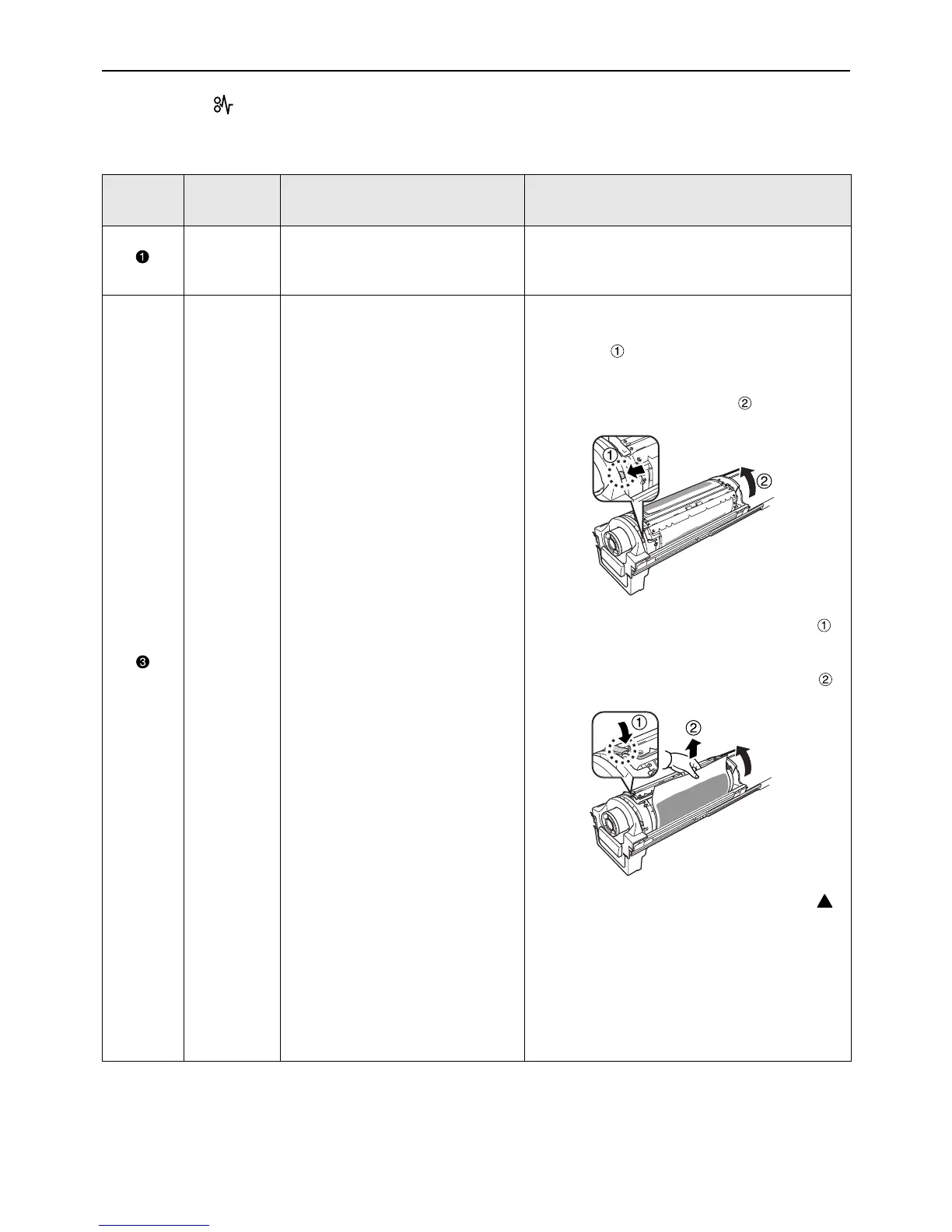
1) Pull out the Print Drum (Cylinder). )p.94
2) Press the Print Drum (Cylinder) Release
Lever ( ), hold the edge of the Print Drum
(Cylinder), and turn the Drum (Cylinder) until
the clamp plate (metallic plate locking the
master) comes to the top ( ).
3) Press the Clamp Plate Release Lever ( )
to unlock the clamp plate, hold the edge of
the master, and then separate the master
while turning the Print Drum (Cylinder) ( ).
4) Turn the Print Drum (Cylinder) until the
marks meet.
5) Set the Print Drum (Cylinder) into the
machine.
6) Pull out the Master Making Unit and set the
master again.
7) Place the Master Making Unit into position.
8) Perform the master-making operation again.



 To Next Page