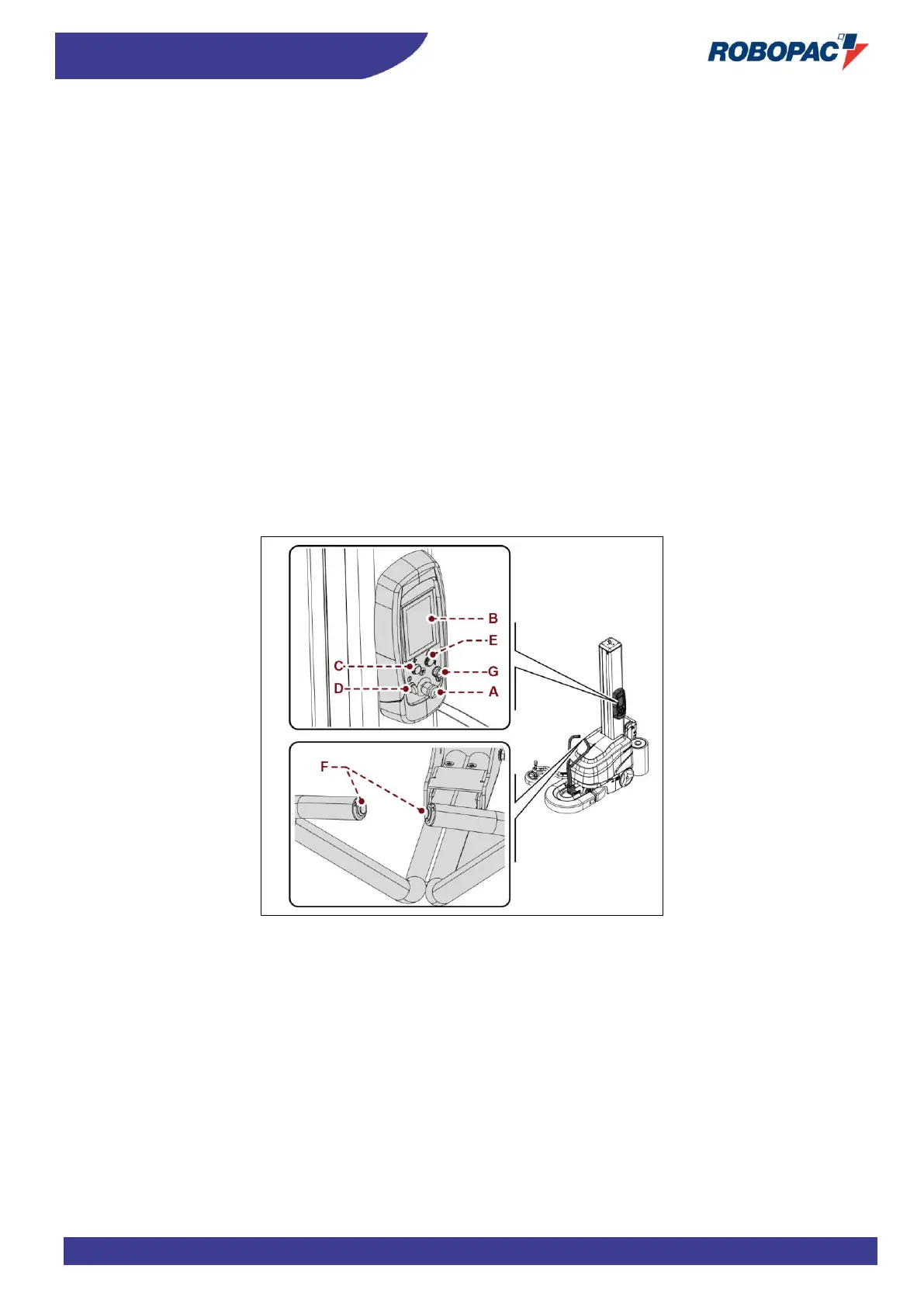
6.2. DESCRIPTION OF THE CONTROLS
The figure shows machine main controls and the list includes their description and function.
A) Emergency stop button:
it is used in case of imminent risk to stop, with a voluntary action, the machine parts which may pose a risk.
For further details, see the paragraph “description of safety devices”.
B) User interface:
it is used to set or modify the machine operating parameters.
For more details, see the paragraph “Description of user interface”.
C) “Cycle start” button:
it is used to start the wrapping automatic cycle.
D) Light selector switch (white light):
it enables and disables the power supply voltage of controls.
When the indicator light comes on, it signals that the function has been activated, turn the selector and hold it
until the light comes on.
E) “Reset” button:
it is used to reset the machine before restarting it after an emergency stop or after a shut-down due to the
disconnection of the power supply.
F) Buttons (hold to run):
they are used to manually move the machine.
G) USB port:
it allows exchange of data.



 To Next Page