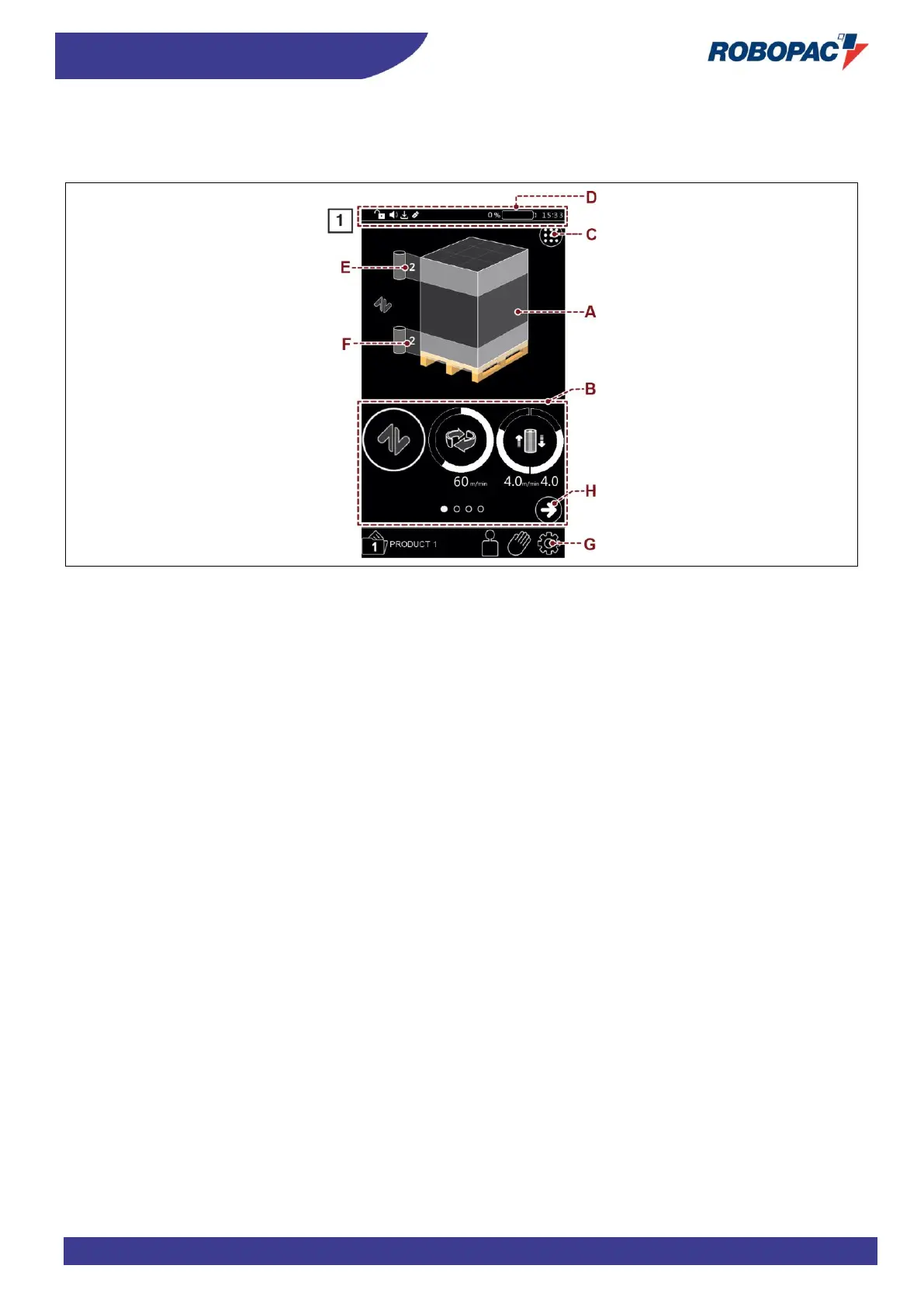
6.4. “HOME” PAGE
6.4.1. “HOME STANDARD CONTROL” PAGE
The page displays the wrapping values currently in use and gives access the other pages.
A) Area: Previews the settings of the selected pallet wrapping cycle.
B) Area: Displays the individual editable parameters for setting the wrapping cycle.
C) Button: It is used to display all the parameters of the "wrapping cycle" at the same time.
To program the wrapping cycle refer to chapter 6.8 "Wrapping Cycle Page".
D) Area: Battery charge status indicator: indicates battery charge status.
- Battery charge: the battery condition is signalled by means of coloured bars (green, yellow and red).
- Battery flat: this condition is signalled with an alarm message and an acoustic warning when the battery
level is below 20%.
E) Button: used to program the quantity of reinforcing wrappings at the upper end of the pallet.
The displayed number indicates the programmed value.
F) Button: used to program the quantity of reinforcing wrappings in the lower area of the pallet.
The displayed number indicates the programmed value.



 To Next Page