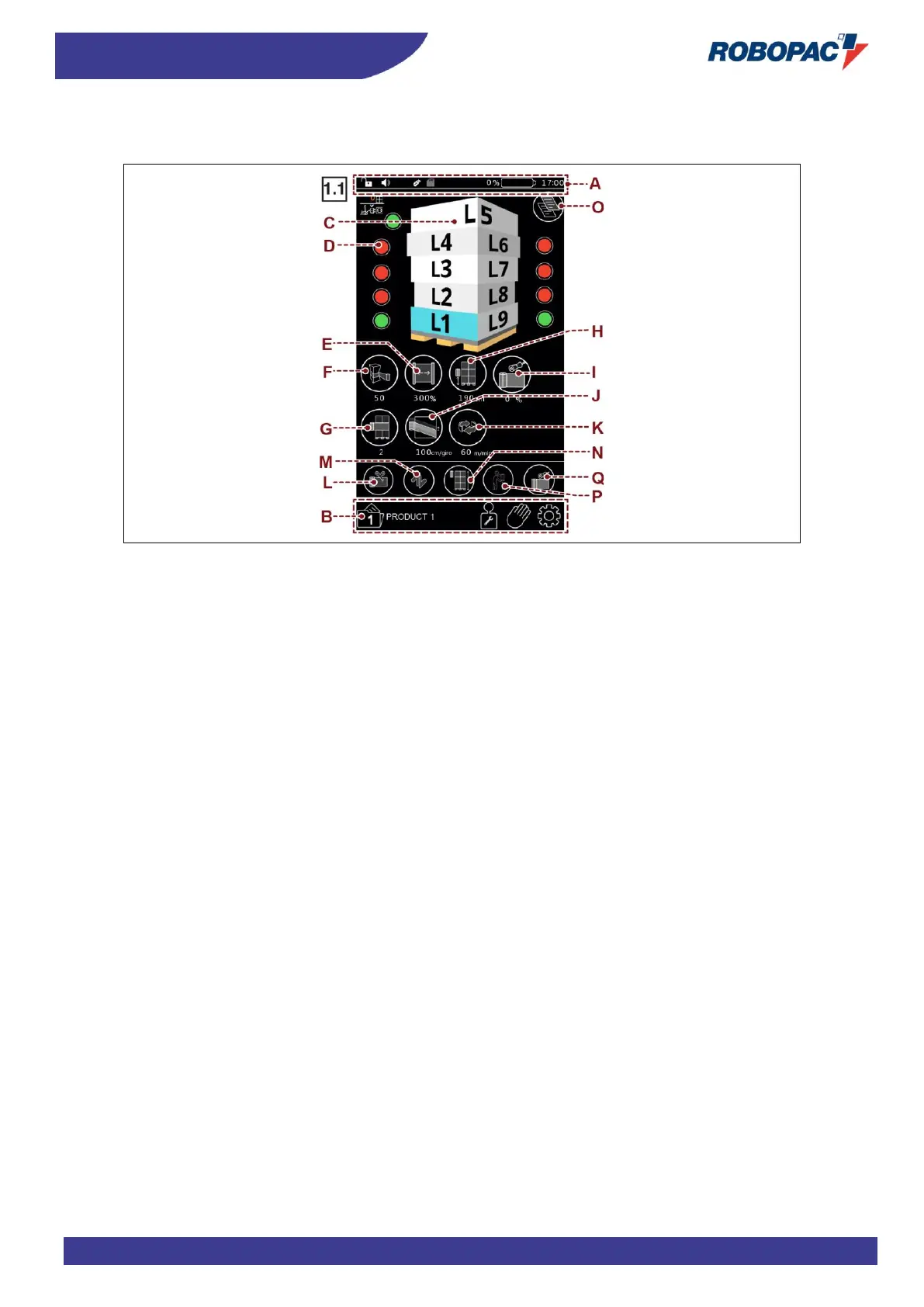
A) Area: this is used to activate/deactivate the drop-down menu (described in par. “Home standard control page”
letter “I”).
The menu can be activated/deactivated in all pages and shows only the buttons that can be activated.
B) Area: Toolbar. (described in par. “Home standard control page” letter “G”)
The toolbar is displayed in every page and features only the buttons which can be activated.
C) Area: allows selecting the level of which you want to set/modify the wrapping parameters.
D) Button: used to enable/disable the level
- Red: level disabled.
- Green: level enabled.
For the description of the buttons E, F, G, H, I, J, K, L, M, N, O see chapter “Wrapping cycles”.
E) Button: it is used to set the film pre-stretch value.
The displayed number indicates the programmed value. Present in carriage PVS only.
F) Button: it is used to set the film stretch value.
The displayed number indicates the programmed value.
G) Button: it is used to set the number of reinforcement wrappings.
The displayed number indicates the programmed value.
H) Button: it is used to set the starting height from the ground of the wrapping cycle.
The displayed number indicates the programmed value.
I) Button: it is used to adjust the settings of the film height reduction roping device.
Present only if the machine is equipped with the optional.
J) Button: it is used to adjust the upstroke of the carriage.
The displayed number indicates the programmed value.
K) Button: it is used to set the rotation speed value of the machine
The displayed number indicates the programmed value.
L) Button: it is used to activate the film automatic cutting type.
Present only if the machine is equipped with the optional.
M) Button: it is used to select the type of pallet wrapping cycle.
N) Button: it is used to select the stop mode of film carriage during upstroke.
O) Button: used to copy the data of one layer onto another. See paragraph “Copy level page”.
P) Button: it is used to set the ergonomic upstroke of the carriage
Q) Selector button: it is used to set the roping mode



 To Next Page