EasyManua.ls Logo

satmap active12 - iii. Map Screen Layout

satmap active12
103 pages
Print Icon
To Next Page IconTo Next Page
To Previous Page IconTo Previous Page
Loading...
Software v3.0.9915
© Satmap Systems Ltd 2015
5
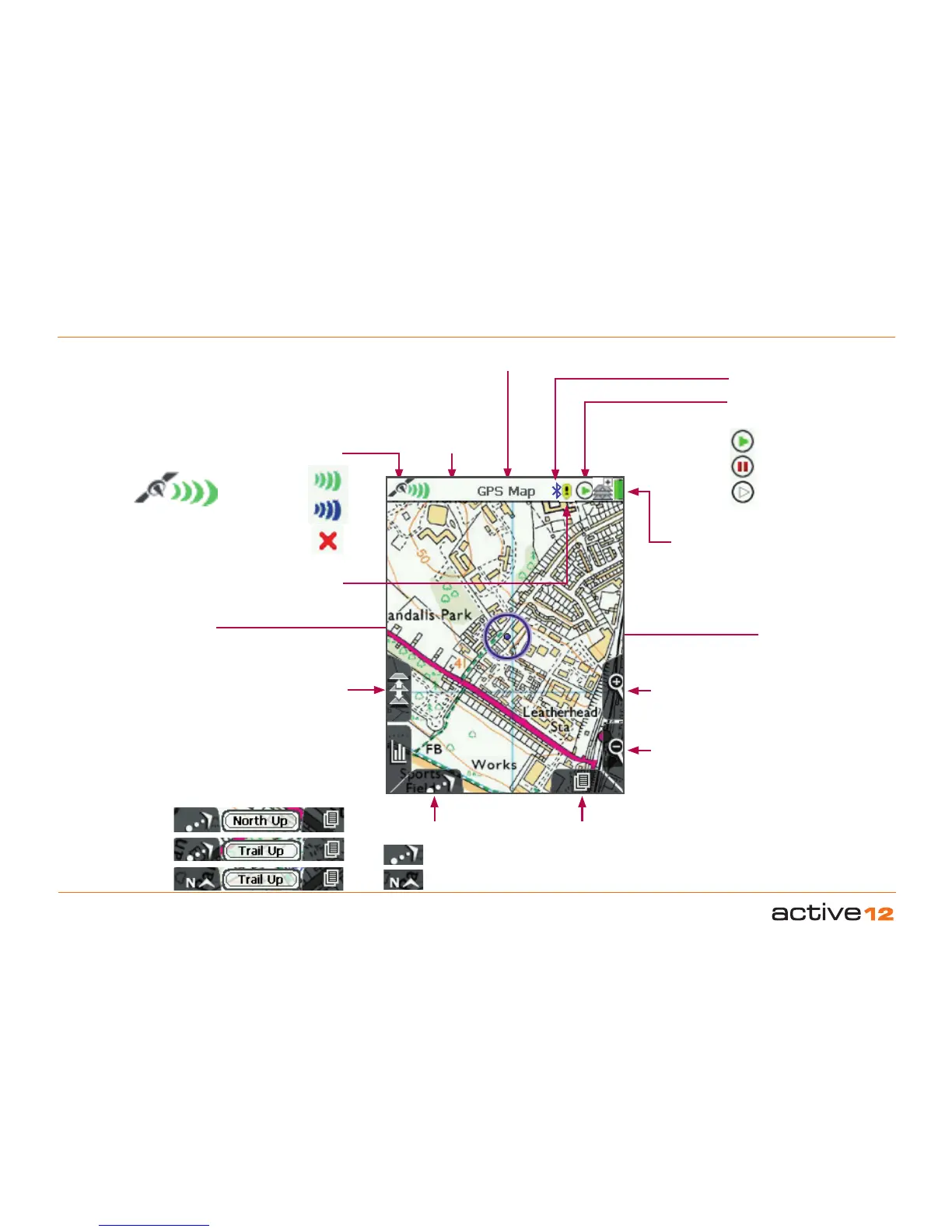
Map Toggle
This is only
functional when
a toggle-enabled
map card is
loaded
Zoom In
Battery icon
When unit is fully
charged icon is a solid
block
Map orientation
Primary Screens
Use to scroll through the
primary screens
Zoom Out
Toggle Icon
Shows when a toggle-
enabled map card is
loaded
Stop/Record Icon
Trip log status
Status Bar
All status icons
shown in the
top bar
Screen name
Memory Status Warning
GPS Signal Lock
Normal lock
EGNOS/WAAS
lock
No lock
Trip Log Active
Trip Log Inactive
No GPS Lock
iii. Map Screen Layout
Location Icon
Move the joystick left/
right to go into PLANNING
mode and see the
Planning icon
If the Trail Up icon
is showing, it means
North Up was the last
option selected.
If the North Up icon is
showing, it means Trail
Up was the last option
selected.
The icon on the
lower left shows the
orientation that will
next appear if the
front left button is
selected.
Trail Up
North Up
Bluetooth Icon

Table of Contents

Related product manuals