Software v3.0.9915
© Satmap Systems Ltd 2015
58
7. MAIN MENU: Routes Menu (... cont)
7.6 Edit Title
(GPS MAP → MAIN MENU → ROUTES MENU →
(folder/route) → Edit → Edit Title)
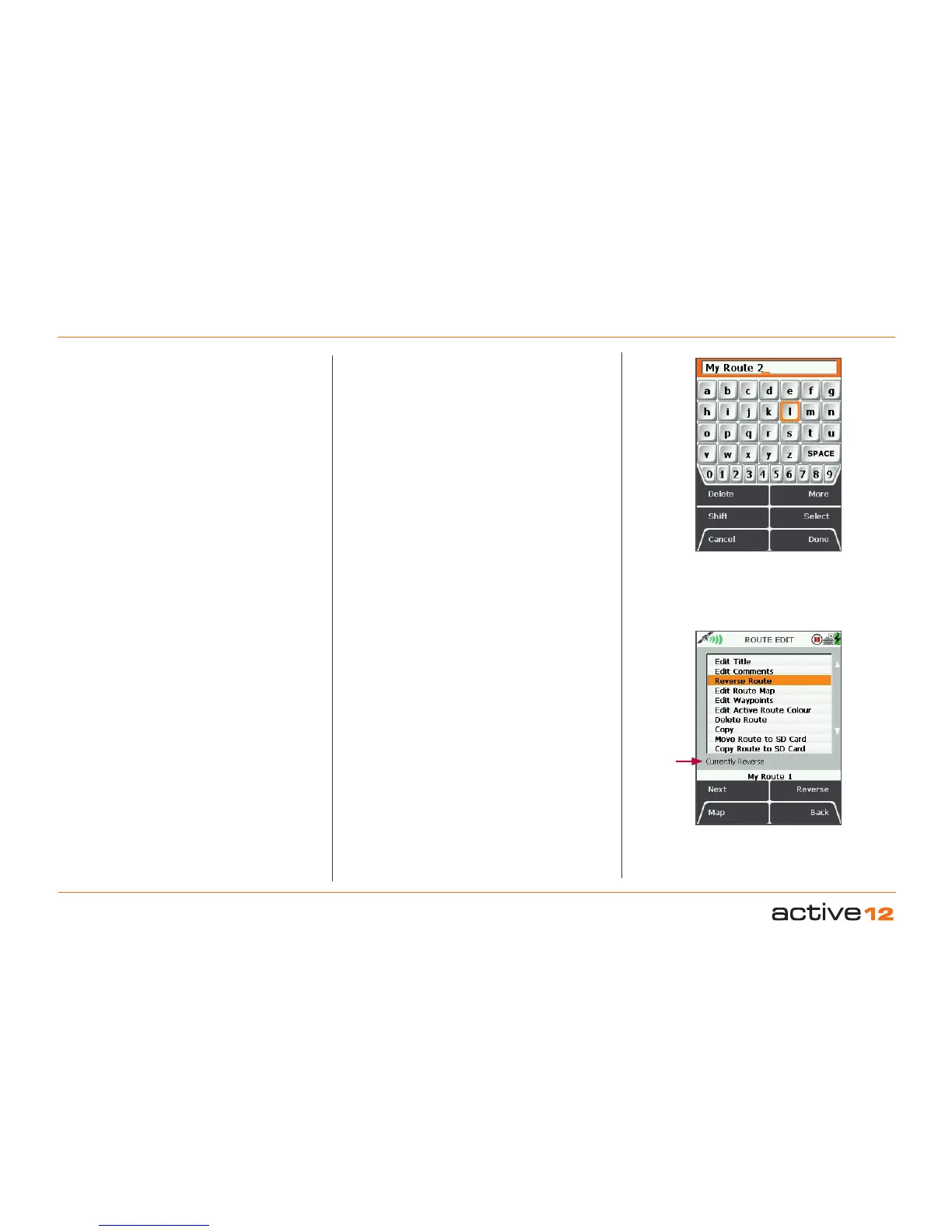
When a route is created it is called 'My Route 1'
by default (or similar, depending on the number of
existing routes). To rename it, use Edit Title.
Highlight Edit Title, then either press the Edit button
or centre press the joystick to access the keypad
(section 9.00).
7.7 Edit Comments
(GPS MAP → MAIN MENU → ROUTES MENU →
(folder/route) → Edit → Edit Comments)
Highlight Edit Comments, then either press the
Edit
button or centre press the joystick to access
the keypad.
Operate the keypad to input comments describing
the route and press Done when finished. The screen
will return to the ROUTE EDIT screen.
TEXT EDIT
screen
Reverse
Route option
7.8 Reverse Route
(GPS MAP → MAIN MENU → ROUTES MENU →
(folder/route) → Edit → Reverse Route)
Press Reverse to reverse the route. Press again to
go back to the original direction of travel. There is
an on-screen statement which says either Currently
Forward or Currently Reverse
.
Alternative ways to reverse the route are via the
ROUTE PLAN screen or the ROUTE CARD screen.
Currently
Reverse
or Currently
Forward



 To Next Page