EQJW14
5: Heating controller
Operation
56 7010015003 A
© Fr. Sauter AG
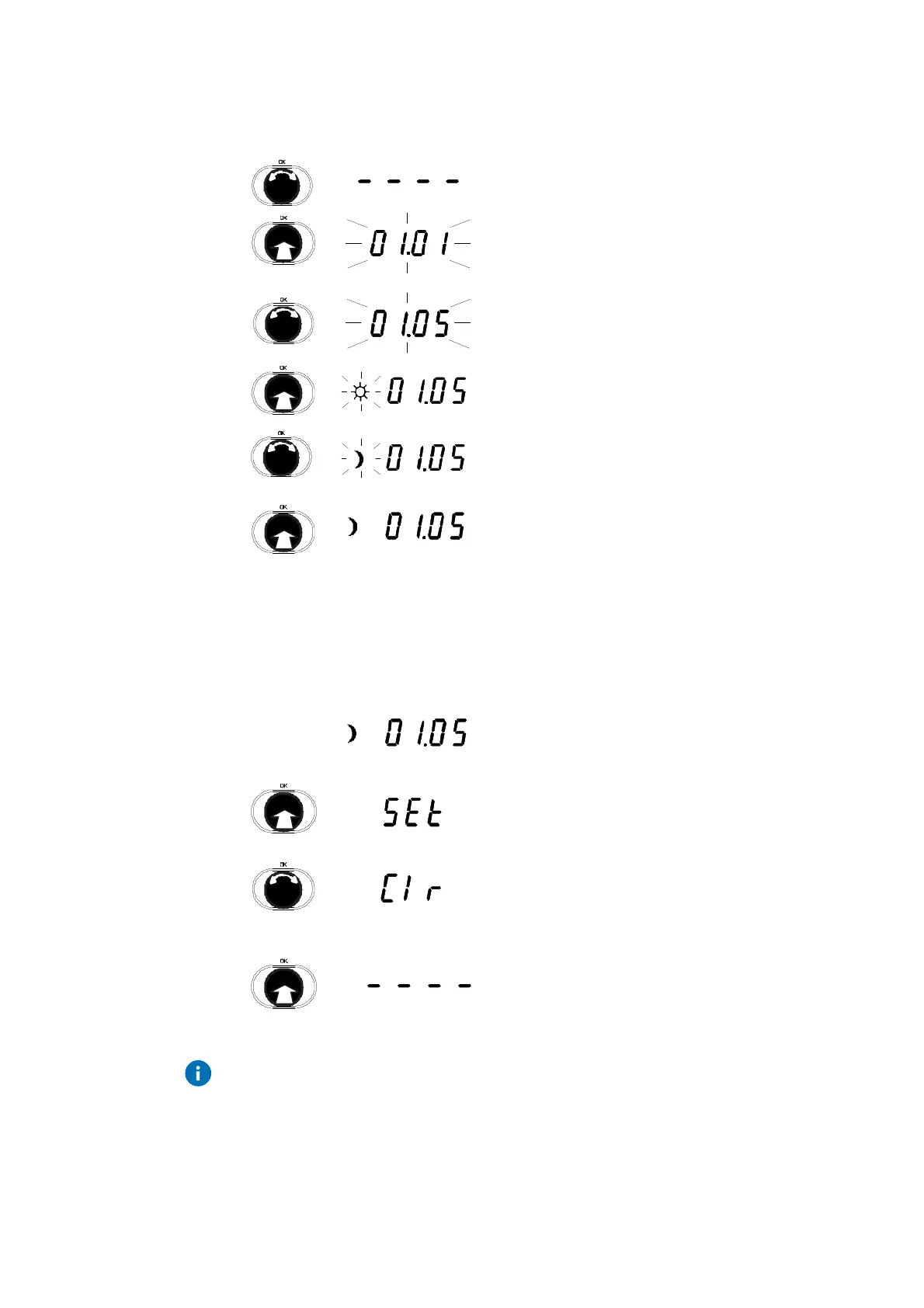
4.5.3 Enter a switching command
1. Turn the input knob until you reach the next
empty switching command.
2. Push the input knob.
•
The new switching command is shown.
3. Turn the input knob.
•
The date for the switching command is
changed.
4. Push the input knob.
•
The date for the switching command is
confirmed.
5. Turn the input knob.
6. Select the mode for the switching command.
7. Push the input knob.
•
The mode is confirmed.
4.5.4 Changing and deleting a switching command
Show the switching command as described in the Section on 'View switching
commands', e.g.:
1. Push the input knob.
•
The switching command is called up.
2. Turn the input knob.
3. Choose whether you want to delete the
switching command (Clr) or change it (SEt).
4. Push the input knob.
•
Your selection is confirmed.
If the switching command was deleted, the
next switching command is shown, or
shown as '_ _ _ _' if there are no more
switching commands.
For a change (SEt), the rest of the procedure is as described in the Section
on 'Enter a switching command.



 To Next Page