EQJW145:
Heating controller
Operation
58 7010015003 A
© Fr. Sauter AG
4.7 Entering DHW temperatures
To enter DHW temperatures, ensure that the top rotary switch is in one of
these positions (see 4.1).
Back-up mode
Reduced mode
Normal mode
Automatic mode
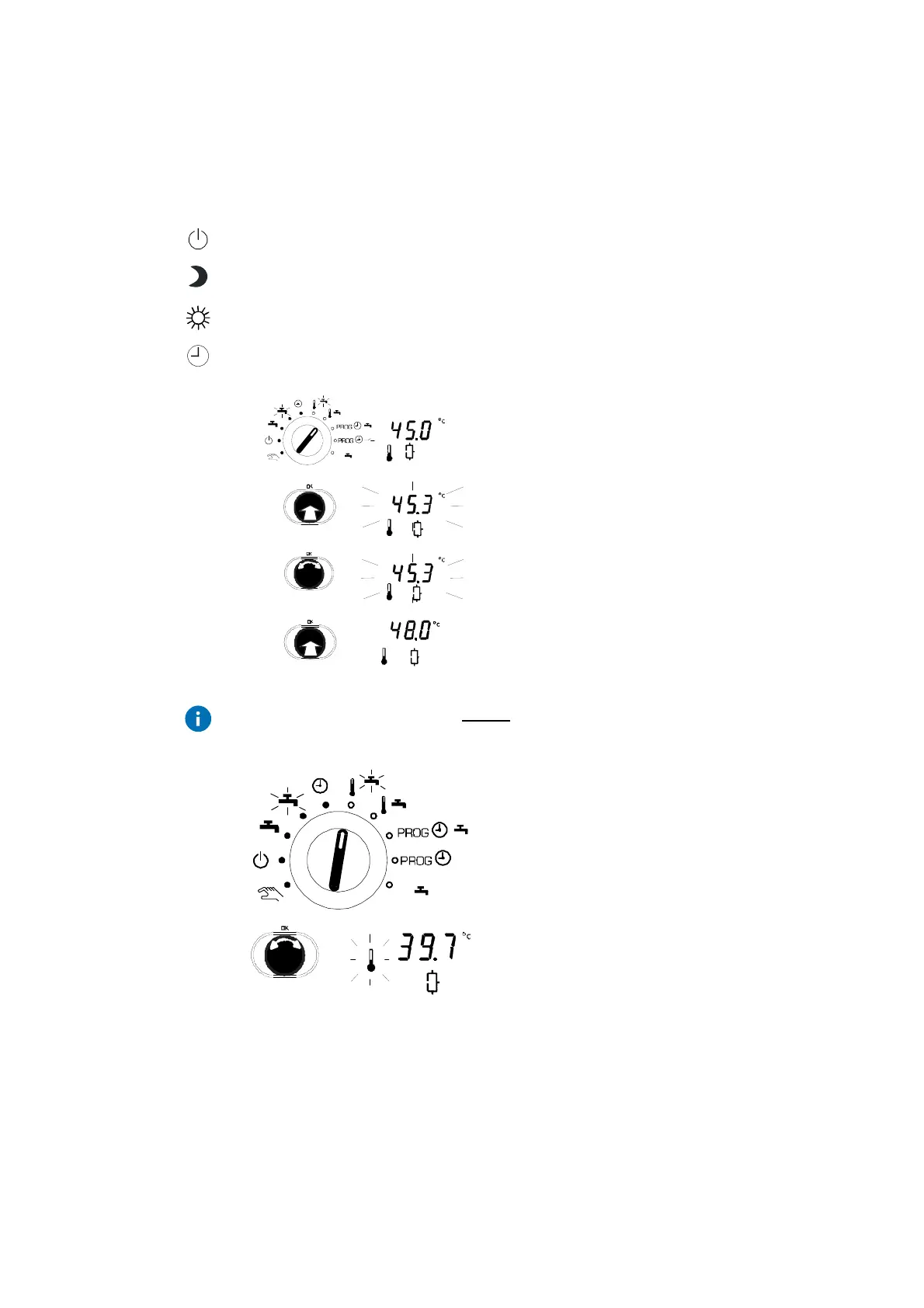
1. Set the bottom rotary switch to the 'Adjust
setpoint for normal DHW temperature' position.
•
The current setpoint temperature is shown.
2. Push the input knob and the numerical value
will flash.
3. ... and you can now change it by turning it
upwards or downwards (step value: 0.1°C).
4. Push the input knob again to confirm the
changed numerical value.
Press the ESC button once before confirming to cancel the input. The old
value is retained.
If the 'Adjust setpoint for boosted DHW
temperature' (thermal disinfection) switch
position is selected, this setpoint temperature
can be set in the same way.
If you turn the input knob without pushing it first
(before or after entering data), the current
temperature in the tank is shown.
Procedure
1 x



 To Next Page